Is the iRobot Roomba j7+ the Right Choice for Seniors?
For seniors living independently, simple daily chores like vacuuming can become challenging. The iRobot Roomba j7+ offers a smart solution to maintain cleanliness without the physical effort, making it a great choice for seniors who want to keep their living spaces tidy with minimal manual intervention. It excels in navigating around obstacles and requires limited interaction, which is a boon for those with mobility issues.
Maintaining a clean home is not just about aesthetics; it’s crucial for health, especially for seniors who may be prone to allergies or respiratory issues. Hiring a regular cleaning service can be expensive, with costs adding up over time. The iRobot Roomba j7+ presents a one-time investment that could alleviate ongoing expenses, while offering the convenience of scheduled cleanings. This makes it our pick for those who want a balance of efficiency and ease of use.
Who This Is For (and Who It’s Not For)
The iRobot Roomba j7+ is perfect for seniors who live independently and want to maintain a clean home without straining their physical abilities. It’s especially useful for those who find it difficult to bend or move around furniture often. The robot vacuum is also ideal for seniors with visual impairments, thanks to its ability to navigate obstacles without supervision.
However, it might not be the best fit for those who are not comfortable with technology or have limited access to Wi-Fi, as setup and control require a smartphone app. Seniors in multi-story homes may prefer traditional vacuums or lightweight models like the Dyson V11, which are easier to carry between floors.
Why This Beats the Alternatives
The iRobot Roomba j7+ stands out from other robot vacuums due to its advanced navigation system, which can identify and avoid obstacles. This is particularly beneficial in homes with many furniture pieces or if pets are present. Compared to the Shark IQ Robot, the Roomba j7+ doesn’t get stuck as easily, reducing the need for manual intervention.
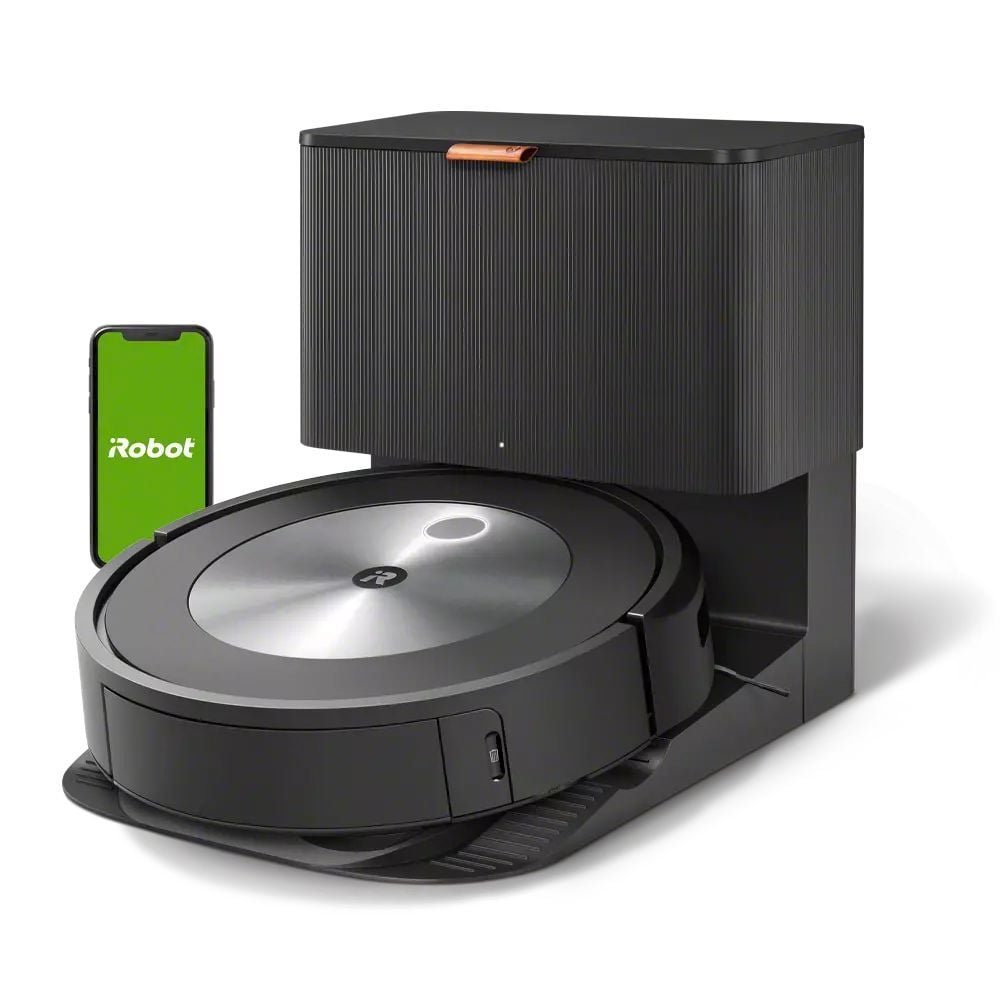
Additionally, its self-emptying base is a significant advantage, minimizing the frequency with which seniors need to handle the dustbin. This feature, which isn’t present in many cheaper alternatives, further enhances its suitability for those with limited dexterity or mobility.
Key Features That Matter for Seniors
Obstacle Detection: The Roomba j7+ uses intelligent sensors to detect and avoid obstacles, a crucial feature for homes where moving furniture or avoiding wires is common. This prevents the vacuum from getting stuck, ensuring continuous operation without requiring the user to intervene frequently.
Self-Emptying Base: Designed to hold weeks of dirt, the base station automatically empties the vacuum’s dustbin. This reduces the physical effort needed to maintain the device, making it ideal for seniors who may struggle with dexterity.
Scheduled Cleanings: Seniors can program the Roomba j7+ to clean at specific times, using the accompanying app. This means the floors are maintained regularly without needing daily manual activation, which is perfect for those who prefer to set it and forget it.
Smart Home Integration: The Roomba j7+ can be connected to smart home systems like Amazon Alexa and Google Assistant. This allows for voice-activated controls, offering an easy operational method for seniors who may have difficulty using touch interfaces.
Battery Life: While specific figures vary, the battery life typically suffices for cleaning standard-sized rooms in one go. The robot automatically returns to its base when the battery is low, ensuring it’s always ready for the next cleaning session without user intervention.
Setup: What to Expect
Setting up the iRobot Roomba j7+ takes approximately 30 to 45 minutes. Begin by unboxing the unit and placing the Clean Base in a central location in the home, near a power source. Plug in the base and charge the Roomba for a few hours before first use. Ensure the area around the base is clear of obstacles to allow smooth operation.
For the digital setup, download the iRobot Home app on a smartphone and create an account. Follow the in-app instructions to pair the Roomba with your Wi-Fi network. Caregivers can assist with this aspect to ensure the senior is comfortable with the app interface. Conduct a test run to ensure the device navigates properly and returns to the base without issues.
What to Know Before Buying
The iRobot Roomba j7+ does not require a monthly subscription for basic cleaning functions. However, a subscription to iRobot’s premium services is available for advanced features like detailed cleaning maps and cleaning history. It’s important to weigh these additional costs against their actual utility for the user.
Coverage limitations can be a concern depending on the home’s layout. While the Roomba j7+ handles most standard home environments, it may struggle with thick carpets or very cluttered spaces. Replacement parts like filters and brushes are additional costs, but these parts are readily available and not overly expensive, ensuring ongoing maintenance is manageable.