Falls are the leading cause of injury among adults over 65. Every year, roughly one in four older Americans experiences a fall, and those numbers climb with age. The consequences range from bruised confidence to broken hips to fatal head injuries. But here is the good news: most falls are preventable with the right combination of awareness, home modifications, and technology.
This guide walks you through a layered approach to fall prevention. Rather than relying on a single device, the goal is to build overlapping layers of protection. Think of it like a safety net with multiple strands. If one strand fails, the others catch you.
Understanding Why Falls Happen
Before diving into technology, it helps to understand the common causes. Falls rarely happen for a single reason. They usually result from a combination of factors working together.
Physical factors include muscle weakness, balance problems, vision changes, and medication side effects. Blood pressure medications can cause dizziness when standing up too quickly. Pain medications can slow reaction times. Even something as simple as new glasses with a different prescription can throw off depth perception for weeks.
Environmental factors are the other half of the equation. Loose rugs, poor lighting, cluttered walkways, slippery bathroom floors, and uneven thresholds all create hazards. A dark hallway at 2 AM is one of the most dangerous places in any home.
The best technology strategy addresses both sides: wearables that detect falls and call for help, sensors that illuminate paths and monitor movement, and devices that keep floors clear of obstacles.
Layer 1: Wearable Fall Detection
The most critical piece of any fall prevention strategy is a wearable device that can detect a fall and call for help automatically. This matters because many falls result in the person being unable to reach a phone. Studies show that lying on the floor for more than an hour after a fall dramatically increases the risk of hospitalization and long-term care placement.
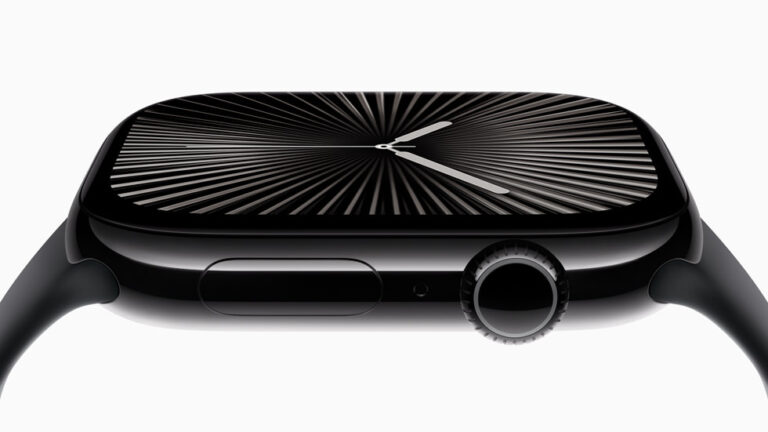
The Apple Watch Series 10 uses an advanced accelerometer and gyroscope to detect the specific motion pattern of a fall. When it detects a hard fall, it taps the wrist, sounds an alarm, and displays an alert. If the wearer does not respond within about a minute, the watch automatically calls emergency services and sends a message with the GPS location to emergency contacts.
This works even if the person is unconscious. The watch does not require the wearer to press a button or remember a sequence. It simply works in the background.
Important consideration: The Apple Watch requires daily charging. If your parent is likely to forget to charge it, or if they have difficulty with the small magnetic charger, a dedicated medical alert pendant with multi-day battery life may be a better fit. The best device is the one that gets worn consistently.
Layer 2: Smart Sensors for Dark Spaces
Nighttime bathroom trips account for a huge percentage of home falls among seniors. The path from bed to bathroom is a minefield in the dark: doorframes to navigate, rugs to trip over, and hard tile floors waiting at the destination.
Motion-activated lighting solves this problem without requiring the person to fumble for a light switch. The Philips Hue Motion Sensor detects movement and instantly turns on connected lights. You can configure it to activate at a low, warm brightness during nighttime hours so it guides without blinding.
Place sensors in these key locations for maximum protection:
- Bedroom doorway: Activates hallway lights the moment they get out of bed
- Hallway: Keeps the path illuminated all the way to the bathroom
- Bathroom entrance: Turns on bathroom lights before they step onto tile
- Top and bottom of stairs: Critical for homes with multiple levels
The lights turn off automatically after a set period of no motion, so there is nothing to remember or manage.
Layer 3: Presence Monitoring
Traditional motion sensors can tell you if someone walked through a room. But they cannot tell you if someone is sitting still in a chair, lying on the floor, or has not moved from the bathroom in an unusually long time. This is where presence detection changes the game.
The Aqara FP2 uses millimeter-wave radar to detect human presence, not just motion. It can sense someone sitting perfectly still by detecting the subtle movement of breathing. This opens up powerful safety scenarios:
- Bathroom monitoring: If someone has been in the bathroom for longer than 30 minutes, send an alert to a caregiver. This could indicate a fall or medical event.
- Bed occupancy: Know if your parent got out of bed in the morning. If they have not left the bedroom by a certain hour, a check-in call might be warranted.
- Room-level tracking: The FP2 can track up to five people in a single room and identify zones. You can set it up to know if someone is near the stove versus sitting at the kitchen table.
All of this happens without cameras. There is no video recording, no audio capture. It preserves privacy while providing meaningful safety data.
Layer 4: Keeping Floors Clear
Clutter on the floor is one of the most common and most preventable fall hazards. Newspapers, shoes, charging cables, pet toys, and throw rugs all create tripping risks. For seniors with mobility issues, bending down to pick things up can itself cause a fall.
A robot vacuum running daily keeps floors clear of debris and reduces the need for manual vacuuming (which involves pushing a heavy machine and navigating around furniture). The iRobot Roomba j7+ is particularly well-suited for senior households because of its obstacle avoidance technology. It uses a camera to identify and avoid common floor obstacles like shoes, cords, and pet waste.
The self-emptying base is an important feature for this use case. Standard robot vacuums need their small dustbin emptied every run or two, which means bending down to floor level. The j7+ empties itself into a bag that only needs replacing every 60 days or so.
Set it on a daily schedule and it becomes invisible background protection, quietly keeping floors clean and clear.
Layer 5: Bathroom Safety Hardware
Technology is powerful, but some of the most effective fall prevention is physical. The bathroom remains the most dangerous room in the house for seniors. Wet surfaces, hard edges, and the physical demands of getting in and out of a bathtub or on and off a toilet create constant risk.
Grab bars are the single most effective bathroom safety modification. The Moen SecureMount grab bars install into wall studs and support significant weight. Unlike the institutional-looking chrome rails of the past, modern grab bars come in finishes and styles that blend with bathroom decor.
Strategic placement matters more than quantity:
- Next to the toilet: Getting up from a seated position on a low toilet is one of the highest-risk movements. A grab bar on the wall beside the toilet provides leverage.
- Inside the shower or tub: Place one vertical bar at the entry point for stability while stepping over the tub edge, and one horizontal bar along the back wall for support while standing.
- Near the vanity: A bar near the sink gives something to hold while bending forward to wash hands or brush teeth.
Putting It All Together
The real power of this approach is how these layers work together. Here is what a typical night looks like in a home with all five layers in place:
Your parent wakes at 2 AM needing the bathroom. The motion sensor detects movement and gently illuminates the hallway at 20% brightness. They walk safely to the bathroom, where another sensor has already turned on a soft light. They use the grab bar to lower themselves onto the toilet and again to stand back up. The presence sensor notes they entered the bathroom and will alert you if they do not leave within a reasonable time. If they were to slip and fall, the Apple Watch on their wrist detects the impact and calls for help automatically. And the floors are clear because the robot vacuum ran its daily cycle that afternoon.
No single device did everything. But together, they created a comprehensive safety system.
Getting Started: Priority Order
If budget or complexity is a concern, here is the order of priority for implementation:
- Grab bars in the bathroom: Lowest cost, highest immediate impact. A handyman can install them in under an hour.
- Wearable fall detection: The Apple Watch or a medical alert pendant provides the critical “call for help” capability.
- Motion-activated nightlights: Even basic battery-powered motion lights in the hallway and bathroom make nighttime trips safer.
- Robot vacuum: Keeps floors consistently clear without physical effort.
- Presence monitoring: The most advanced layer, best added once the basics are in place.
Frequently Asked Questions
Do I need Wi-Fi for all of these devices?
Grab bars and basic motion-activated nightlights work without any connectivity. The Apple Watch needs an iPhone and Wi-Fi (or cellular on GPS+Cellular models) for its fall detection calling feature. The Aqara FP2 and Hue sensors require a Wi-Fi network and their respective hubs. The Roomba needs Wi-Fi for scheduling and app control but can be started manually with a button press.
Will my parent feel like they are being monitored?
The key is choosing invisible technology. Grab bars look like towel bars. Motion lights turn on automatically. A robot vacuum is a household appliance. The presence sensor is a small, camera-free box mounted high on a wall. The Apple Watch looks like a regular watch. None of these devices feel clinical or institutional.
What if my parent refuses to wear a smartwatch?
This is common. If they resist a wrist-worn device, consider a pendant-style medical alert like the Medical Guardian Mini, which can be worn as a necklace. Some people are more comfortable with a pendant because it feels less like technology and more like jewelry. The most important thing is that they wear something consistently.
How much does a full setup cost?
A basic setup with grab bars, motion lights, and a medical alert pendant can be done for under $300. Adding a robot vacuum and smart sensors brings the total to roughly $800-$1,200. Compare this to the average cost of a hip fracture ($35,000-$45,000 including rehabilitation) and the investment becomes clear.
Can I set this up myself or do I need a professional?
Most of this can be done in a single afternoon visit. Grab bars require a drill and stud finder (or hire a handyman for about $100). The electronic devices are all consumer-grade and designed for self-installation. The Aqara FP2 mounts with adhesive tape. The Hue sensors are battery-powered and stick anywhere. The Roomba works out of the box.