Loneliness is not just an emotion. It is a health condition. Research from the National Academies of Sciences found that social isolation increases the risk of premature death by 26%. It raises the risk of dementia by 50%. It is associated with higher rates of heart disease, stroke, and depression. The U.S. Surgeon General declared loneliness a public health epidemic, comparing its health impact to smoking 15 cigarettes per day.
For seniors living alone, isolation creeps in gradually. Friends pass away or move. Driving becomes difficult, limiting social outings. Hearing loss makes phone calls exhausting. Technology is not a substitute for human connection, but the right tools can create more touchpoints between visits and make connection easier.
This guide covers solutions for different comfort levels with technology, from zero-touch photo frames to simplified tablets to AI companions.
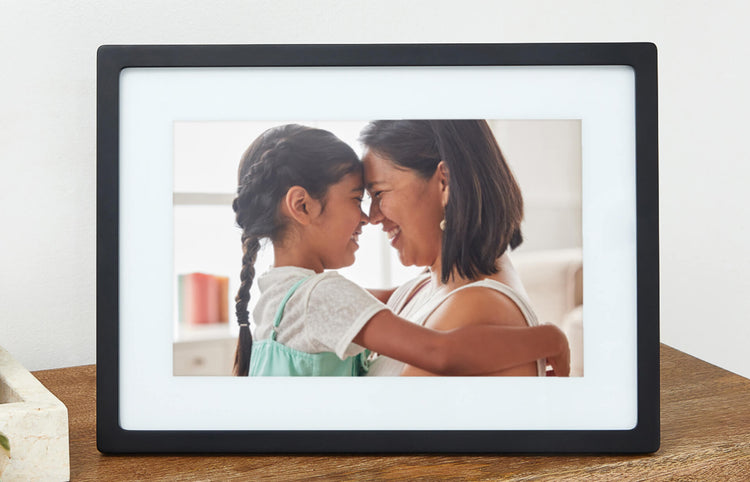
Skylight Frame
Family sends photos by email, they appear on the frame instantly
Check Price on AmazonThe Zero-Effort Option: Digital Photo Frames
Not every senior wants to learn a new device. Many are resistant to technology, and pushing too hard can backfire. For these situations, a digital photo frame is perfect because it requires literally nothing from the person receiving it. They do not set it up, they do not manage it, and they do not interact with it. They simply enjoy it.
The Skylight Frame works like this: family members email photos to a dedicated address (like [email protected]) from anywhere in the world. The photo appears on the frame within seconds. That is it. There is no app to install on the senior’s end, no account to manage, no buttons to press.
Why this combats isolation:
- Daily connection without effort: When grandchildren send a photo from soccer practice, a birthday party, or just a silly face at breakfast, it creates a moment of connection. The senior sees their family’s daily life unfolding, even from hundreds of miles away.
- Conversation starter: When you call or visit, the photos on the frame become natural conversation topics. “I loved that photo of Emma at the beach!” gives both people something to talk about beyond “how are you feeling?”
- Multiple contributors: Everyone in the family can send photos. Siblings, grandchildren, nieces, and nephews. The frame becomes a shared family channel that happens to display in Grandma’s living room.
Setup tip: Place the frame somewhere it is naturally visible, like the kitchen counter, a living room side table, or the bedside table. Plug it in and send the first batch of 20-30 family photos so it has a rich rotation from day one.
For the Willing But Overwhelmed: Simplified Tablets
Some seniors want to video call, see family photos, and maybe read the news, but standard tablets and smartphones are too complex. Too many icons, too many notifications, too many ways to get lost.
The GrandPad is a tablet designed from the ground up for seniors. It is not a regular tablet with a “senior mode” bolted on. The entire interface is custom-built for simplicity:
- Large, clearly labeled buttons: Calls, Photos, Music, Weather, News. No app store, no settings menu, no system updates to navigate.
- One-touch video calling: Tap a family member’s photo to start a video call. No dialing, no Zoom links, no “you are on mute” moments.
- Family-managed contacts: You control who can contact the GrandPad through a companion app. No spam calls, no scam texts, no strangers.
- Built-in cellular: The GrandPad has its own data plan (included in the monthly subscription). No Wi-Fi setup required. It works anywhere with cell service, which means it works out of the box with zero network configuration.
- Music and games: Curated music (oldies, classical, hymns) and simple games provide solo entertainment for times between calls.
The tradeoff: The GrandPad is a subscription service ($40-50/month), which includes the tablet, cellular data, and customer support. This is more expensive than buying a regular tablet, but it includes everything and eliminates the technical support burden on family members.
Voice-First Connection: Smart Displays
If your parent is comfortable with voice commands (or willing to learn a few), the Echo Show 8 offers video calling, photo display, and daily connection through Alexa. It bridges the gap between a passive photo frame and an active communication device.
Drop In feature: This is the most powerful connection tool for caregivers. When enabled, you can “drop in” on your parent’s Echo Show at any time. The screen activates, shows your face, and you can talk. Your parent does not need to answer or press anything. It is the digital equivalent of popping your head into their living room. This is particularly valuable for morning wellness checks. Drop in, say good morning, see that they are up and moving, and go about your day.
Two-way video calling: Your parent says “Alexa, call Sarah” and a video call starts on the Echo Show screen. No dialing, no device to hold, no small phone screen. The 8-inch display shows your face clearly, and the camera automatically frames them.
Photo display: When not in use, the Echo Show displays family photos from Amazon Photos. Upload a shared album and it becomes a smart photo frame that also makes calls.
For Deeper Loneliness: Companion Robots and AI Pets
Some seniors experience profound loneliness that phone calls and photos cannot fully address. This is especially true for those who have lost a spouse, live far from family, or are in the later stages of cognitive decline where complex communication becomes difficult. For these situations, companion technology offers a different kind of connection.
The Joy For All Companion Cat is a robotic pet that responds to touch and voice with lifelike purring, meowing, and movement. It is soft, warm, and designed to provide the calming sensory experience of petting a real cat without the demands of pet ownership (feeding, vet visits, litter boxes).
Who benefits most:
- People with dementia: The companion cat provides comfort and engagement without requiring the cognitive complexity of conversation. The tactile experience of petting is soothing and can reduce agitation and anxiety.
- People who miss a pet: Many seniors had to give up beloved pets when they moved to assisted living or when caring for an animal became too difficult. The companion cat fills that void.
- People between visits: For the hours and days between family calls or caregiver visits, having a responsive, comforting presence in the room makes a measurable difference in mood and well-being.
Setting realistic expectations: Companion pets are not trying to fool anyone into thinking they are real. Most seniors understand they are robotic. The comfort comes from the sensory experience (warmth, softness, responsive behavior) and the routine of “caring” for something. Research from Brown University found that robotic pets reduced loneliness and improved mood in nursing home residents similarly to visits from real therapy animals.
Matching the Solution to the Person
The biggest mistake families make is choosing technology that matches their own comfort level rather than their parent’s. Here is a practical framework:
For someone who resists all technology: Start with a Skylight Frame. They do not need to do anything. Just plug it in and start sending photos. Once they see and enjoy the photos, they may become more open to other technology.
For someone willing to try but easily frustrated: The GrandPad eliminates nearly all frustration points. Its simplicity means fewer “I broke it” calls. The included customer support handles any issues directly, so you are not the tech support line.
For someone who already uses Alexa or a smart speaker: Add an Echo Show to upgrade from voice-only to video. The transition from “Alexa, play music” to “Alexa, call my daughter” is natural.
For someone who is lonely between interactions: A companion pet provides continuous presence. It does not replace human connection, but it fills the quiet hours.
For the most isolated: Combine approaches. A Skylight Frame for passive family connection, an Echo Show for active video calling, and a companion pet for comfort between interactions. These layers work together to reduce the total hours of isolation per day.
Getting Family Buy-In
Technology only works if the family participates. A Skylight Frame without photos is just a black screen. An Echo Show without anyone dropping in is just a clock.
Practical steps:
- Create a family group chat and set a norm: everyone sends at least one photo to Grandma’s frame per week. Make it easy by saving the frame’s email address as a contact.
- Schedule regular Drop In times so your parent looks forward to seeing your face. Consistency matters more than frequency. A 5-minute drop-in every morning at 9 AM is more effective than an unpredictable 30-minute call once a week.
- Involve grandchildren. Kids are natural photo-senders and video-callers. Give them the responsibility. It builds intergenerational connection in both directions.
Frequently Asked Questions
My parent says they are fine and do not need any of this.
This is extremely common. Many seniors minimize their loneliness out of pride or not wanting to be a burden. Rather than arguing, just install a Skylight Frame as a gift. “I wanted you to see more photos of the grandkids” is a statement about the family sharing, not about the senior being lonely. Once the photos start flowing, most people love it.
Is the Echo Show Drop In feature too invasive?
It depends on the person. Some seniors love it. It feels like family popping in. Others feel watched. Always ask permission and let them choose the rooms where Drop In is enabled. A good compromise: enable Drop In on the kitchen or living room Echo Show, but not the bedroom. And always announce yourself (“Good morning, Mom!”) as soon as the screen activates.
Are robotic pets weird? Will my parent think it is insulting?
The research says no. Most seniors who try companion pets quickly form genuine attachment to them. They name them, talk to them, and find real comfort in the interaction. The key is framing. “I thought you might enjoy this” works better than “this is a replacement for a real pet.” Let them discover the benefits on their own terms.
What if my parent lives in a facility? Do these still work?
Absolutely. The Skylight Frame and Echo Show only need a Wi-Fi connection and a power outlet. Most assisted living facilities have Wi-Fi. The GrandPad works on cellular, so it does not even need the facility’s network. Companion pets need no connectivity at all. Check with the facility about video calling policies, as some have guidelines about camera use in shared rooms.