At some point in the progression of dementia, a standard smartphone stops working. Not because it breaks, but because the person can no longer use it. The icons make no sense. Swiping and tapping become confusing. Notifications pile up and create anxiety. They accidentally call 911, open random apps, or change settings they cannot undo. Eventually, they stop trying to use the phone altogether.
This is a devastating loss. The phone was their connection to family, their lifeline in an emergency, and a daily ritual (the morning call to a daughter, the evening chat with a friend). When the phone goes away, isolation accelerates. And isolation accelerates dementia.
The answer is not a “senior phone” with bigger buttons. Those still require navigating a contact list, recognizing names, and operating a menu. For someone with moderate dementia, these tasks are equally impossible.
The answer is a phone built around the one cognitive ability that persists longest in dementia: facial recognition.
Why Smartphones Fail for Dementia
Understanding why standard phones do not work helps explain why a purpose-built solution is necessary. The problem is not just “big enough buttons.” It is a fundamental mismatch between how smartphones work and how a person with dementia processes information.
Sequential tasks break down. Making a phone call on a smartphone requires: wake the phone, unlock it, find the phone app, find the contact, tap the name, confirm the call. That is six steps. Each step requires remembering what you are doing and what comes next. For someone with dementia, any multi-step sequence is likely to fail at step 2 or 3.
Abstract symbols lose meaning. The green phone icon, the red hang-up button, the microphone mute symbol. These are abstractions that we learn through use. When the brain can no longer form and retrieve associations between symbols and functions, every icon becomes meaningless.
Accidental interactions cause panic. A stray swipe opens the camera. A long press activates the voice assistant, which starts talking at them. A notification banner covers the screen they were trying to use. Each of these events creates confusion, frustration, and often fear. The phone becomes an adversary rather than a tool.
Names fade before faces. Your parent may not remember that “Sarah Miller” is their daughter when they see the name in a contact list. But they instantly recognize Sarah’s face in a photograph. This is because facial recognition and name recall are processed by different parts of the brain, and the part that handles faces is more resilient to the damage caused by dementia.
How Picture Dialing Works
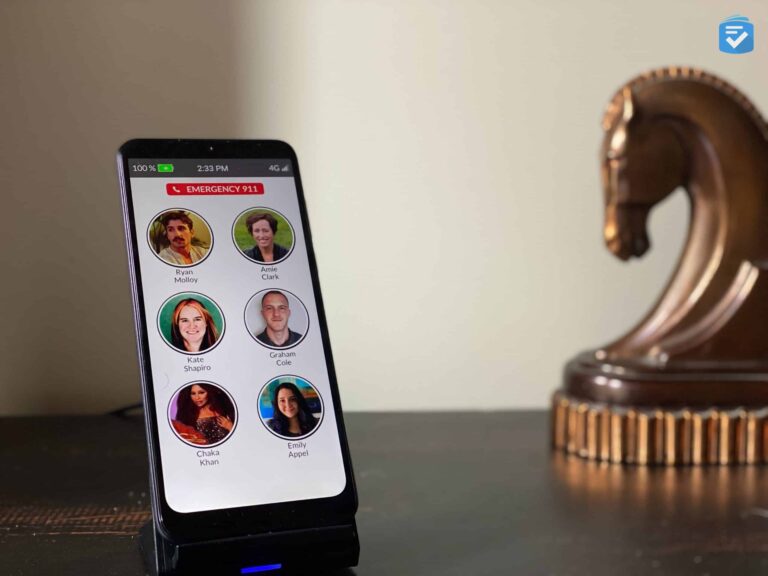
The RAZ Memory Cell Phone eliminates every problem described above by replacing the entire smartphone interface with a single screen of photographs.
When the person picks up the phone, they see a grid of large, clear photos showing the faces of their closest family members and friends. Six to eight photos fill the screen. To call someone, they tap the photo. The phone dials. That is it.
There is no home screen to navigate away from. There is no lock screen. There is no contact list. There is no phone app. There is no way to accidentally open settings, the browser, or the camera. The phone does one thing: connect the person to people whose faces they recognize.
Incoming calls: When someone calls, the phone rings and displays the caller’s photo full-screen. The person taps the photo to answer. If they do not answer, the call goes to voicemail (which you manage remotely; there is no voicemail interface on the phone itself).
Call screening: Only numbers you have approved can ring through. All other calls are silently rejected. This means no robocalls, no scam calls, no confusing calls from unknown numbers. For someone with dementia, who may give personal information or credit card numbers to scam callers, this protection is essential.
Setting Up the RAZ Memory Phone
Setup is done entirely through a web-based caregiver portal. The person with dementia does not need to touch any settings. Here is the step-by-step process:
Step 1: Activate the Phone
The RAZ Memory Phone operates on a cellular network (no Wi-Fi required). When you order the phone, you choose a data plan. It arrives activated and ready to use. Insert the SIM card if it is not pre-installed, and power it on.
Step 2: Access the Caregiver Portal
Create an account on the RAZ website. This portal is where you control everything about the phone: contacts, photos, settings, call logs.
Step 3: Upload Contact Photos
This is the most important step. For each contact you want on the phone, upload a clear, well-lit photo of their face.
Photo guidelines for best results:
- Use a recent photo. The person with dementia needs to recognize the face as it looks now, not 10 years ago.
- Show the face from shoulders up, looking at the camera.
- Use a simple, uncluttered background.
- Good lighting, no heavy shadows across the face.
- Avoid group photos. One person per contact photo.
- If possible, use a photo that captures a characteristic expression. The familiar smile or look is part of the recognition.
Step 4: Assign Phone Numbers
Link each photo to a phone number. You can also add multiple numbers to a single contact (home phone and cell phone) and set the order the phone tries them.
Step 5: Configure Call Screening
Add all numbers you want to allow through. This includes the contacts on the photo screen plus any additional numbers (doctor’s office, pharmacy, day program) that should be able to reach the phone.
Step 6: Set Up Emergency Contact
Designate one contact as the emergency contact. If the phone has an SOS button (model dependent), pressing it calls this person immediately.
Step 7: Hand It Over
Give the phone to your parent and show them: “Tap Sarah’s picture to call Sarah.” That is the entire tutorial. Practice it a few times. Leave the phone somewhere they will naturally see it and reach for it, like the kitchen table or their favorite chair’s side table.
What Caregivers Can Do Remotely
The caregiver portal gives you ongoing control and visibility:
- Update photos: As your parent’s condition changes, you may need to update photos. A contact who has significantly changed their appearance (new hairstyle, lost or gained weight) may no longer be recognizable.
- View call logs: See who your parent called and when, and who called them. This helps you understand their communication patterns and notice changes (calling less frequently may indicate declining cognition or depression).
- GPS location: See where the phone is at any time. This is a secondary location tool, not as robust as a dedicated GPS tracker, but helpful for quick check-ins.
- Add or remove contacts: If a friend passes away, you can quietly remove their photo to avoid confusion and distress. If a new caregiver enters their life, add their photo.
- Battery status: Check the battery level remotely so you can remind a caregiver to charge it.
When the Phone Becomes Too Much
The RAZ Memory Phone extends phone use significantly further into dementia than any standard phone can. But there may come a point when even tapping a photo is no longer something your parent can initiate. Signs that this stage has arrived:
- They no longer pick up the phone on their own
- They stare at the photos without tapping
- They answer incoming calls but cannot follow the conversation
- They become agitated or confused by the phone ringing
When this happens, the phone may transition from a tool the person uses independently to one a caregiver uses to facilitate calls. The caregiver can tap the photo and hold the phone or put it on speaker, providing a connection that the person can still enjoy passively even if they cannot initiate it.
The Cost of Staying Connected
The RAZ Memory Phone requires a monthly cellular plan, which typically runs $15-25/month depending on the plan. The phone itself is sold separately or bundled with a plan discount.
Compared to the cost of increased isolation (accelerated cognitive decline, depression, higher care needs), the monthly fee is minimal. And compared to the distress of a parent who cannot reach family and family who cannot reach their parent, it is a small price for maintained connection.
Frequently Asked Questions
Can the person with dementia change the settings or break anything?
No. The phone interface is completely locked. There is no way to access settings, install apps, change the photos, or modify the configuration from the phone itself. Everything is managed through the caregiver web portal. The worst thing that can happen from the phone side is an accidental pocket dial, which is harmless.
What if my parent already has a phone plan and number?
You can typically port their existing phone number to the RAZ Memory Phone. This is important because the number is familiar to their contacts, and incoming calls from known numbers will ring through. Check with RAZ’s support team about the porting process for your specific carrier.
How is battery life?
The RAZ Memory Phone is designed for simplicity, and that extends to battery life. With typical use (a few calls per day), the battery lasts 2-3 days. Charging is via a standard USB cable or cradle. Establishing a nightly charging routine (like plugging it in on the nightstand before bed) is the easiest approach.
Is this just for people with dementia? What about seniors who are not tech-savvy?
The RAZ Memory Phone works beautifully for anyone who finds smartphones overwhelming, regardless of cognitive status. Seniors who have never used a smartphone, who cannot read small text, or who simply want a phone that only makes calls to family are all good candidates. The picture dialing interface is intuitive for anyone.
What happens if the phone is lost?
The caregiver portal includes GPS location tracking, so you can see where the phone is on a map. If it is truly lost, you can remotely lock it. Because the phone has no stored passwords, banking apps, or personal data beyond the contact photos, the security risk of a lost phone is minimal compared to a lost smartphone.