Smart Lighting for Aging in Place: How Motion Sensors Prevent Falls in the Dark
Falls are the leading cause of injury for adults over 65, and a disproportionate number happen in the dark. The hallway between the bedroom and bathroom at 2 AM. The kitchen at dawn before anyone else is awake. The living room at dusk when the light is fading but nobody has turned on a lamp yet.
The common advice is to leave nightlights on. But nightlights produce a narrow circle of weak light that often does not cover the full path. They plug into low outlets that people have to bend down to manage. And they stay on all night, whether anyone is walking or not.
Smart lighting solves this differently. Instead of always-on dim glow, smart lighting for seniors responds to motion. When someone gets out of bed and walks down the hall, the lights come on automatically at a comfortable brightness. When they return to bed and stop moving, the lights turn off on their own. No switches, no fumbling, no decision-making at 2 AM when you are half asleep.
This article explains how smart lighting works for aging in place, what you need to set it up, and why a motion-activated system is one of the most effective fall prevention tools you can install in a home.
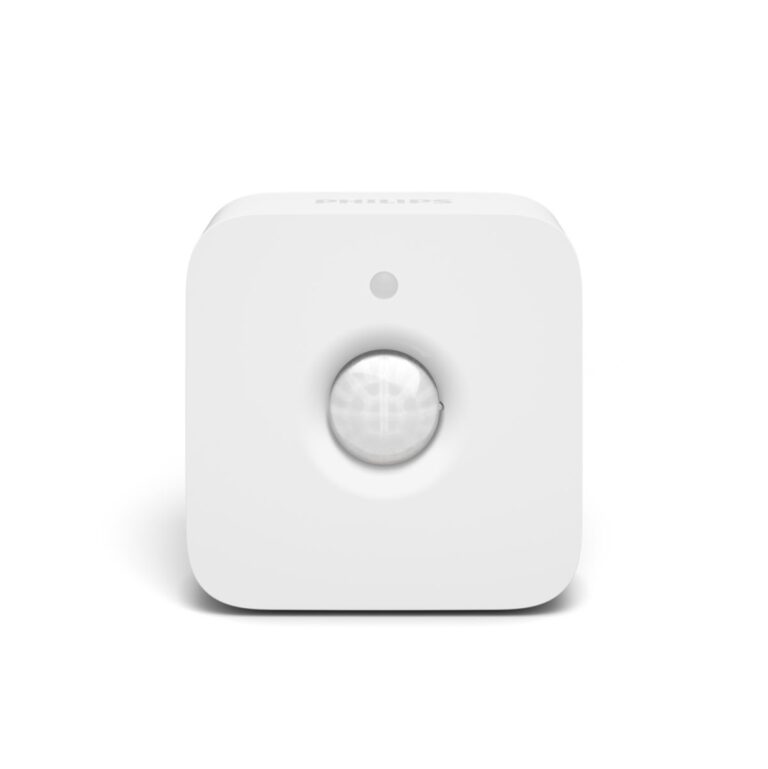
Philips Hue Motion Sensor
Wireless motion sensor that automatically lights the path to the bathroom at night
Check Price on AmazonWhy Darkness Is So Dangerous for Older Adults
The relationship between darkness and falls is not just about bumping into furniture. As we age, our eyes take longer to adjust between light and dark environments. A 70-year-old needs roughly three times more light than a 20-year-old to see the same level of detail. Depth perception weakens in low light, making it harder to judge the edge of a step or the distance to a doorframe.
Add in common age-related conditions like cataracts, glaucoma, or macular degeneration, and navigating a dark hallway becomes genuinely risky. The eyes cannot provide enough information fast enough, and the brain fills in gaps with assumptions that may be wrong.
The bathroom trip is the most dangerous moment. The person has been sleeping. Their muscles are stiff. Their blood pressure may be low from lying down. They are not fully awake. Now add complete darkness to that list. The risk of a fall increases dramatically.
Studies consistently show that improving nighttime lighting in the home reduces fall risk. The challenge has always been making that lighting automatic and unobtrusive. Nobody wants to sleep with bright lights on. Nobody wants to fumble for a switch while half-asleep. Motion-activated smart lighting eliminates both problems.
How Motion-Activated Smart Lighting Works
A motion-activated smart lighting system has three components: a motion sensor, smart light bulbs, and a hub that connects them. When the sensor detects movement, it sends a signal to the hub, which tells the designated bulbs to turn on. When movement stops for a set period, the lights turn off again.
The key advantage over basic motion-sensor nightlights is control. With a smart system, you decide exactly which lights respond, how bright they get, what color temperature they use, and when the behavior changes. You can program one behavior for nighttime (dim, warm light at 15% brightness) and a completely different behavior for daytime (full brightness, cool white). The same sensor, the same bulbs, but context-appropriate responses.
You also get multi-room coordination. A single motion sensor in the hallway can trigger lights in the hallway, the bathroom, and the bedroom simultaneously. The person never walks into a dark room. The light is already on before they arrive.
Our Pick: The Philips Hue Motion Sensor
The Philips Hue system is the most reliable and flexible smart lighting platform for aging in place. The Hue Motion Sensor is the specific piece that makes the system reactive to movement rather than requiring manual control.
The sensor is a small, battery-powered device that mounts on a wall or shelf with included adhesive or screws. It detects motion within a roughly 12-foot range and 100-degree field of view. When it sees movement, it communicates wirelessly with the Philips Hue Bridge, which triggers whatever lights and scenes you have configured.
Battery life is approximately two to three years on standard AAA batteries. The sensor itself requires no wiring, no electrical work, and no permanent installation. You can reposition it any time you find a better spot.
What You Need for a Complete Setup
The Hue Motion Sensor does not work alone. It is part of a system. Here is what a complete aging-in-place lighting setup requires.
The Hue Bridge
The Hue Bridge is a small box that plugs into your home router with an ethernet cable. It acts as the brain of the system, connecting all your Hue devices and enabling automation rules. One bridge supports up to 50 lights and 12 accessories, which is more than enough for any home. The bridge costs about $50 and is a one-time purchase.
Hue Smart Bulbs
You need at least one Hue smart bulb in each light fixture you want to automate. The standard Hue White bulb costs about $15 and screws into any standard lamp socket. For a typical hallway-to-bathroom setup, plan on two to three bulbs: one in the hallway, one in the bathroom, and optionally one in the bedroom.
A basic system with a bridge, a sensor, and three bulbs runs roughly $120 to $150. That is a one-time cost with no monthly fees, no subscriptions, and no ongoing expense beyond replacement batteries every few years.
The Hue App
The free Philips Hue app (available for iPhone and Android) is where you configure everything. You assign bulbs to rooms, create scenes with specific brightness and color temperature settings, and set up the motion sensor’s behavior. The app is well designed and walks you through each step.
Setting It Up: A Practical Walkthrough
Setup is a one-time process that takes about 30 to 45 minutes. An adult child or caregiver can do this during a single visit.
Step One: Install the Bridge
Connect the Hue Bridge to your router using the included ethernet cable. Plug in the power cable. Wait about 60 seconds until all three indicator lights are solid blue. Open the Hue app and follow the prompts to discover the bridge.
Step Two: Install the Bulbs
Screw Hue bulbs into the fixtures along the nighttime path. Start with the hallway between the bedroom and bathroom, then add the bathroom itself. Turn the light switches ON and leave them on permanently. This is important: the bulbs need constant power so the smart system can control them. Put a small piece of tape over the light switches as a reminder not to flip them off manually.
Step Three: Add Rooms in the App
In the Hue app, create rooms that match your home layout. Add “Hallway,” “Bathroom,” and “Bedroom” as rooms, then assign the appropriate bulb to each room. Name them clearly.
Step Four: Create a Nighttime Scene
Create a scene called “Night Path” or something similar. Set the brightness to 10% to 20% and the color temperature to the warmest available setting (around 2200K). This produces a soft orange-amber glow that provides enough light to see the floor and walls without jarring you awake. Test it in the dark to make sure it feels right.
Step Five: Mount and Configure the Motion Sensor
Place the sensor in the hallway where it can detect someone leaving the bedroom. About chest height on the wall opposite the bedroom door works well. Use the included adhesive mount initially. You can switch to screws later if you want a more permanent installation.
In the Hue app, go to the sensor’s settings. Set the daytime behavior to “full brightness” and the nighttime behavior to your “Night Path” scene. Set the time-after-motion to about 5 minutes, so the lights stay on long enough for a full bathroom trip and return.
Step Six: Test It
Wait until evening. Walk the path from bedroom to bathroom and back. The lights should come on as you approach and stay on while you are moving. They should turn off automatically a few minutes after you return to bed. Adjust brightness, sensor placement, or timing as needed.
Where to Place Sensors for Maximum Safety
The hallway is the most important location, but it is not the only one worth considering. Here are the spots that make the biggest difference for fall prevention.
Hallway Between Bedroom and Bathroom
This is the highest-priority location. Place the sensor so it detects movement as soon as someone exits the bedroom. Pair it with lights in both the hallway and the bathroom so the full path is lit before the person reaches the bathroom door.
Top and Bottom of Stairs
If the home has stairs, place a sensor at both the top and the bottom. Falls on stairs are among the most severe. Automatic lighting ensures the steps are visible from the moment someone approaches.
Kitchen Entrance
Early morning kitchen visits for water or medication happen in low light. A sensor at the kitchen entrance that triggers the under-cabinet lights or a single overhead fixture reduces the risk of tripping over a pet, a chair leg, or an uneven transition between floor surfaces.
Garage or Utility Room Entry
Transition spaces between rooms with different floor heights are fall hazards. A motion sensor that lights up the entry before you reach the step down eliminates that surprise.
Smart Lighting vs. Other Nighttime Solutions
How does motion-activated smart lighting compare to other common approaches?
Basic nightlights are cheap and require no setup, but they produce minimal light, plug into low outlets (bending risk), and stay on all night. They do not adapt to the person’s actual movement.
Motion-sensor plug-in lights (like the ones sold at hardware stores) are better than static nightlights, but they only cover a single spot and offer no brightness control. You cannot coordinate them across rooms or set different behaviors for day and night.
Leaving regular lights on all night works but wastes electricity, disrupts sleep quality, and can create glare that actually reduces visibility in adjacent dark areas.
Smart lighting with motion sensors provides the right amount of light, at the right brightness, in the right rooms, only when someone is actually moving. It turns off when it is not needed. It adapts to time of day. And it can be adjusted remotely if the initial settings are not quite right.
For the cost difference between a few nightlights and a smart lighting system, you get a dramatically better safety outcome.
Maintenance and Long-Term Use
Once configured, the system requires almost no maintenance. The motion sensor runs on two AAA batteries that last two to three years. The Hue app displays battery status so you can replace them before they die. The bulbs are LED and rated for approximately 25,000 hours, which translates to many years of normal use.
If the internet goes out, the Hue Bridge continues to operate locally. Motion-triggered scenes still work because the bridge handles the automation without needing cloud connectivity. This is an important reliability advantage over some competing systems that depend entirely on internet access.
If a bulb fails, you replace it with a new Hue bulb, add it to the app, and assign it to the same room and scene. It takes about two minutes. The sensor does not need to be reconfigured.
A Conversation Worth Having
If you are an adult child thinking about your parent’s safety at night, smart lighting is one of the most impactful changes you can make in a single afternoon visit. It does not require any physical modification to the home. It does not change how the home looks during the day. It simply makes the dark hours safer.
The conversation is easy because the technology is invisible. You are not asking your parent to wear something, carry something, or remember something. You are making the house respond to them automatically. The lights come on when they move. They go off when they stop. That is it.
For seniors who live alone, smart lighting also provides peace of mind. Knowing you will never walk into a dark room again, knowing the hallway will always be lit when you get up at night, is a small but meaningful comfort. It is one less thing to worry about in a home that should feel safe.
Smart lighting for seniors is not about turning a home into a technology showroom. It is about solving a specific, well-documented safety problem with a quiet, reliable tool that works every time without being asked.