When glasses can no longer correct your vision enough to read a medicine label or a bank statement, the conversation shifts from corrective lenses to assistive technology. Electronic magnifiers, also called digital video magnifiers or closed-circuit television (CCTV) magnifiers, use a camera and screen to enlarge text and images far beyond what optical lenses can achieve. For the millions of older adults living with macular degeneration, glaucoma, diabetic retinopathy, and other causes of low vision, these devices can restore the ability to read, manage daily tasks, and maintain independence.
This guide covers the different types of electronic magnifiers, the features that matter most, how to choose between them, and practical tips for getting the most out of whichever device you select.
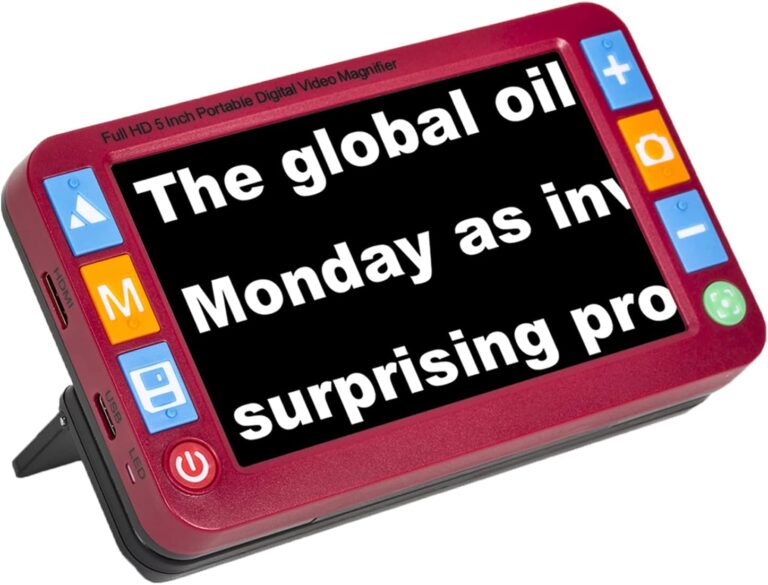
MoreDisp Portable Digital Video Magnifier, 5.0 Inch
5-inch HD screen with 2x to 32x zoom and 26 color modes for people with low vision to read books, labels, and medicine bottles independently.
Check Price on AmazonWhy Optical Magnifiers Fall Short
A traditional magnifying glass works by bending light through a curved lens. It is simple, cheap, and effective for mild vision loss. But it hits a ceiling quickly. To achieve high magnification with an optical lens, the lens must be either very thick (heavy and distorted at the edges) or very small (tiny field of view). By the time you need 10x or 15x magnification, an optical magnifier shows you only a few letters at a time through a small circle of clarity.
Electronic magnifiers break through this ceiling. A camera captures the image, and a screen displays it at whatever size you need. A 5-inch screen at 10x magnification shows you a full word or short phrase at a time, not just a letter or two. A 24-inch desktop screen at the same magnification shows you several words or an entire line. The viewing experience is fundamentally more usable.
Electronic magnifiers also offer something optical lenses cannot: contrast enhancement. Different color modes (yellow on black, white on blue, green on black) can make text dramatically easier to see for specific eye conditions. For many people with macular degeneration, switching from standard black-on-white text to yellow-on-black text makes more difference than increasing the zoom level.
Types of Electronic Magnifiers
Electronic magnifiers come in three main form factors, each suited to different needs and situations.
Handheld Portable Magnifiers
These are compact devices, typically with screens between 3.5 and 7 inches, that you hold over the material you want to read. They look and feel like small tablets or oversized smartphones. You slide them across a page, a food label, or a prescription bottle, and the text appears enlarged on the screen.
Best for: Reading mail, checking labels, reviewing prescriptions, use outside the home (restaurants, stores, doctor’s offices). These are the most portable option and fit in a purse or large pocket.
Limitations: The small screen means you see only a few words at a time at high magnification. Extended reading (books, long documents) is tiring because you must continuously slide the device across the page.
Price range: $100 to $400.
Desktop Video Magnifiers (CCTVs)
Desktop units feature a large monitor (17 to 27 inches or larger), a camera mounted on an arm or built into the base, and a movable reading table where you place your material. The camera captures the page, and the monitor displays it at high magnification. You move the reading table (which glides on ball bearings) to navigate across the page.
Best for: Extended reading (books, newspapers, magazines), writing (you can see your pen on screen), detailed tasks (crafts, sorting photos, reading sheet music). The large screen and smooth-sliding table make reading for 30 to 60 minutes much more comfortable than a handheld device.
Limitations: They are stationary. A desktop magnifier stays on a desk or table and is not something you bring to the grocery store. They also take up significant desk space and cost considerably more than portable units.
Price range: $500 to $3,500.
Wearable Magnifiers
These are glasses-like devices (such as the eSight or IrisVision) that mount screens in front of the eyes. A camera on the front captures the world, and the screens inside the headset display an enhanced, magnified version in real time. Some models overlay magnification on top of the wearer’s remaining natural vision.
Best for: People who need magnification while moving around, doing activities, or looking at things at a distance (watching TV, recognizing faces, navigating outdoors).
Limitations: Expensive ($2,000 to $6,000), heavier and more conspicuous than other options, and battery life is typically 2 to 3 hours. The technology is advancing quickly but still feels early-generation for many users.
Price range: $2,000 to $6,000.
Conditions That Electronic Magnifiers Help
Electronic magnifiers are most effective for conditions that reduce central vision or overall visual acuity while leaving some functional vision intact. They are not a solution for total blindness, but for the far more common situation where vision is significantly impaired but not entirely gone.
Age-Related Macular Degeneration (AMD)
AMD is the most common cause of severe vision loss in adults over 50. It damages the macula, the part of the retina responsible for sharp central vision. People with AMD often describe a dark or blurry spot in the center of their visual field while their peripheral vision remains relatively intact. Electronic magnifiers help by enlarging text enough that it falls across more of the remaining functional retina. High-contrast color modes (especially yellow on black) are particularly effective for AMD because they reduce glare and increase the distinction between text and background.
Glaucoma
Glaucoma typically damages peripheral vision first, creating tunnel vision in advanced stages. The remaining central vision may still be relatively sharp but covers a narrow area. Electronic magnifiers help by allowing the user to zoom in on specific portions of a page, making the most of their remaining field of view.
Diabetic Retinopathy
Diabetic retinopathy causes patches of vision loss and overall blurriness as damaged blood vessels affect the retina. Electronic magnifiers with strong contrast enhancement help text stand out against backgrounds that the eye might otherwise blur together.
Cataracts (Advanced or Post-Surgery)
While cataract surgery resolves most cataract-related vision problems, some people have complications or are not candidates for surgery. For these individuals, electronic magnifiers with glare-reducing color modes can significantly improve reading ability.
Key Features to Look For
When evaluating electronic magnifiers, focus on these features:
Magnification Range
A wider range gives you more flexibility. For a handheld device, look for at least 2x to 20x. Higher magnification (up to 32x) is useful for extremely fine print. For desktop units, 2x to 70x is common.
Color Modes
More is generally better here, because the right mode varies by condition and by individual. A minimum of 8 to 10 modes gives you enough options. Some devices offer 20 or more. The most universally useful modes are: full color, black on white, white on black, yellow on black, and yellow on blue.
Screen Quality
An HD screen with good contrast and wide viewing angles makes a real difference in readability. Anti-glare coatings help in rooms with overhead lighting. For handheld devices, screen brightness matters because you may use the device under different lighting conditions.
Battery Life (Portable Devices)
Three to four hours of continuous use is the practical minimum. Look for rechargeable batteries, and strongly prefer devices with replaceable batteries. A battery that cannot be replaced means the entire device becomes useless when the battery degrades after a year or two.
Freeze Frame
The ability to capture a still image and then zoom in on it is surprisingly useful. Point the device at a sign across the room, freeze the image, and zoom in to read it at your desk. This feature turns a reading magnifier into a distance magnifier in one button press.
TV Output
The ability to connect to a television transforms a handheld magnifier into something approaching a desktop system. Read from the couch with the text displayed on a large screen. This feature is available on many mid-range and higher handheld devices.
How to Choose the Right Type
The right magnifier depends on how you plan to use it. Here is a simple decision framework.
If your primary need is reading labels, mail, and prescriptions for short periods, a handheld portable magnifier in the $150 to $300 range covers most situations. It is also the best starting point if you are new to electronic magnifiers and want to try the technology without a large investment.
If you want to read books, newspapers, or long documents comfortably, a desktop magnifier is worth the investment. The large screen and reading table make extended reading sessions feasible. Many low-vision rehabilitation centers have demo units you can try before purchasing.
If you need magnification while doing activities (cooking, walking, watching TV, recognizing faces), a wearable magnifier offers hands-free operation but at a significantly higher cost. Check whether your insurance or a low-vision rehabilitation program covers part of the expense.
If you need a versatile all-purpose solution on a budget, a handheld magnifier with TV output gives you portable magnification for daily tasks and a large-screen reading experience when you connect it to your television at home.
Tips for Getting Started
The first few days with an electronic magnifier involve a learning curve. These tips help accelerate the adjustment period.
Find Your Color Mode First
Before worrying about zoom levels or reading speed, spend 15 minutes cycling through all available color modes using a page of text you are familiar with. You will likely notice that one or two modes make text noticeably sharper and more comfortable than the others. Set your preferred mode and leave it there. You can always revisit later, but starting with the right contrast makes everything else easier.
Start at Low Magnification
It is tempting to zoom in as far as possible, but higher magnification means you see fewer words at a time and must move the device more frequently. Start at the lowest magnification that allows you to read comfortably and only increase it for especially small text. Many people find that 5x to 8x handles most daily reading needs.
Use a Stable Surface
For handheld magnifiers, rest the device on the material rather than holding it in the air above the page. This eliminates shake and keeps the camera at a consistent distance, producing a clearer image. The built-in stand that many devices include is designed for exactly this purpose.
Practice with Familiar Material
Start with material you already know, like a favorite book or yesterday’s mail. Familiarity with the content lets you focus on learning the device rather than struggling with both the device and the text simultaneously.
Connect with a Low-Vision Specialist
Optometrists and ophthalmologists who specialize in low vision can recommend specific devices and settings based on your particular condition. Many offer in-office demonstrations of different magnifier types. Some low-vision rehabilitation programs loan devices for trial periods before you commit to a purchase. If you have not seen a low-vision specialist, ask your eye doctor for a referral.
Insurance and Financial Assistance
Medicare does not typically cover electronic magnifiers, classifying them as convenience items rather than medical devices. However, there are other avenues worth exploring:
State vocational rehabilitation programs sometimes provide assistive technology for people with vision loss, particularly if the device helps maintain employment or independence.
Nonprofit organizations like the Lions Club, Lighthouse for the Blind, and local low-vision support groups sometimes have grant programs or loaner libraries.
Veterans Affairs provides assistive technology, including electronic magnifiers, to eligible veterans through their Visual Impairment Services Team.
Flexible Spending Accounts (FSAs) and Health Savings Accounts (HSAs) often cover electronic magnifiers when prescribed by a doctor for a diagnosed vision condition.
A Tool for Independence
Losing the ability to read feels like losing a piece of yourself. Recipes, letters, bank statements, prescription instructions, the daily newspaper. These are not luxuries. They are the fabric of independent daily life. When glasses can no longer provide that access, an electronic magnifier can.
The technology is straightforward. The learning curve is short. And the impact on daily quality of life is often immediate. The first time you read a prescription label on your own after months of asking for help, or the first time you sit down with a book after thinking that chapter of your life was over, the value of the device becomes very clear.
Start with a handheld portable magnifier if you are unsure. Try it for a week. If it changes what you can do in a day, you will know the investment was worth it.