Hearing loss affects roughly one in three adults between 65 and 74, and nearly half of those over 75. It is one of the most common conditions of aging, and one of the most socially isolating. When phone conversations become frustrating, many seniors simply stop answering. They let calls go to voicemail. They avoid calling the doctor. They talk less to family. The phone, once a lifeline, becomes a source of anxiety.
An amplified phone does not cure hearing loss. But it can restore comfortable, comprehensible phone conversations for millions of people with mild to moderate hearing impairment. This guide explains how amplified phones work, what features to look for, how to match amplification level to hearing loss severity, and when alternatives like captioned phones may be a better fit.
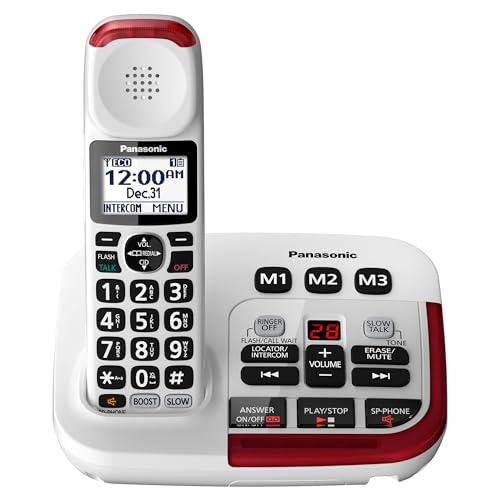
Panasonic Amplified Cordless Phone KX-TGM420W
Amplifies incoming volume up to 40 dB with a Slow Talk button that slows speech in real time for easier understanding.
Check Price on AmazonWhy Landlines Still Matter
Smartphones have replaced landlines for most Americans, but seniors are the exception. According to the CDC, about 37% of adults over 65 still use a landline as their primary phone. The reasons are practical: familiarity, reliability, and sound quality.
A landline does not need charging. It does not receive software updates that change how it works. It does not lose signal in certain rooms. And importantly for people with hearing loss, a wired or amplified cordless landline can deliver audio quality that most cell phones cannot match, especially when paired with proper amplification.
For 911 calls, a landline automatically transmits the home address to emergency dispatchers. A cell phone transmits GPS coordinates, which can be less precise, especially indoors. For a senior living alone, this difference in emergency response accuracy is not trivial.
Whether a senior eventually transitions to a cell phone or not, making sure they can hear and use the landline they have right now is an immediate, achievable improvement.
Understanding Amplification Levels
Phone amplification is measured in decibels (dB) above the standard phone output. The higher the dB number, the louder the sound. Here is a rough guide to matching amplification level with hearing loss severity.
Mild Hearing Loss (26-40 dB hearing level)
A phone with 18 to 26 dB of amplification is usually sufficient. The caller’s voice will be noticeably louder than a standard phone, enough to compensate for the difficulty hearing soft speech and high-frequency consonants. Many “loud phones” in this range cost $30 to $60.
Moderate Hearing Loss (41-55 dB hearing level)
A phone with 30 to 40 dB of amplification is appropriate. This is where purpose-built amplified phones like the Panasonic KX-TGM420W (40 dB) become necessary. Standard “loud” phones will not provide enough boost. Tone control (the ability to boost specific frequency ranges) becomes important at this level, since boosting only the frequencies where hearing is weakest produces clearer speech than simply making everything louder.
Severe Hearing Loss (56-70 dB hearing level)
A phone with 50 dB or more of amplification is needed. Very few cordless phones reach this level. Corded amplified phones like the Clarity XLC3.4+ (50 dB) and the Serene Innovations HD-60 (55 dB) are options, but they require sitting at a desk or table near the base. At this severity, captioned phones or hearing aid streaming may be more practical solutions.
Profound Hearing Loss (71+ dB hearing level)
Traditional amplified phones are unlikely to provide sufficient volume. Captioned phones (which display real-time text of what the caller is saying), video relay services, or text-based communication may be necessary. Consult an audiologist for recommendations specific to the individual.
Key Features to Look For
Adjustable Volume with Tone Control
Volume alone is not enough. An amplified phone should also offer tone adjustment, the ability to boost bass, treble, or specific frequency bands independently. Age-related hearing loss (presbycusis) typically affects high frequencies first. Boosting the treble range (where consonants like “s,” “f,” “th,” and “sh” live) makes speech clearer even at the same overall volume level.
Look for phones with at least three to four tone presets, or ideally a multi-band equalizer. The Panasonic KX-TGM420W offers six tone settings, which provides meaningful customization.
Hearing Aid Compatibility (HAC)
If the senior wears hearing aids, the phone should be rated for hearing aid compatibility. The TIA-1083 standard is the current benchmark. Phones meeting this standard work with hearing aids in both acoustic mode (sound through the hearing aid microphone) and telecoil mode (sound transmitted electromagnetically to the hearing aid’s T-coil).
Telecoil mode is particularly valuable because it bypasses background noise entirely. The phone’s audio signal goes directly to the hearing aid, producing cleaner sound than any speaker can deliver. Not all hearing aids have a T-coil. Check with the audiologist or look at the hearing aid settings menu.
Large Buttons and Display
Hearing loss and vision loss frequently co-occur in older adults. An amplified phone should have oversized buttons that are easy to press, a backlit keypad for low-light use, and a high-contrast display with large text. Talking caller ID (the phone announces the caller’s name aloud) helps when the display is not visible.
Visual Ringer Indicators
A loud ringer helps, but a visual indicator (flashing light on the base or handset) ensures the phone is noticeable even for someone who cannot hear the ring from another room. Some models also offer vibrating handsets, which work well for pocket carry.
Slow Talk or Speech Enhancement
The Panasonic KX-TGM420W’s Slow Talk feature digitally slows incoming speech without changing pitch. This is not a gimmick. Hearing loss impairs the brain’s ability to process rapid speech. Slowing speech by 10 to 15 percent gives the auditory system more time to decode each word. If available, this feature is worth prioritizing.
Cordless vs. Corded Amplified Phones
Cordless Advantages
Cordless amplified phones let you answer from anywhere in the home. Multiple handsets can be placed in different rooms, all connected to a single base. You do not need to rush to a specific location when the phone rings. For mobility-limited seniors, this is a major convenience and safety factor.
Cordless phones depend on electricity for the base station. If the power goes out, the base goes offline (though handsets may hold a charge for some time). A battery backup on the base or a corded phone as a secondary option addresses this.
Corded Advantages
Corded amplified phones draw power from the phone line itself, so they work during power outages. They also tend to offer higher maximum amplification than cordless models, since they do not have the size and power constraints of a handheld battery-powered device. The Clarity XLC3.4+ (corded, 50 dB) outperforms most cordless models on raw amplification.
The obvious downside is being tethered to the phone jack location. You must sit or stand near the base to use it. For a senior who primarily takes calls from a favorite chair or desk, this may not be a problem. For someone who moves around the house frequently, it is limiting.
The Practical Recommendation
For most seniors with moderate hearing loss, a cordless amplified phone with multiple handsets provides the best combination of amplification, convenience, and safety. Keep one corded phone (even a basic one) plugged in somewhere as a power-outage backup.
Setting Up an Amplified Phone for a Parent
If you are setting up an amplified phone for a parent, plan to do it during a visit rather than mailing the phone and hoping for the best. The initial configuration makes a significant difference in how well the phone works and whether the senior will actually use it.
Step One: Choose the Right Location
Place the base station in the room where the senior spends the most time. The base ringer is louder than the handset ringer, so proximity matters. If the living room is the primary space, put the base there. Place additional handsets in the bedroom and kitchen.
Step Two: Set the Amplification Level
Start at a moderate amplification level, not maximum. Have the senior pick up the handset while you call from your cell phone. Talk at a normal volume and ask if they can hear you clearly. Adjust the volume up gradually until they report comfortable, clear audio without distortion. If the phone has tone presets, try each one and ask which sounds clearest.
Step Three: Program Speed Dials
Program the most important numbers into speed dial: your number, other family members, the doctor’s office, the pharmacy, and 911 if speed dial supports it. Label them clearly. Write a simple reference card (“Press 1 for [your name], Press 2 for Dr. Smith”) and tape it near the base station.
Step Four: Test the Ringer
Go to another room in the house and call the phone. Can the senior hear it from the kitchen? From the bedroom? Adjust the ringer volume and choose a ring tone in a frequency range they can hear. Test the visual flasher too. If they rely on seeing the flash, make sure the base is in their line of sight from common locations.
Step Five: Demonstrate Slow Talk
If the phone has Slow Talk, demonstrate it during your test call. Press the button and talk normally. Let the senior hear the difference. Show them which button activates it so they can use it on calls that are hard to follow. Practice it a few times until they are comfortable.
Alternatives to Amplified Phones
Captioned Phones
Captioned phones display real-time text of what the caller is saying on a built-in screen while you listen. They combine hearing with reading, which dramatically improves comprehension for people with significant hearing loss. Services like CaptionCall and CapTel provide captioned phones at no cost to qualifying individuals (a hearing care professional must certify hearing loss). The captioning service is funded by the FCC.
Captioned phones require an internet connection and work best for people who can read comfortably. If a senior has both hearing loss and significant vision impairment, captioned phones may not be practical.
Hearing Aid Bluetooth Streaming
Many modern hearing aids can stream phone audio directly from a smartphone via Bluetooth. This turns the hearing aids into a wireless headset, delivering amplified, frequency-adjusted audio directly to the ear. If a senior already uses Bluetooth-capable hearing aids and a smartphone, this may be a better long-term solution than a dedicated amplified landline.
The limitation is complexity. Bluetooth pairing, maintaining the connection, and troubleshooting when it does not work all require more technical comfort than picking up a landline handset. For tech-comfortable seniors with supportive family, it works well. For others, the simplicity of an amplified landline is the safer choice.
Personal Amplifiers
Personal sound amplification products (PSAPs) like the Williams Sound Pocketalker amplify all sound in the environment, including phone conversations played on speaker. They are not phone-specific, but some seniors use them with a regular phone on speaker mode. This is a workaround rather than a solution. A dedicated amplified phone will produce better results for phone calls specifically.
The Bigger Picture
An amplified phone is a practical tool, but it sits within a larger context. Untreated hearing loss is associated with social isolation, depression, cognitive decline, and increased fall risk. A phone that works is one part of addressing hearing loss. An audiologist evaluation, properly fitted hearing aids, and environmental modifications (reducing background noise, facing the person when speaking) are equally important.
If you are an adult child noticing that your parent avoids phone calls, asks you to repeat yourself constantly, or has the TV volume at uncomfortable levels, the amplified phone is a good starting point. But also encourage a hearing evaluation. The phone makes calls easier. Hearing aids make everything easier.
For the cost of a single missed doctor’s appointment (because the senior could not hear the scheduler on the phone), an amplified phone pays for itself. It is one of those purchases where the real question is not “should I buy it” but “why did I wait so long.”