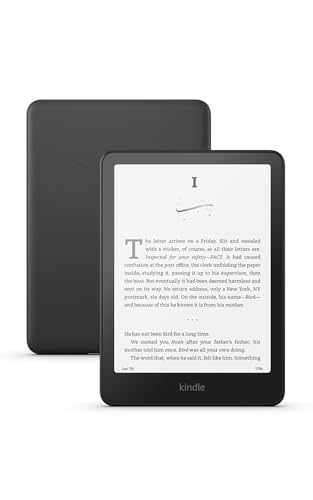
Amazon Kindle Paperwhite (16 GB) 12th Generation
7-inch glare-free E Ink display with adjustable warm light, 14 font sizes, and up to 12 weeks of battery life for comfortable senior reading.
Check Price on AmazonWhy E-Readers Are a Game-Changer for Aging Eyes
Vision changes are one of the most common challenges of aging. By age 65, most adults need brighter light to read comfortably, and many struggle with standard-size print even in good lighting. Large-print books help, but the selection is limited, the books are heavy, and they take up significant shelf space. Reading glasses and magnifiers add another layer of hassle.
E-readers solve these problems in a single, lightweight device. The ability to increase font size to whatever is comfortable, adjust lighting to suit the environment, and carry an entire library in one hand makes them one of the most practical technology upgrades for seniors who love reading.
This guide covers everything you need to know about choosing, setting up, and getting the most out of an e-reader for yourself or an older parent.
E Ink vs. Tablets: Understanding the Display Difference
The most important distinction in e-readers is the display technology. Dedicated e-readers like the Kindle Paperwhite and Kobo Clara use E Ink (electronic ink) displays. These screens reflect light like real paper instead of projecting light at your eyes like a phone or tablet. The result is a reading experience that feels natural and causes far less eye fatigue.
Tablets like the iPad can display e-books through apps like Kindle or Apple Books, but they use LCD or OLED screens that emit light directly. For short reading sessions, this is fine. For hours of reading, many people (especially those with dry eyes or light sensitivity) find glowing screens uncomfortable. Tablets also present distractions: notifications, emails, games, and web browsing all compete for attention.
When to Choose an E Ink Reader
An E Ink e-reader is the better choice when the primary goal is reading books, especially novels, biographies, and text-heavy nonfiction. The battery life advantage is dramatic. While an iPad lasts about 10 hours of active use, a Kindle Paperwhite lasts up to 12 weeks. This means far less charging and no anxiety about a dead battery mid-chapter.
When a Tablet Makes More Sense
If the reader wants magazines, cookbooks with color photos, illustrated reference books, or the ability to check email and browse the web on the same device, a tablet is the better fit. Some seniors already own and are comfortable with an iPad. In that case, installing the Kindle or Kobo app adds e-reading capability without another device to learn.
Key Features to Look for in a Senior-Friendly E-Reader
Adjustable Font Size
This is the most important feature. Look for a device that offers at least 8 to 10 size options, with the largest sizes displaying text significantly bigger than standard large-print books. Bold font options are a bonus for readers who need extra contrast.
Adjustable Warm Light
A front-lit display with a warm light slider lets readers shift from cool white to an amber tone. The warm setting reduces blue light and is more comfortable for reading in the evening or in dimly lit rooms. Some models adjust automatically based on time of day.
Lightweight Design
Weight matters for comfort, especially during long reading sessions. Most dedicated e-readers weigh between 6 and 8 ounces. Compare that to a loaded iPad at roughly 16 ounces. For seniors with grip weakness or hand pain, the lighter option makes extended reading practical.
Simple Navigation
Touchscreen page turns (tap or swipe) are standard on modern e-readers. Some models, like the Kindle Oasis and certain Kobo models, add physical page-turn buttons on the side. Physical buttons can be easier for readers who find touchscreen tapping unreliable.
Waterproofing
An IPX8 waterproof rating (common on current Kindle and Kobo models) protects against spills, splashes, and bathroom reading accidents. This is a nice-to-have safety net rather than a primary feature.
Kindle vs. Kobo: The Two Best Options
Amazon Kindle Paperwhite
The Kindle Paperwhite is the most popular e-reader in the world, and for good reason. It offers a 7-inch glare-free display, 14 font sizes, adjustable warm light, 16 GB of storage, and 12-week battery life. The Kindle ecosystem provides the largest bookstore, seamless library lending through Libby, and strong family sharing features through Amazon Household.
The primary drawback is that Kindles are tied to the Amazon ecosystem. Books purchased on Kindle cannot be read on Kobo devices, and vice versa. For most readers who already have an Amazon account, this is not a meaningful limitation.
Kobo Clara Colour
Kobo is the main alternative to Kindle. The Kobo Clara Colour features a 6-inch color E Ink display that can show book covers and illustrations in muted color (not as vivid as a tablet, but a step up from grayscale). Kobo integrates directly with public library systems through OverDrive, which some readers find simpler than the Kindle/Libby process.
Kobo supports the open ePub format, giving readers more flexibility with book sources. However, the bookstore selection is smaller than Amazon’s, and the device is less widely known, which can make it harder to get help from friends or family.
Which Should You Choose?
For most seniors and their families, the Kindle Paperwhite is the safer choice. The larger screen (7 inches vs. 6), longer battery life, bigger bookstore, and broader family support network make it easier to set up and maintain. Choose Kobo if library integration is a top priority or if you prefer to avoid the Amazon ecosystem.
Setting Up an E-Reader for a Parent
Initial setup is the biggest hurdle. If you are setting up the device for a senior family member, plan to spend 15 to 20 minutes on configuration. Here is a step-by-step approach:
Step 1: Create or Use an Amazon/Kobo Account
The device needs an account to download books. If the senior already has an Amazon account, use that. If not, create one with their email address. Write down the login credentials and store them in a safe place (a password manager is ideal, but a written card in a drawer works too).
Step 2: Connect to WiFi
Connect the device to the home WiFi network. The reader only needs WiFi to download new books. Once downloaded, books are stored locally and can be read anywhere without internet access.
Step 3: Adjust Display Settings
Open any book and adjust: font size (start large, around size 8 or 9 out of 14 on Kindle), font weight (bold for extra contrast), line spacing (wider is easier to follow), and warm light (set to about 50% for a comfortable amber tone). These settings persist across all books.
Step 4: Load a Few Books
Pre-load three to five books the person will enjoy. Familiar authors and genres make the first experience positive. This avoids the need for the senior to navigate the bookstore during their first session with the device.
Step 5: Show the Basics
Demonstrate three things: how to turn pages (tap the right side to go forward, the left side to go back), how to return to the library (tap the top of the screen, then the back arrow), and how to adjust brightness (swipe down from the top). That is all they need to start.
Borrowing Library Books on an E-Reader
Most public libraries in the United States and Canada lend e-books that work on Kindle and Kobo devices. The Libby app (by OverDrive) is the most common platform. Here is how it works:
Install the Libby app on a phone or tablet (not on the e-reader itself). Sign in with a library card. Browse or search for titles. When you find one, tap “Borrow” and choose “Read on Kindle” (or download the ePub for Kobo). The book appears on the e-reader within a minute or two. Borrowed books return automatically when the lending period ends, so there are no late fees.
For seniors who read several books per month, library lending can save hundreds of dollars per year. Many libraries also offer audiobooks through the same app.
Audiobook Integration
Some e-readers support audiobook playback through Bluetooth headphones or speakers. The Kindle Paperwhite pairs with Bluetooth audio devices and can play Audible audiobooks. This is useful for seniors who enjoy switching between reading and listening, perhaps reading during the day and listening to the same book while doing chores or resting their eyes.
Audible membership costs $14.95 per month and includes one audiobook credit. Many libraries also lend audiobooks for free through Libby.
Accessories That Make a Difference
Protective Cases
A case protects the screen from scratches and drops. Cases with an auto-wake feature (the screen turns on when you open the cover) add convenience. Amazon and Kobo sell official cases, and third-party options are widely available.
Stands and Holders
For seniors who have difficulty holding a device for extended periods, a tabletop stand or adjustable arm holder is a worthwhile investment. These let the reader prop the device at a comfortable angle on a table, nightstand, or bed tray. Some book stands designed for physical books work equally well for e-readers.
Reading Lights
Since modern e-readers have built-in lighting, a separate reading light is usually unnecessary. However, seniors who read in very dim rooms may appreciate a small clip-on light to supplement the built-in glow.
Common Concerns and How to Address Them
“I Like Real Books”
Many seniors resist e-readers because they love the feel of paper. This is entirely valid. An e-reader does not have to replace physical books. It can simply supplement them, providing access to titles that are not available in large print, letting you read in bed without a lamp, or serving as a travel companion that weighs next to nothing.
“I Am Not Good with Technology”
E-readers are deliberately simpler than tablets or computers. There is no operating system to update, no apps to manage, and no notifications to dismiss. The device does one thing: display text. Most seniors who are initially hesitant become comfortable within a week of daily use.
“What If I Break It?”
Modern e-readers are surprisingly durable. A case protects against most drops and bumps. The waterproof models survive spills. And because the device is a gateway to a cloud-based library, nothing is truly lost even if the hardware is damaged. All purchased books remain in the account and can be downloaded again on a replacement device.
Making the Decision
An e-reader is one of the most appreciated gifts you can give a senior who loves to read. The combination of adjustable font sizes, comfortable lighting, and lightweight design removes the barriers that make reading difficult as vision and grip strength change. At $100 to $200 for a device that lasts years, the value is exceptional. Start with the basics, keep it simple, and let the reading do the rest.