Understanding Caption Phones
As we age, hearing loss can become a common issue. This can make phone conversations challenging. Caption phones are specially designed to help individuals with hearing difficulties communicate more effectively. These phones display real-time captions of the conversation, allowing users to read what the other person is saying while listening. This guide will help you understand how caption phones work, what features to look for, and how to choose the best one.
How Caption Phones Work
Caption phones use voice recognition technology to convert spoken words into text. When you make or receive a call, the phone connects to a captioning service. This service transcribes the conversation into text, which appears on the screen of the phone. You can read the text while listening to the audio, making it easier to follow the conversation.
Key Features to Look For
When selecting a caption phone, consider the following features:
1. Display Size and Clarity
The size and clarity of the display are crucial. Look for a phone with a large, easy-to-read screen. Some phones also have adjustable font sizes, which can be helpful for users with vision loss.
2. Voice Recognition Accuracy
Not all caption phones have the same level of voice recognition accuracy. Choose a model known for high accuracy to ensure you receive the best possible captions during calls.
3. Ease of Use
Look for a caption phone that is user-friendly, with intuitive buttons and menus. Some phones come with touchscreen displays, while others use traditional buttons. Consider what will be easiest for you or your loved one to use.
4. Connectivity Options
Consider how the phone connects to the internet. Many caption phones require a Wi-Fi connection for accurate captioning. Ensure that you have a reliable internet setup at home.
5. Additional Accessibility Features
Some caption phones offer extra features such as amplification, adjustable volume, and compatibility with hearing aids. Look for these features if they are important for your needs.
Choosing the Right Caption Phone
With numerous options available, selecting the right caption phone can feel overwhelming. Here are some steps to simplify the process:
1. Assess Your Needs
Consider the specific needs of the user. Do they have significant hearing loss? Do they also have vision issues? Understanding their requirements will help narrow down your options.
2. Research Options
Take time to research different models and brands. Read reviews from other seniors and caregivers to get an idea of which phones are most recommended.
3. Test Before You Buy
If possible, visit a store to test out different caption phones. This allows you to see how easy they are to use and how clear the captions are.
4. Consider Your Budget
Caption phones can vary in price. Determine your budget before you start shopping. Remember that some phones may be covered by insurance or government programs, so inquire about those options.
Our Top Pick for Caption Phones
After careful consideration, we recommend the
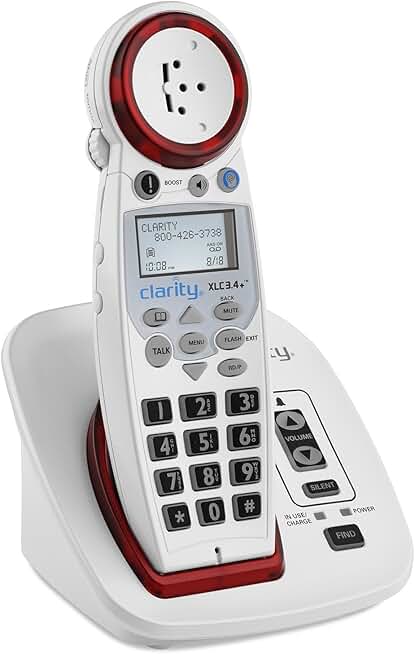
Clarity XLC3.4 Big Button Caption Phone
The Clarity XLC3.4 offers up to 50 decibels of amplification, ensuring clear communication.
Check Price on AmazonSetting Up a Caption Phone
Once you have chosen a caption phone, follow these steps to set it up:
1. Unbox and Assemble
Carefully unbox the phone and follow the included instructions for assembly. Make sure to connect any necessary components, such as a power adapter or base.
2. Connect to Wi-Fi
Most caption phones require a Wi-Fi connection for real-time captioning. Follow the on-screen instructions to connect the phone to your home Wi-Fi network.
3. Set Up a Captioning Service
You may need to register for a captioning service if the phone does not come with one pre-installed. Follow the instructions provided to set this up. This usually involves creating an account and entering some basic information.
4. Test the Phone
Make a few test calls to ensure everything is working correctly. Check the clarity of the captions and the audio quality. Adjust settings if necessary.
Practical Caregiver Advice
As a caregiver, setting up and monitoring a caption phone can be straightforward with a little guidance. Here are some tips:
1. Remote Setup
If you cannot be there in person, many caption phones allow for remote setup. Use the phone’s online portal to assist your loved one with configuration from afar.
2. Regular Check-ins
Schedule regular check-ins to ensure the phone is functioning properly. Ask your loved one if they are experiencing any issues with the captions or audio quality.
3. Teach and Support
Take the time to teach your loved one how to use their new caption phone. Show them how to make calls, adjust settings, and access features. Offer ongoing support as they get accustomed to the device.
4. Encourage Feedback
Encourage your loved one to provide feedback on their experience with the caption phone. This information can help you determine if any adjustments need to be made or if a different model would be more suitable.
Conclusion
Caption phones can significantly improve communication for seniors with hearing loss. By understanding the features to look for and how to choose the right phone, you can help your loved one maintain their independence while staying connected. Consider our top pick and follow the setup tips provided to ensure a smooth transition to using a caption phone.