Is the Philips Wake-Up Light Alarm Clock with Sunrise Simulation Worth It?
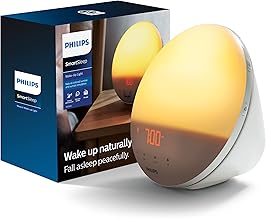
Waking up can be a struggle for anyone, but for seniors, especially those who find it difficult to get out of bed in the morning, a gentle nudge can make all the difference. The Philips Wake-Up Light Alarm Clock with Sunrise Simulation is designed to simulate a natural sunrise, gradually increasing in brightness to wake the user gently. We recommend this product for seniors who find traditional alarms too jarring and want a more natural way to start their day. The combination of light and sound creates an environment that is less stressful and more conducive to waking up refreshed.
For seniors, the stakes of a harsh wake-up call can be higher. Sudden loud noises may lead to disorientation or even an increased risk of falls if they startle upon waking. This is why a wake-up light, which offers a gradual and gentle awakening process, is not just convenient but also a safer alternative. The Philips model is a standout in this category thanks to its reliable performance and thoughtful design, which takes into account the needs of older adults.
Who This Is For (and Who It’s Not For)
The Philips Wake-Up Light Alarm Clock is ideal for seniors who have trouble waking up with traditional alarms, particularly those who are light sleepers or have sensitive hearing. It’s also beneficial for individuals who may struggle with seasonal affective disorder (SAD) or those living in areas with limited natural sunlight. If waking up feeling refreshed and not startled is important, this device can be a helpful tool.
However, this clock might not be suitable for seniors with severe visual impairments, as the primary feature relies on the gradual increase in light. Additionally, if the senior already uses a smart home system with integrated lighting solutions, they might find this device redundant. For those, exploring a fully integrated smart home light system might be a better fit.
Why This Beats the Alternatives
The Philips Wake-Up Light Alarm Clock stands out due to its thoughtful design features that cater specifically to seniors. Unlike the cheaper models from brands like Homelabs or JALL, Philips offers a more customizable sunrise simulation with adjustable settings for light intensity and duration. This flexibility ensures the device can be tailored to individual preferences, a crucial aspect for user satisfaction.
Another edge over its competitors, such as the Lumie Bodyclock, is Philips’ proven reliability and brand reputation in lighting technology. Users have consistently praised its durability and the natural quality of the light, making it a trusted choice among its peers.
Key Features That Matter for Seniors
Sunrise Simulation: This feature gradually increases the light intensity over a customizable period, mimicking a natural sunrise. For seniors with vision sensitivities, this gentle increase is less likely to cause discomfort compared to abrupt lighting changes. It helps in adjusting the wake-up process to be more aligned with the body’s natural rhythms, reducing the stress often associated with waking up.
Sunset Simulation: The sunset simulation feature can be particularly beneficial for seniors who struggle with falling asleep. By gradually dimming the light, it helps signal the body that it’s time to wind down, promoting a more restful sleep. This can be especially helpful for those with irregular sleep patterns.
Sound Options: Alongside the light, the alarm clock offers a range of soothing sounds, such as birdsong or ocean waves, which can be more pleasant than traditional alarm noises. This is an important feature for those with hearing sensitivities, providing a gentler auditory experience.
Readability: The clock’s display is designed to be easy to read with large, clear numbers. This is crucial for seniors who may have difficulty seeing smaller print or who wear glasses. Ensuring users can easily check the time without strain is a significant advantage.
Backup Alarm: In case of power outages, the clock has a backup alarm feature that ensures it will still wake the user. This reliability is essential for those who cannot afford to miss an alarm due to unforeseen power issues, providing peace of mind.
Setup: What to Expect
Setting up the Philips Wake-Up Light Alarm Clock is straightforward and should take about 15 to 20 minutes. First, place the clock on a bedside table where it can illuminate the room effectively. Plug it into a standard outlet, and ensure the cord is safely tucked away to prevent any tripping hazards.
Next, you will need to set the time and alarm preferences. Use the simple button interface to adjust the light intensity, duration of the sunrise or sunset simulation, and select your preferred sound. A caregiver may assist with initial setup, especially if programming the settings feels daunting. It’s advisable to test the alarm one evening to make sure the light and sound levels are comfortable for the user.
What to Know Before Buying
There are no ongoing monthly fees or subscriptions required for the Philips Wake-Up Light Alarm Clock. Once purchased, it functions independently without any added costs, which makes it a budget-friendly option for seniors on a fixed income.
However, it’s important to note that while the device works well within its intended design, its effectiveness can be limited by the ambient light in the room. Those with rooms that receive a lot of natural light may find the simulation less impactful. Additionally, if the bulb or parts need replacing, ensure they’re available and budget-friendly.