Your parent is about to start living alone. Maybe a spouse passed away. Maybe they are moving to a smaller place after a divorce. Maybe they chose to downsize after the kids left decades ago and you are only now realizing they have been alone for years without any safety infrastructure. Whatever the reason, the transition to living alone is one of the highest-risk periods for an older adult.
The instinct is to buy everything at once: medical alert, cameras, sensors, smart locks, a new phone, a robot vacuum, a pill dispenser. Do not do that. An avalanche of new technology is overwhelming and counterproductive. Your parent will resist all of it if you try to install everything in one weekend.
Instead, start with five things. These five devices address the most critical safety gaps for someone living alone, in the order that matters most. Get these right first. Build from there later.
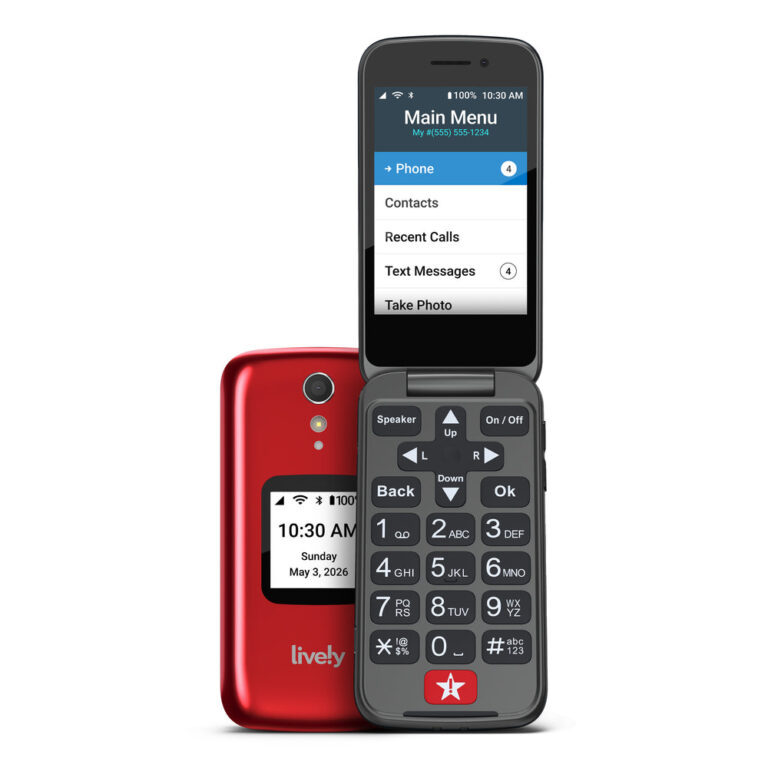
Jitterbug Flip2 by Lively
Simple flip phone with dedicated emergency button and 24/7 urgent response agents
Check Price on AmazonPurchase 1: A Medical Alert Device
This is the first thing because it addresses the single biggest risk of living alone: having a medical emergency with no one around to help. A fall, a stroke, a heart attack, a diabetic crisis. If your parent cannot reach a phone, they need a way to call for help that works even if they are on the floor, disoriented, or unconscious.
Medical alert devices come in two forms: pendants worn around the neck and smartwatches. Both have a button your parent can press to connect with an emergency response center. The better ones also include automatic fall detection, which calls for help without any button press if the device senses a hard fall impact.
Choose the form factor your parent will actually wear. This is more important than any feature comparison. A pendant with every feature in the world is useless in a drawer. If your parent wears a watch, get the watch version. If they will wear a necklace, get the pendant. If they refuse to wear anything, look at smartwatches that double as fall detectors so the device serves a purpose beyond safety.
Key features to prioritize:
- Automatic fall detection (does not require pressing a button)
- GPS tracking (works outside the home, not just indoors)
- Waterproof (can be worn in the shower, which is a high-risk area)
- Cellular connection (works without Wi-Fi or a smartphone)
- Multi-day battery life (does not need daily charging)
What to skip: Do not get a medical alert that requires a landline. Many newer alert systems are cellular and work anywhere. Also skip the systems that charge $50+ per month for basic monitoring. There are good options at $20 to $30 per month.
Purchase 2: A Smart Lock
The second priority might surprise you. A smart lock before a doorbell camera? Before a phone? Yes, and here is why.
If your parent has a medical emergency and you need to get someone into the house fast, a locked front door becomes a dangerous obstacle. Paramedics can break down a door, but the neighbor who is closest cannot. The home health aide arriving for a scheduled visit cannot. You, calling from three hours away, cannot.
A smart lock solves this with access codes. You create a code for yourself, one for each family member, one for the regular caregiver, and one for the neighbor who agreed to be the emergency contact. In a crisis, you call the neighbor, give them the code, and they can enter the house in minutes.
The smart lock also solves the daily problem of your parent forgetting to lock the door. With auto-lock set to 30 seconds, the door locks itself after every entry and exit. Your parent does not need to think about it, remember it, or physically turn a lock. And you can check the lock status from your phone and lock it remotely if you see it is open.
Key features to prioritize:
- Keypad with access codes (no fumbling with physical keys)
- Auto-lock timer (door locks itself after a set interval)
- Remote access via app (check status and lock/unlock from your phone)
- No subscription required for basic features
- Physical key backup (in case batteries die)
Installation tip: Smart locks replace the existing deadbolt and fit the same hole pattern. A screwdriver is the only tool you need. Install it during your next visit and program the codes before you leave.
Purchase 3: A Video Doorbell
With the medical alert handling emergencies and the smart lock handling access, the video doorbell adds the third layer: visibility. Who is coming and going? Is the home health aide showing up? Did the package arrive?
For a parent living alone, the doorbell camera serves three specific functions:
Screening visitors. Your parent can see who is at the door before deciding whether to open it. This is protection against scammers, aggressive salespeople, and anyone who makes them uncomfortable. They can talk through the doorbell without opening the door, or they can ignore the bell entirely.
Remote answering. When you have shared access, you can answer the doorbell from your phone. If your parent is not expecting anyone and someone rings the bell, you can speak to the visitor and handle the situation. “My mother is not available right now. Can I help you?” This is powerful for deterring unwanted visitors when your parent is home alone.
Activity monitoring. The motion log shows when people come and go. Over time, you develop a sense of the normal pattern. If the pattern changes significantly (no activity for a full day when there is usually coming and going), it is a signal to check in.
Installation tip: The battery-powered version is best for most senior homes. Two screws and a Wi-Fi connection. No wiring required. Set up shared access during installation so you receive all alerts on your phone.
Purchase 4: A Smart Plug for Safety
This is the simplest and cheapest item on the list, and it addresses a surprisingly common risk. A smart plug lets you control any device plugged into it via an app or voice command. For a parent living alone, the most valuable use is turning off a potential hazard remotely.
The space heater scenario. Your parent plugs in a portable space heater in the bedroom. They fall asleep with it running. Portable heaters are the leading cause of home heating fires and fire deaths. With a smart plug, you can set the heater to turn off automatically at a set time (say, 10 PM every night). Or you can turn it off from your phone when you realize your parent is asleep. Or you can set it on a schedule so it runs for two hours and shuts off automatically.
The forgotten appliance scenario. A curling iron left on. A heating pad running all night. An old box fan with a fraying cord. Any of these can be plugged into a smart plug with an auto-off timer. Your parent uses the device normally. The smart plug turns it off after a reasonable period whether they remember to or not.
The porch light scenario. If the front porch light is plugged in (common with lamp-style porch lights), a smart plug can turn it on at sunset and off at sunrise automatically. A well-lit entrance deters unwanted visitors and helps your parent see the steps when coming home after dark.
A single smart plug costs around $10 to $15 and requires no installation beyond plugging it into an outlet. Start with one for the highest-risk device in your parent’s home, whether that is a space heater, a heating pad, or a porch light.
Purchase 5: A Simple Phone with an Emergency Button
If your parent has a modern smartphone and uses it comfortably, skip this section. But if they struggle with their current phone, a simplified phone can dramatically improve their ability to communicate and call for help.
The Jitterbug Flip2 is a flip phone designed for older adults. Large buttons. A bright screen. A simple menu. And most importantly, a dedicated emergency button on the back that connects directly to a trained agent who can dispatch emergency services or call family contacts.
Why a simple phone matters when living alone:
Reliable communication. If your parent struggles with their smartphone, they may avoid using it. Missed calls go to voicemail. Text messages go unread. The phone sits on the charger because it is too confusing to operate. A simple phone removes that barrier. They flip it open, press a big button, and they are talking to you.
Emergency access. The emergency button works with one press. Your parent does not need to unlock a screen, find the phone app, scroll to a contact, and press call. They press one button. For someone who is injured, confused, or panicked, the difference between one step and four steps is the difference between getting help and not getting help.
Medication reminders. If you are not ready for an automated pill dispenser yet, the Jitterbug can be set up with daily reminder calls. A friendly voice calls at medication time to remind your parent to take their pills. This is less effective than an automated dispenser, but it is better than nothing.
No smartphone complexity. No app updates. No storage full warnings. No accidental pocket dials from a touchscreen. No “I swiped something and now I cannot find my contacts.” The phone does a few things well and nothing else.
Why This Order Matters
These five items are prioritized based on the severity of the risk they address and the immediacy of the need:
- Medical alert prevents the worst-case scenario: an emergency with no one to call for help. This is life or death.
- Smart lock ensures that when help is needed, people can get in. It also eliminates the daily risk of an unlocked door.
- Video doorbell provides visibility and protects against social threats (scams, unwanted visitors) that target seniors living alone.
- Smart plug addresses fire risk from forgotten appliances, which is one of the leading causes of home injury and death for older adults.
- Simple phone ensures your parent can communicate reliably and call for help independently.
If the medical alert has a built-in phone capability (many do), you could argue that purchases 1 and 5 overlap. That is fair. In that case, your fifth purchase might be a water leak sensor, a nightlight for the bathroom hallway, or a smoke detector upgrade. Choose whatever addresses the next biggest risk in your parent’s specific situation.
What NOT to Buy First
There are plenty of useful products for seniors living alone that do not belong on the first-purchase list. These are second-round additions for after the basics are in place:
- Robot vacuum. Nice to have but not a safety essential.
- Smart thermostat. Important for comfort and energy savings, but not an immediate safety need unless your parent lives in an extreme climate.
- Tablet or smart display. Great for video calls and entertainment, but your parent needs safety infrastructure before entertainment infrastructure.
- Indoor cameras. These create more family tension than they resolve in most cases. The doorbell camera handles the exterior. The medical alert handles emergencies. Cameras inside the home should be a last resort for specific medical situations, not a first purchase.
- Automated pill dispenser. Important if your parent takes multiple medications with a complex schedule, but a simpler reminder system (phone alarm, daily call) can bridge the gap until the basics are covered.
The Installation Visit
Plan a single visit to install all five items. Order everything ahead of time and have it shipped to your home. Unbox and download apps the night before. Arrive at your parent’s house with everything ready to go.
Realistic time estimate for all five installations:
- Medical alert setup: 15 minutes (charge, activate, pair, test)
- Smart lock: 20 minutes (remove old deadbolt, install new lock, program codes)
- Video doorbell: 20 minutes (mount, connect to Wi-Fi, set up shared access)
- Smart plug: 5 minutes (plug in, connect to app, set schedule)
- Simple phone: 15 minutes (activate, add contacts, show your parent the emergency button)
Total: about 75 minutes of focused work. Add buffer time for Wi-Fi issues, app account creation, and showing your parent how everything works. Plan for a two-hour visit and you will have time for a cup of coffee afterward.
These five devices form the safety foundation. Everything else you add later is an enhancement. But without this foundation, the enhancements do not matter. Start here. Get it right. Then build from here.