The Simplest Smart Home Upgrade
Helen, 80, lived alone in the house she’d shared with her husband for forty years. She was independent and sharp, but her daughter Kathy worried about small things. The porch light that Helen forgot to turn on before dark, making the front steps dangerous. The bathroom nightlight she couldn’t reach behind the dresser to switch on. The coffee maker she sometimes left on all morning because she got busy with her garden.
Kathy bought three Amazon Smart Plugs and an Echo Dot during a holiday sale for less than $80 total. During her next visit, she plugged one into the porch light, one into the bathroom nightlight, and one into the coffee maker. She set the porch light to turn on automatically at sunset and off at sunrise. She set the nightlight to come on at 8 PM. And she showed Helen one phrase: “Alexa, turn off the coffee maker.”
Helen was delighted. “I just talk to it?” She tested it five times that first evening, turning the porch light on and off from her recliner with a grin. Two weeks later, she called Kathy. “Can you get me more of those plug things? I want one for the living room lamp too.”
Who This Is For (and Who It’s Not For)
The Amazon Smart Plug is the ideal starting point for any senior curious about smart home technology, or any caregiver who wants to add a layer of safety and convenience to a parent’s home without overwhelming them. It does exactly one thing: turns a regular outlet into a voice-controlled, app-controlled, schedulable outlet. That simplicity is its greatest strength.
It’s especially useful for seniors with mobility issues who have trouble reaching light switches, bending to plug and unplug devices, or remembering to turn things on and off. Voice control means you never have to get up to flip a switch. Scheduling means the house handles routines automatically.
This is not the right product for someone without WiFi in their home or someone who refuses to have any smart devices. It also won’t help much without an Alexa device for voice control. If your parent doesn’t have an Echo and doesn’t want one, the smart plug’s value drops significantly because they’d need to use a phone app to control it. The combination of Echo plus Smart Plug is where the real benefit lives.
Why This Product
There are dozens of smart plugs on the market from brands like TP-Link, Wyze, and GE. Many of them cost less and have similar features. The reason the Amazon Smart Plug is the best choice for most seniors comes down to one thing: it works seamlessly with Alexa without any extra setup.
Third-party smart plugs require you to install a separate app, create an account with that company, link the account to Alexa through a “skill,” and then configure the device. That’s manageable for tech-savvy users but unnecessarily complicated for a senior or their caregiver. The Amazon Smart Plug sets up entirely within the Alexa app that’s already on your phone if you have any Echo device. No extra apps, no separate accounts, no skill linking.
Reliability matters too. The Amazon Smart Plug has been on the market since 2018 and has millions of users. It rarely disconnects from WiFi, it responds to voice commands within a second, and it doesn’t require firmware updates that could confuse a non-technical user. For a product that you install at your parent’s house and need to work reliably every day without troubleshooting, that track record matters.
Key Features That Matter for Seniors
Voice Control Through Alexa: Say “Alexa, turn on the porch light” or “Alexa, turn off the coffee maker” from anywhere in the house. No need to get up, walk to a switch, or find your phone. This is transformative for seniors with limited mobility, balance issues, or anyone who just doesn’t want to get up from their comfortable chair.
Automatic Scheduling: Set any connected device to turn on and off at specific times or at sunrise and sunset. Porch lights at dusk, bedroom lamp at 10 PM, coffee maker at 6 AM. Once set, these schedules run automatically every day without any input. You can also set routines that trigger multiple plugs at once, like “Alexa, good night” turning off every lamp in the house.
Remote Monitoring and Control: Through the Alexa app, you or a caregiver can check whether a connected device is on or off from anywhere. Did Mom leave the coffee maker on? Open the app, check, and turn it off from your office 30 miles away. This simple capability provides real peace of mind for adult children.
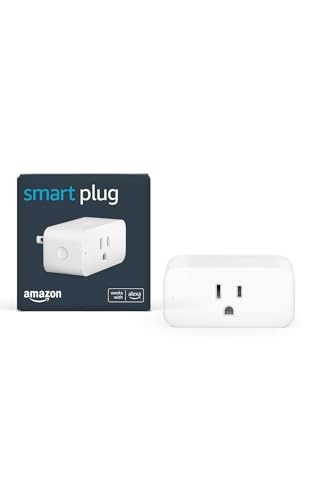
Compact Single-Outlet Design: The plug is small enough that it doesn’t block the second outlet on a standard wall plate. This sounds minor but matters in practice, because many older homes have only a few outlets per room. You won’t lose an outlet by using this plug.
No Hub Required: The plug connects directly to your home WiFi network. There’s no separate hub, bridge, or base station to buy, set up, or maintain. Fewer devices means fewer things that can go wrong or confuse a non-technical user.
Setup: What to Expect
Setup takes about five minutes. Open the Alexa app on your phone, go to Devices, tap the plus icon, and select “Plug.” The app will search for the plug automatically. Once found, connect it to your WiFi network and give it a name like “Porch Light” or “Coffee Maker.” That name is what you’ll use in voice commands.
The naming step is important for seniors. Choose names that match how your parent naturally refers to things. If they call it “the front light,” name the plug “Front Light” so the voice command feels natural: “Alexa, turn on the front light.” Avoid technical names like “Smart Plug 1” that won’t mean anything to them in daily use.
After setup, plug in the lamp or appliance. Make sure the appliance’s own switch is set to “on” so the smart plug controls the power. This is the one concept that trips up new users: the appliance must be switched on physically so that the smart plug can toggle the power at the outlet. Explain this once and mark the switch position with a piece of tape if needed.
What to Know Before Buying
The Amazon Smart Plug only works with devices that have a simple on/off switch. A basic lamp, a coffee maker, a fan, a radio. It will not work with devices that have electronic controls requiring a button press to start, like most modern TVs or computers. When the plug sends power, the device needs to turn on automatically. If it doesn’t turn on when you plug it into a regular outlet, it won’t work with a smart plug either.
WiFi reliability is essential. If your parent’s WiFi router is old, frequently drops connection, or doesn’t reach certain rooms, the smart plug may disconnect and become unresponsive until WiFi returns. If you notice intermittent issues, the problem is almost always the WiFi, not the plug. Consider upgrading an aging router or adding a WiFi extender near the plug.
At $25 per plug with no monthly fees, the cost is remarkably low for the benefit it provides. Most families start with one or two plugs and add more as they discover new uses. Common setups include porch lights, bedside lamps, bathroom nightlights, holiday decorations, and kitchen appliances. Amazon frequently discounts these plugs during Prime Day and holiday sales, sometimes as low as $13.