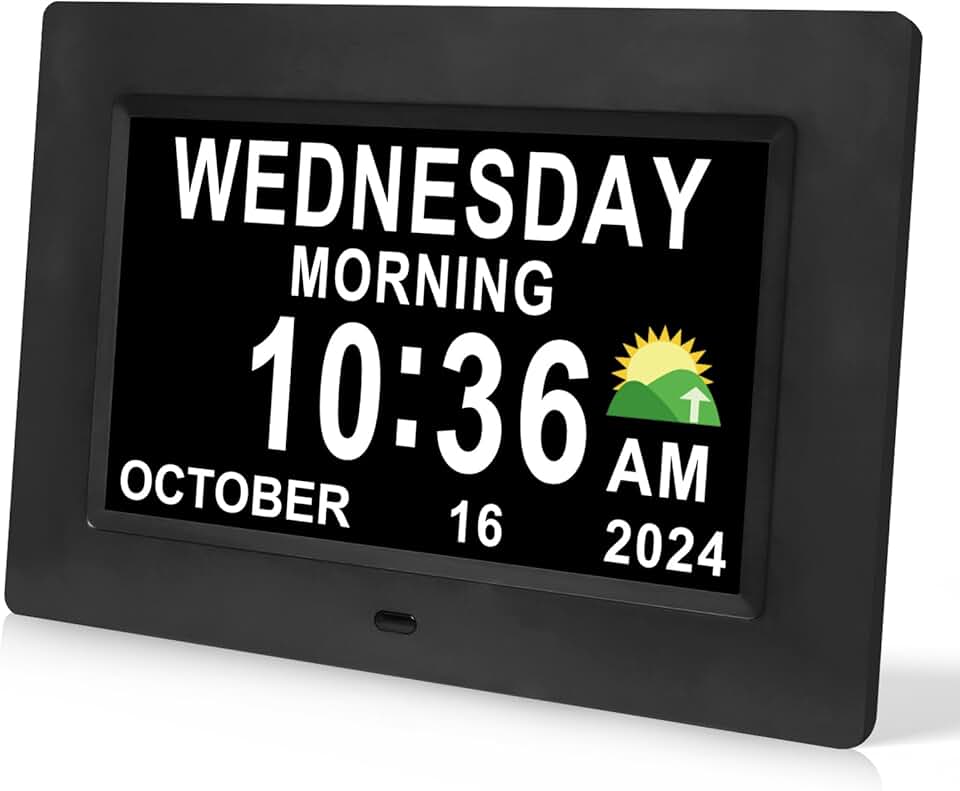
Is the DreamSky Digital Day Clock for Seniors Worth It?
For seniors who struggle with keeping track of days and times due to memory challenges, the DreamSky Digital Day Clock for Seniors can be a valuable tool. This clock offers a clear and straightforward display of the date and time, which can be particularly helpful for those experiencing symptoms of dementia or Alzheimer’s. Based on our research, we recommend it for families seeking a simple, effective solution for daily time orientation. At $59.99, it’s an affordable addition that can ease confusion, making it a worthwhile consideration for those in this situation.
For many seniors, maintaining a sense of time is crucial to their daily routine and wellbeing. Without reliable reference points, confusion can easily set in, leading to anxiety and disorientation. This is where a dedicated day clock shines , it strips down information to the essentials and provides seniors with a constant, easy-to-read point of reference. The DreamSky clock’s large, clear display is designed specifically for those who may struggle with standard clocks or digital devices, making it a strong choice for anyone in need of this kind of support.
Who This Is For (and Who It’s Not For)
The DreamSky Digital Day Clock is ideal for seniors who live independently or those in assisted living situations who still manage much of their daily schedule. It suits individuals who have dementia, Alzheimer’s, or generally experience forgetfulness, helping them stay oriented with the day and time. If you’re looking for a straightforward tool to reinforce routines and reduce anxiety related to time, this clock fits the bill.
If your senior is already adept with digital devices like smartphones or tablets, or if they prefer to use a smart home assistant for reminders, this might not be necessary. Similarly, if the senior in question struggles with more severe cognitive issues that require constant supervision, a device with more interactive capabilities might be needed, such as a digital assistant with voice control like the Amazon Echo Show.
Why This Beats the Alternatives
The DreamSky clock stands out due to its focus on simplicity and ease of use. Unlike other digital clocks that may come with complicated features, this clock’s main strength is its ability to clearly display day, time, and period of the day (morning, afternoon, evening, or night) without unnecessary distractions. Compared to competitors like the American Lifetime Day Clock, DreamSky provides a more budget-friendly option while maintaining essential functionality.
Furthermore, owner feedback consistently highlights the reliability and straightforward setup of the DreamSky clock. Many alternative products require more complicated installations or have interfaces that are confusing for seniors. By focusing on what truly matters, the DreamSky manages to deliver an efficient solution that meets the specific needs of its intended users.
Key Features That Matter for Seniors
Large Display: The screen is designed to be easily readable from across the room. This is especially important for seniors with declining eyesight, as the large, bold font helps eliminate the need for glasses to check the time or date.
Clear Time Indicators: It shows not just the time, but also the day of the week and whether it’s morning, afternoon, evening, or night. This separation of time periods aids in mental clarity, especially for those who might wake up unsure of the time of day.
Simple Interface: This clock is built to be set up once and left alone. There are no complex menus or settings to navigate, which minimizes the chance of accidental changes that could lead to confusion.
Auto-Dimming Feature: The clock automatically adjusts its brightness depending on the time of day. This ensures it is not too bright at night, which can be disruptive to sleep, while remaining visible during the day.
Dependable Power Source: It plugs directly into the wall, eliminating the worry about changing batteries regularly. This reliability is crucial for seniors who might forget to replace batteries.
Setup: What to Expect
Setting up the DreamSky Digital Day Clock is straightforward and should take no more than 15 to 20 minutes. Begin by finding a suitable location, ideally somewhere that is easily visible throughout the day. Place it on a stable surface or mount it on the wall as needed. Plug the clock into a nearby power outlet using the included adapter.
Once physically set up, the clock itself offers a simple configuration process. Set the time, date, and preferred time format (12-hour or 24-hour). This step is typically handled by a caregiver or family member, ensuring everything is correctly calibrated before use. It’s wise to spend a moment confirming that the clock is functioning as expected, potentially asking the senior to verify readability and comfort with the display.
What to Know Before Buying
Unlike some tech products, this clock does not involve monthly fees or subscription costs, which is a relief for families on a budget. It’s a one-time purchase, and the lack of ongoing fees is a significant advantage. However, potential buyers should be aware that the clock requires a consistent power source, which means it won’t operate during power outages unless connected to a backup power solution.
Furthermore, while the clock is generally compatible with most home setups, it does not have battery backup. Thus, during any power disruption, the time and date settings will need to be reset unless connected to a power backup. Replacement parts like a new power adapter are fairly standard and should be easy to source if needed. It’s essential to keep these considerations in mind to ensure consistent functionality.