Why the Kindle Paperwhite Is the Best E-Reader for Seniors
Reading is one of the most popular pastimes for older adults, but standard paperbacks and hardcovers present real challenges as vision changes with age. Small print, heavy books, and poor lighting can turn an enjoyable habit into a frustrating chore. The Amazon Kindle Paperwhite solves all three problems in a device that weighs less than a typical smartphone.
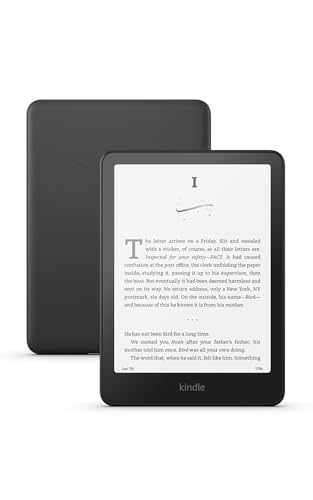
The 12th-generation Paperwhite features a 7-inch E Ink display that looks like real paper. Unlike tablets and phones, there is no backlight shining into your eyes. Instead, a front-lit system illuminates the page evenly, making text crisp and comfortable whether you are reading in a sunlit room or in bed at night. For seniors with light sensitivity or anyone who finds screens tiring, this design difference matters enormously.
Font Size and Display Features That Make Reading Easier
The single most important feature for aging readers is adjustable text size. The Kindle Paperwhite offers 14 font sizes, starting from a standard book size and scaling up to very large text that puts even large-print editions to shame. Each size is available in regular and bold weights, so readers who need extra contrast can thicken the letters without changing the layout.
Beyond size, you can choose from several typeface options. Some fonts are designed specifically for readers with dyslexia, while others maximize clarity at larger sizes. Line spacing, margin width, and page orientation are all adjustable. If a reader prefers landscape mode for even larger text across the screen, it takes one tap to switch.
The adjustable warm light is another standout. A slider lets you shift the display from cool white to a warm amber tone that reduces blue light exposure. Many seniors find the warm setting more comfortable for extended reading sessions, especially in the evening. The brightness adjusts automatically based on ambient lighting, or you can set it manually to your preferred level.
Lightweight Design and Long Battery Life
At 7.5 ounces, the Kindle Paperwhite weighs less than most paperbacks. For seniors with arthritis or reduced grip strength, this is a significant advantage over holding a 500-page novel. The device is thin enough to hold comfortably in one hand, and many readers pair it with a stand or case that props it up on a table or lap.
Battery life is measured in weeks, not hours. Amazon rates the Paperwhite at up to 12 weeks on a single charge with typical use of 30 minutes per day. In practice, even heavy readers can go several weeks between charges. The USB-C charging port is the same one used by most modern phones and tablets, so there is usually a compatible cable nearby.
The device stores thousands of books on its 16 GB of internal memory. For most readers, that is a lifetime of titles without ever needing to manage storage.
Getting Books on the Kindle
There are several ways to fill the Kindle with reading material. The Kindle Store offers millions of titles, including new releases, classics, and an enormous selection of large-print books. Purchasing is straightforward. You can browse on the Kindle itself or shop on Amazon from a computer and send books directly to the device.
For budget-conscious readers, the Kindle Unlimited subscription ($11.99 per month) provides access to over four million titles. Many public libraries also lend e-books through the Libby app, which works seamlessly with Kindle. A library card and a few minutes of setup is all it takes to borrow books for free.
Family members can also share books through Amazon Household, which lets two adults and up to four children share purchased content across their devices. This is especially helpful for adult children who want to send a parent a new book without walking them through a purchase.
Setting Up for a Parent or Grandparent
If you are setting up the Kindle for someone else, the initial configuration takes about 10 minutes. Connect to WiFi, sign in with an Amazon account (or create one), and adjust the default font size and warm light to the reader’s preference. You can also turn off the lock screen ads by paying a one-time $20 fee in the Kindle settings on Amazon’s website.
Consider pre-loading a few books before handing the device over. Set the font to a large, bold option and enable the warm light at about 50%. These defaults make the first experience comfortable and reduce the likelihood of confusion.
Waterproof and Durable
The Kindle Paperwhite carries an IPX8 waterproof rating, meaning it can survive submersion in fresh water for up to 60 minutes. While most seniors are not reading underwater, this rating provides peace of mind against spills, rain, and bathroom accidents. A knocked-over glass of water will not ruin the device or the library stored on it.
What the Kindle Does Not Do
It is important to set expectations. The Kindle Paperwhite is a dedicated reading device. It does not send email, browse the web (in any practical way), display photos in color, or run apps. For readers who want magazines, illustrated cookbooks, or colorful content, a tablet like the iPad is a better choice. But for anyone who primarily reads novels, biographies, or text-heavy nonfiction, the Kindle’s focused design is an advantage, not a limitation. There are no notifications, no distracting apps, and no reason to feel overwhelmed.
Accessories Worth Considering
A protective case is highly recommended. Amazon’s official fabric cover adds minimal weight and automatically wakes the Kindle when opened. Third-party options with built-in stands let readers prop the device on a table for hands-free reading. For bedside use, a small book stand or tablet holder keeps the screen at a comfortable angle without requiring a firm grip.