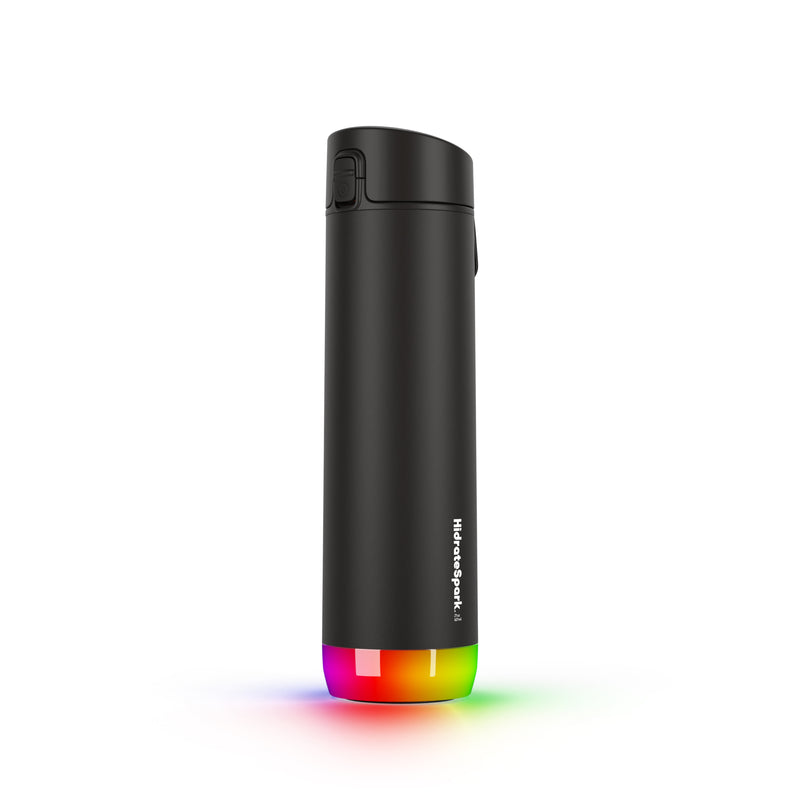
A Simple Glow That Changes Everything
Margaret, 78, ended up in the emergency room twice last summer for dehydration. Both times, she told her daughter the same thing: “I just forgot to drink.” It wasn’t that Margaret didn’t have water available. There was a full glass on her kitchen counter every morning. She simply got absorbed in her crossword puzzles, her phone calls, her afternoon TV shows, and hours would pass without a single sip. Her daughter, Lisa, lives forty minutes away and couldn’t be there to remind her.
After the second ER visit, Lisa started researching solutions. She found the HidrateSpark PRO, a water bottle that glows when it’s time to drink. Margaret was skeptical at first. “I don’t need a fancy bottle to tell me I’m thirsty.” But after a week of watching it light up on her end table every hour, she admitted it was working. She was finishing her daily water goal by dinnertime instead of realizing at 9 PM that she’d barely had two glasses.
Lisa checks the app every evening. She can see exactly how much her mother drank and when. No nagging phone calls required. “It took something I used to worry about every day,” Lisa says, “and turned it into something I can just glance at on my phone.”
Who This Is For (and Who It’s Not For)
The HidrateSpark PRO is ideal for seniors who routinely forget to drink water throughout the day. Dehydration is one of the most common reasons older adults end up in the emergency room, and it can worsen confusion, increase fall risk, and lead to urinary tract infections. If your parent or loved one regularly finishes the day having barely touched their water, this bottle directly addresses that problem.
It is also a strong choice for caregivers who want a simple way to monitor hydration from a distance. The app gives you real data without having to call and ask “Did you drink your water today?” which most seniors find annoying.
This is not the right product for someone who already drinks plenty of water, or for someone who refuses to use anything connected to a smartphone. The bottle works without the app in a basic way (it still glows), but the tracking and remote monitoring features require a phone with Bluetooth. If your loved one lives in a memory care facility with staff managing hydration, this bottle adds complexity that staff probably don’t need.
Why This Product
There are simpler approaches to hydration reminders. You could set phone alarms. You could buy a water bottle with time markings printed on the side. You could ask Alexa to remind you every hour. All of these work in theory. In practice, seniors ignore phone alarms, forget to look at bottle markings, and dismiss voice reminders after a few days.
The HidrateSpark works because the reminder is the bottle itself. It sits right where you can see it, and when it glows, the visual cue is immediate and specific. You don’t have to interpret an alarm or remember what the reminder was for. The glowing bottle means one thing: take a drink. That simplicity is why it succeeds where other reminders fail.
The tracking component adds real accountability. When a caregiver can see that Mom drank 6 ounces by 2 PM, that’s actionable information. It can prompt a gentle phone call or a text. Over time, patterns emerge. Maybe she drinks well in the morning but nothing after lunch. That insight helps caregivers and doctors adjust the approach.
Key Features That Matter for Seniors
Customizable Glow Reminders: The bottle lights up at intervals you set in the app. You can choose every 30 minutes, every hour, or a custom schedule. The glow color is customizable too, so you can pick one that’s easy to see against your furniture or countertops. The glow is bright enough to notice from across the room.
Automatic Sip Tracking: The sensor in the lid detects every time you drink and logs the exact amount. You never have to manually enter anything. This is critical for seniors, because any system that requires manual input gets abandoned within a week.
Personalized Daily Goals: The app calculates a daily hydration target based on your age, weight, and local weather conditions. On hot days, it adjusts upward automatically. This takes the guesswork out of “how much should I drink today?”
Caregiver Remote Monitoring: Family members can view hydration data through the app from anywhere. You’ll see total intake for the day, a timeline of when drinks happened, and whether the daily goal was met. No special hardware or subscription is required.
Durable, Practical Design: The bottle holds 21 ounces, is vacuum insulated to keep water cold for hours, and fits in standard cup holders. The body is dishwasher safe. It feels like a regular water bottle, which matters for seniors who don’t want to carry something that looks medical or complicated.
Setup: What to Expect
Setting up the HidrateSpark PRO takes about ten minutes. Download the free HidrateSpark app on an iPhone or Android phone. Create an account, enter basic information like age and weight, and the app calculates a daily hydration goal. Turn on Bluetooth and the app will find the bottle automatically.
The lid comes partially charged. Give it a full charge with the included USB cable (about two hours) before first use. Once charged, set the glow reminder interval and color in the app. Fill the bottle with water, and you’re done.
If you’re setting this up for a parent, the easiest approach is to do everything during a visit. Pair the bottle to their phone, configure the settings, and show them one thing: “When it glows, take a drink.” Then install the app on your own phone to start monitoring. The whole process can be completed over a cup of coffee.
What to Know Before Buying
The lid contains all the electronics and must be hand washed. The bottle body can go in the dishwasher, but the lid needs a quick rinse under the tap. This is the most common complaint from users, so set expectations early. If your parent tends to throw everything in the dishwasher, label the lid clearly.
The bottle needs to stay within Bluetooth range of a phone to sync data in real time. If your loved one leaves their phone in another room, the bottle still glows on schedule, but the sip data will sync the next time the phone is nearby. This is usually not an issue for most households.
At $45, this is significantly cheaper than medical-grade hydration monitoring systems. There is no monthly subscription. The app is free, the data is free, and the bottle itself is the only cost. For a product that can realistically prevent an ER visit or two, the value is hard to argue with.