The Phone That Does Less on Purpose
When Gloria, 82, fell in her bathroom last November, she crawled to the hallway where her smartphone was charging. She couldn’t unlock it. Her fingers were wet, the screen wouldn’t respond to her touch, and she couldn’t remember her passcode. She lay on the hallway floor for forty minutes until her neighbor happened to stop by. The phone was right there, and she couldn’t use it when it mattered most.
Gloria’s son Marcus replaced her smartphone the next week with a Jitterbug Flip2. He showed her one thing: the big button on the back. “If anything happens, flip this open and press that button. Someone will answer and send help.” Gloria practiced it twice and nodded. “That I can do.”
Three months later, she hasn’t had another fall. But she uses the phone every day for calls with her sister, texts from her grandchildren, and a level of confidence she didn’t have with the smartphone. “I’m not afraid of this phone,” she told Marcus. “I actually know how to use it.”
Who This Is For (and Who It’s Not For)
The Jitterbug Flip2 is built for seniors who find smartphones overwhelming, confusing, or physically difficult to use. That includes people with low vision who can’t read small text, people with arthritis who struggle with touchscreen gestures, and people who simply don’t want or need internet access, email, social media, or apps. If your parent’s primary need is making phone calls, sending simple texts, and having an emergency lifeline, this phone does exactly that and nothing more.
It’s also a strong choice for caregivers who worry about a parent living alone. The emergency button provides 24/7 access to trained agents who can dispatch help. Knowing that your parent can always reach someone with a single button press provides genuine peace of mind.
This is not the right phone for seniors who actively use the internet, video call with family on FaceTime or Zoom, or rely on apps like Uber, banking, or medication management. Those activities require a smartphone. If your parent uses and enjoys their smartphone but you want emergency capabilities, consider adding a medical alert device instead of replacing their phone.
Why This Product
The market for “senior phones” is surprisingly small. Most phone manufacturers have abandoned simple phones in favor of smartphones, leaving seniors to choose between devices designed for a younger audience. The Jitterbug Flip2 is one of the few phones still being made specifically for older adults, and it shows in every design decision.
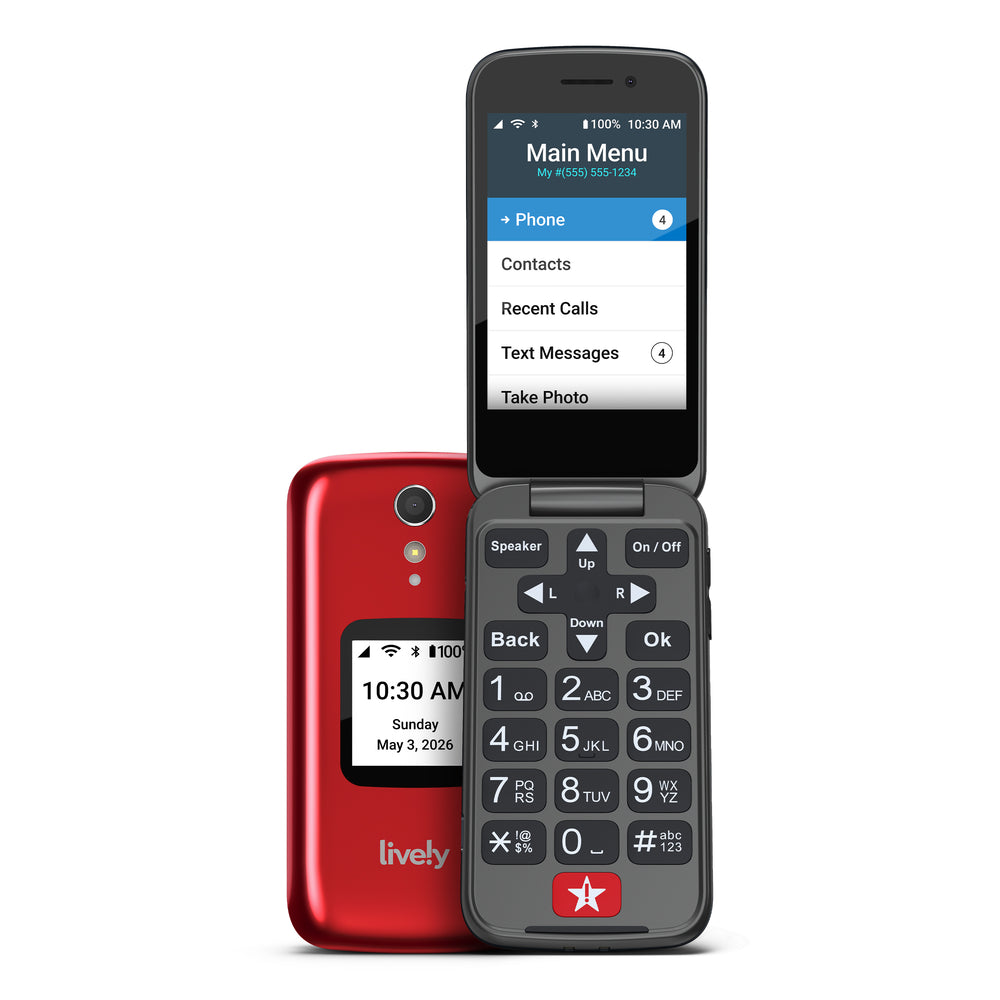
The buttons are large and raised, not flat touchscreen targets. The screen text is big and high contrast. The menu is a simple top-to-bottom list, not a grid of tiny icons. The speaker is louder than most smartphones, and the hearing aid compatibility rating (M4/T4) is the highest available. Every feature was designed around the physical and cognitive needs of people over 70.
The Urgent Response button is what truly sets it apart from other simple phones. Cheap flip phones exist for $20 at any drugstore, but none of them connect you to a 24/7 emergency response center with a single press. That feature alone justifies the monthly cost for many families. It turns an ordinary phone into a personal safety device that your parent carries everywhere they go.
Key Features That Matter for Seniors
Urgent Response Button: A dedicated button on the back of the phone connects directly to Lively’s 24/7 response center. Trained agents assess the situation, dispatch 911 if needed, and call your designated emergency contacts. The agent stays on the line until the situation is resolved. This works anywhere in the U.S. with cellular coverage.
Large, Tactile Buttons: The keypad buttons are raised, well-spaced, and easy to press even with stiff or swollen fingers. Each button has large numbers and letters that are visible without reading glasses for many users. The tactile feedback confirms each press so you know the button registered.
Powerful Speaker and Hearing Aid Compatibility: The earpiece and speakerphone are significantly louder than typical smartphones. The M4/T4 hearing aid compatibility rating means minimal interference for hearing aid users. Volume can be adjusted easily with side buttons during any call.
Simple List Menu: Instead of a grid of app icons, the menu is a scrollable list with large text. Phone, Messages, Camera, Settings. That’s essentially it. There’s nothing to accidentally tap, no notifications cluttering the screen, and no confusing layers of settings within settings.
Built-in Camera and Voicemail: The phone includes a basic camera for simple snapshots and a visual voicemail feature that displays messages in a list so you can play them back in any order. Both features are straightforward and don’t require any technical knowledge.
Setup: What to Expect
The Jitterbug Flip2 requires activation with a Lively service plan, which starts at $25 per month and includes minutes, texts, and the Urgent Response service. You can activate online at lively.com or by calling their customer service number. If you’re transferring your parent’s existing phone number, the process takes 24 to 48 hours.
Once activated, the phone is ready to use out of the box. The battery comes partially charged, so plug it in for a full charge before first use (about 2 hours). Program your parent’s important contacts into the phone and show them how to scroll through the list and press the green button to call. Show them the emergency button on the back and have them practice pressing it once (you can cancel the response during setup).
For caregivers, the most valuable setup step is configuring the emergency contact list through the Lively service. These are the people the response center will call if your parent presses the Urgent Response button. Make sure multiple family members are listed in case one doesn’t answer. You can manage these contacts online or by calling Lively’s support team.
What to Know Before Buying
The monthly service plan is a real ongoing cost. At $25 per month minimum, that’s $300 per year on top of the phone’s purchase price. However, this includes both the phone service and the emergency response feature. If you compare it to a basic phone plan ($15-$20) plus a separate medical alert service ($25-$45 per month), the combined cost is actually competitive. You’re getting two services in one device.
The phone runs on the Lively (formerly GreatCall) network, which uses Verizon’s cellular network for coverage. In most of the U.S., coverage is excellent. Check the coverage map on lively.com before purchasing if your parent lives in a rural area. The phone will not work without an active Lively service plan, so you cannot use it with a different carrier.
Battery life is solid for a flip phone. A full charge lasts several days with typical use (a few calls and texts per day). If your parent forgets to charge it regularly, the phone will remind them with an audible low battery alert. Consider setting up a charging station at a consistent spot, like their nightstand, so charging becomes part of the bedtime routine.