Why the Flipper Remote Is the Best Simplified TV Remote for Seniors
Most modern TV remotes have 40 to 60 buttons. Many are tiny, unlabeled, and nearly identical in shape. For seniors with low vision, arthritis, or cognitive decline, these remotes are a daily source of frustration. Accidentally pressing the wrong button can switch the input, change the language, or bring up a menu that seems impossible to escape. The result is often a call to a family member for help or simply giving up on watching TV altogether.
The Flipper Big Button Remote takes the opposite approach. It strips away everything except the buttons that matter and makes those buttons impossible to miss. The design is not about dumbing anything down. It is about removing the obstacles between a person and the shows they enjoy.
Only the Buttons You Actually Need
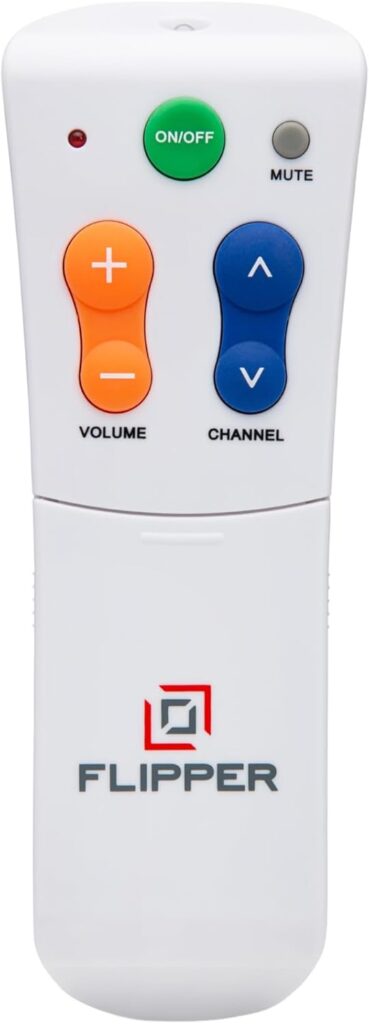
The front of the Flipper Remote shows just six large, raised buttons: Power, Channel Up, Channel Down, Volume Up, Volume Down, and Mute. Each button is a different color with a distinct shape, making them easy to identify by sight and by touch. The Power button is red and located at the top. Volume and Channel buttons are clearly separated on opposite sides.
A sliding panel on the back reveals additional buttons for less frequent tasks: number keys (0 through 9) for direct channel entry, an Input/Source button, and a Favorites button. The sliding design is intentional. Day-to-day use requires only the front buttons, so the extra controls stay hidden and out of the way until needed.
This layout solves the most common remote control problem for seniors. There is simply nothing to press that will cause confusion. No button will accidentally open Netflix, switch to HDMI 2, or change the closed captioning language.
Favorite Channels for One-Touch Access
The Flipper Remote stores up to 25 favorite channels. Once programmed, the user can cycle through only their preferred channels instead of scrolling through hundreds. For a senior who watches the same five or six channels, this feature alone transforms the TV experience. No more flipping past shopping networks and foreign language channels to find the news.
Setting up favorites requires the rear panel number keys. Enter a channel number, press the Favorite button, and it is stored. An adult child or caregiver can program all 25 slots in about five minutes. After that, the senior simply presses Channel Up or Channel Down on the front to move between their saved channels only.
Comfortable to Hold, Easy to Press
The Flipper Remote is shaped to fit naturally in the hand. It is slightly wider than a standard remote, which makes it easier to grip for people with reduced hand strength. The buttons require light pressure and provide a tactile click, so users know when a press has registered.
For seniors with arthritis, this design makes a meaningful difference. Standard remotes often require precise finger placement on small, flat buttons. The Flipper’s raised, well-spaced buttons accept a less precise press and still register correctly. Several users report that family members with moderate arthritis can operate the Flipper comfortably when other remotes were too difficult.
Setup and Compatibility
The Flipper Remote works with most major TV brands, cable boxes, and satellite receivers. It uses infrared (IR) signals, which is the same technology used by the remotes that came with the TV or cable box. Setup involves entering a code from the included code list or using the automatic search feature, which cycles through codes until it finds the right one.
Most setups take under five minutes. The Flipper can control two devices at once: a TV and a cable or satellite box. One set of buttons handles both, so there is no need to switch between remotes or modes.
One important limitation: the Flipper Remote does not work with streaming devices like Roku, Apple TV, or Amazon Fire Stick. These devices use Bluetooth or WiFi for their remote signals, not infrared. If the senior watches TV primarily through a streaming device, the Flipper is not the right solution. However, for anyone with a standard TV, cable subscription, satellite service, or antenna, it works reliably.
Setting Up for a Parent
If you are configuring the Flipper for a parent or grandparent, plan for a short visit. Pair the remote with the TV and cable box, program 10 to 15 favorite channels, and walk through the front buttons. Most seniors are comfortable within a day or two. Consider labeling the remote with a small sticker that says “This is your only remote” so they do not accidentally reach for the original.
What the Flipper Does Not Do
The Flipper Remote does not have a backlight. In dim rooms, the color-coded buttons help, but they are not illuminated. It does not control smart home devices, streaming apps, or sound bars (unless the sound bar accepts IR signals). There is no voice control and no Bluetooth connectivity.
For many seniors, these missing features are actually benefits. Every added function is another potential source of confusion. The Flipper does one thing well: it lets people watch TV without frustration.
Battery Life and Durability
The remote runs on two AAA batteries. Because IR remotes consume very little power, a set of batteries typically lasts six months to a year with normal use. The plastic body is sturdy enough to survive the occasional drop from a couch armrest, and the simple electronics mean there is very little that can go wrong internally.