Is the BOOGIIO Large Print Computer Keyboard Worth It?
The BOOGIIO Large Print Computer Keyboard is an affordable and practical solution for seniors who struggle with traditional keyboards due to vision impairments. Our bottom-line recommendation is that if you or your parent has difficulty distinguishing letters and numbers on standard keyboards, this product is worth considering. The large print keys offer clear visibility, reducing eye strain and making typing more comfortable. It’s a straightforward solution for anyone who needs extra help seeing their keyboard.
Vision challenges are common among seniors, and the BOOGIIO keyboard directly addresses this issue. Typing on a standard keyboard with small print can be frustrating, leading to mistakes and decreased productivity. This can become a barrier to using email, online banking, or other internet activities. By choosing a large print keyboard, seniors can maintain their digital independence without the additional expense of specialized assistive tech. Priced at around $15, it’s an accessible option for many budgets.
Who This Is For (and Who It’s Not For)
The BOOGIIO Large Print Computer Keyboard is ideal for seniors who have visual impairments but are otherwise comfortable using a computer. It’s particularly useful for those who may not be tech-savvy but still want to engage in basic digital activities like emailing, social media, or internet browsing. If your loved one struggles to read standard keyboard labels, this product can significantly ease their frustration.
This product might not be suitable for individuals who require more advanced assistive technology due to severe vision issues or other disabilities. If a senior needs a keyboard with specialized software for further accessibility, consider options such as a keyboard with built-in screen readers or voice command capabilities. Also, if your senior already uses a tablet with an on-screen keyboard that works well for them, this might be unnecessary.
Why We Picked BOOGIIO
BOOGIIO stands out among large print keyboards due to its affordability, simplicity, and ease of use. Compared to other options, such as the Azio Vision keyboard, BOOGIIO provides similar functionality at a lower cost. Its plug-and-play setup means no additional software is required, which is a big plus for seniors who may not be comfortable with complex installations.
Another reason this keyboard beats the alternatives is its compatibility with both Windows and Mac computers, making it versatile for different users. Its bold, high-contrast keys are designed to catch the eye immediately, reducing the strain and frustration that come with trying to find the right key on a standard keyboard. These features make it a strong contender for seniors who need a straightforward solution.
Key Features That Matter for Seniors
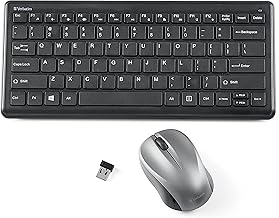
Large Print Keys: The keys on this keyboard are designed with high-contrast, large print which is significantly easier to read. This is especially beneficial for seniors with diminished eyesight, as it helps reduce eye strain and makes typing more accurate and comfortable.
Compatibility: The BOOGIIO keyboard is compatible with both Windows and Mac operating systems. This cross-platform functionality ensures that no matter what type of computer a senior uses, this keyboard will work without any hassle.
Plug-and-Play Setup: Installation is straightforward as it requires no additional software or drivers. This is ideal for seniors who might find installing software daunting or confusing. Simply plug the keyboard into a USB port and it’s ready to use.
Durable Construction: Although lightweight, the BOOGIIO keyboard is built to withstand regular use. This durability means it can handle everyday typing without wearing out quickly, which is important for seniors who rely on their technology.
Affordable Price: At approximately $15, this keyboard is an economically sound choice for those on a budget. Compared to more expensive options, it provides similar benefits without the hefty price tag.
Setup: What to Expect
Setting up the BOOGIIO Large Print Computer Keyboard is simple and should take no more than a few minutes. Start by unpacking the keyboard and placing it on a flat surface where it will be used. Plug the USB connector into an available USB port on your computer. The keyboard will be automatically recognized by the computer, and no additional software installations are needed.
Once plugged in, test the keyboard by typing a few sentences in a document or email to ensure all keys are functioning correctly. If you’re assisting a senior with the setup, guide them through this process and remind them about the keyboard’s larger, more visible keys. This step is important to confirm that the keyboard is properly connected and functioning as expected.
What to Know Before Buying
There are no monthly fees or subscriptions required for using the BOOGIIO Large Print Computer Keyboard, which is a relief for those looking for a one-time purchase without ongoing costs. This makes it accessible for a broader range of budgets, especially important for seniors on fixed incomes.
However, potential buyers should be aware of compatibility limitations. Ensure that the computer you’re planning to use has a USB port available, as this is necessary for the connection. Additionally, if the keyboard becomes damaged or a key stops functioning, it may be more cost-effective to replace it entirely due to its low price rather than trying to repair it.