A Problem You Cannot See from Far Away
Karen lives in Minneapolis. Her mother, Darlene, 82, lives alone in a small ranch house in Des Moines. Last January, Karen called her mother on a Wednesday evening and something seemed off. Darlene’s words were slightly slurred and she sounded confused. Karen almost called 911, but first she asked, “Mom, what’s the temperature in the house?” Darlene said she did not know. She had not thought about it. Karen drove down the next morning and found the thermostat set to 58 degrees. Darlene had accidentally bumped it weeks earlier and never noticed. She had been living in a 58-degree house in a Minnesota winter, layering blankets without understanding why she was so cold. Hypothermia in older adults is subtle and dangerous. It does not always feel like what you would expect.
A smart thermostat would have prevented this entirely. Karen could have checked the temperature from her phone in Minneapolis and adjusted it in seconds. That is why the Google Nest Thermostat is one of the most practical safety tools you can install in an aging parent’s home.
Who This Is For (and Who It’s Not For)
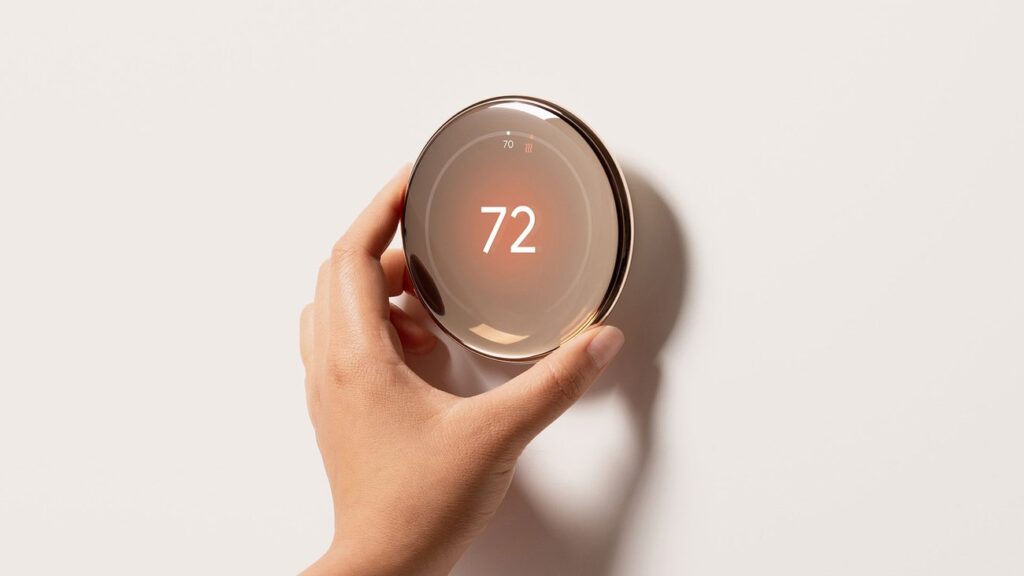
The Nest Thermostat is for two audiences. First, seniors who want a thermostat that is easier to read and use than the confusing multi-button programmable thermostats from the 1990s and 2000s. The Nest has a clean mirror display that shows the current temperature in large numbers. Swipe to adjust. That is it. Second, it is for adult children who want visibility into their parent’s home environment. If you worry about whether your mother’s house is too cold in winter or too hot in summer, remote access gives you the ability to check and adjust from anywhere.
This is NOT the right choice if your parent’s home has an unusual HVAC system like a boiler with radiators, a wall-mounted heater, or a system older than 1990. While the Nest works with most forced-air systems (furnace plus central AC), it does not work with every setup. Use Google’s online compatibility checker before purchasing. It is also not ideal for seniors who have zero Wi-Fi at home, since the smart features require an internet connection.
Why the Google Nest Thermostat
The Nest Thermostat costs $130 and does everything most people need from a smart thermostat. Competitors like the Nest Learning Thermostat ($250) and Ecobee ($200) offer additional features like room sensors and a more premium design, but for straightforward temperature control and remote access, the standard Nest covers it.
Three things make it our recommendation for aging-in-place use. First, the display. The mirror-finish screen shows the current temperature in large, high-contrast numbers that are readable from across the room. For seniors with vision challenges, this clarity matters more than any smart feature. Second, remote access through the Google Home app. Adding yourself as a home member takes two minutes and gives you full control from your phone. No passwords to remember, no separate accounts to manage. Third, the learning capability. The Nest observes when your parent adjusts the temperature and gradually builds a schedule that matches their preferences. After a week or two, it handles most adjustments on its own.
Key Features That Matter for Seniors
Clear Display: The mirror-finish display shows the current temperature, target temperature, and system status in large, easy-to-read numbers. When you approach the thermostat, the display activates automatically. No buttons to press to see the current temperature.
Simple Touch Controls: Swipe left or right on the right side of the thermostat to adjust the temperature up or down. That is the primary interaction. No complex menus, no tiny buttons, no confusing mode switches. Your parent touches one surface and the temperature changes.
Remote Access: The Google Home app lets family members monitor and control the thermostat from anywhere. See the current indoor temperature, check the set point, adjust the schedule, and review energy usage. If your parent calls and says the house feels cold, you can raise the temperature from your phone before you even hang up.
Schedule Learning: The thermostat pays attention to manual adjustments and builds a daily schedule based on patterns. If your parent consistently turns the heat up at 7 AM and down at 10 PM, the Nest will start doing this automatically after a week or two. The schedule can also be set manually through the app if you prefer precise control.
Energy Savings: The Nest displays an energy report each month showing how much heating and cooling was used. Google claims average savings of 10% to 12% on heating and 15% on cooling, which typically pays for the thermostat within the first year. For seniors on a fixed income, lower utility bills are a tangible, meaningful benefit.
Setup: What to Expect
Installation takes 20 to 30 minutes for someone comfortable with basic tools. Turn off the HVAC system at the breaker. Remove the old thermostat faceplate and take a photo of the existing wiring (the Nest app prompts you to do this). Label each wire with the included stickers. Disconnect the old thermostat base, mount the Nest base plate using the included screws and level, connect the wires to the labeled terminals, and snap on the Nest display. Turn the breaker back on and follow the app setup to connect to Wi-Fi and configure your preferences.
If your parent’s existing thermostat has four or five labeled wires, installation is straightforward. If it has only two wires (common in older homes with simple heating systems), you may need a C-wire adapter, which Google sells for about $20. If you are not comfortable working with wiring, most electricians and HVAC technicians can install a Nest in under an hour for $75 to $100.
After installation, add your parent’s Google account (or create one for them) and connect the thermostat to their Wi-Fi network. Then add yourself as a member of their “home” in the Google Home app so you can access the thermostat remotely. This shared access is the feature that makes the biggest difference for families managing a parent’s home from a distance.
What to Know Before Buying
Check compatibility first. Google’s online compatibility checker asks you to identify the wires connected to your current thermostat and tells you whether the Nest will work with your system. This takes two minutes and can save you a return trip to the store.
The Nest Thermostat does not include built-in alerts for dangerously high or low temperatures by default. However, you can set up automations through the Google Home app to send you a notification if the temperature drops below a certain threshold. For families in cold climates, this is worth configuring during setup. Pipes can freeze if a furnace fails and nobody notices for days. A simple temperature alert on your phone could prevent thousands of dollars in water damage.
Wi-Fi is required for all smart features. Without internet, the Nest functions as a basic programmable thermostat with manual controls. It will not lose its programmed schedule during an outage, but you will not be able to monitor or adjust it remotely until the connection is restored.
The Nest Thermostat comes in four colors: Snow (white), Charcoal (dark gray), Sand (beige), and Fog (light blue-gray). All colors have the same features and price. Choose whichever blends best with your parent’s wall color. A small detail, but it helps the thermostat look like it belongs rather than standing out as a piece of technology bolted to the wall.