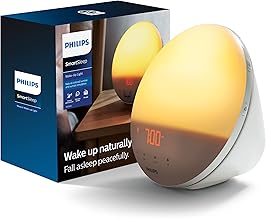
Wake Up Naturally with Philips
The Philips Wake-Up Light Alarm Clock is an innovative solution that provides a gentle way to wake up. Instead of the jarring sound of a traditional alarm, this clock uses a gradual light simulation to mimic a natural sunrise. This feature is especially beneficial for seniors and caregivers looking for a more peaceful and natural waking experience.
Key Features
This alarm clock offers a variety of features that make it stand out. It has 20 brightness settings, allowing you to customize the intensity of the light based on your preference. The light gradually brightens over a set period, ranging from 20 to 40 minutes, before your chosen alarm time. This gradual increase in light can help to regulate your body’s natural sleep-wake cycle.
Additionally, the Philips Wake-Up Light includes soothing sounds such as birds chirping or a gentle piano melody. You can also opt to wake up to your favorite FM radio station. This combination of light and sound creates a serene environment for waking up, which can be particularly helpful for seniors who may have difficulty rising early.
Setup and Use
Setting up the Philips Wake-Up Light is straightforward. You start by plugging in the device and adjusting the time settings. The clock has a clear digital display that shows the time and allows you to easily navigate through the menu. You can select your preferred light settings, alarm sounds, and even the sunset simulation feature, which helps you wind down at the end of the day.
For caregivers, remote setup is simple. You can assist your loved ones in setting up the clock by guiding them through the menu options. The intuitive interface makes it easy for seniors to customize their alarm settings without confusion. Once set, the clock will remember your preferences, making it hassle-free for daily use.
Monitoring and Adjustments
Monitoring how well the wake-up light works can be beneficial for caregivers. You can check in with your loved one about their waking experience and make adjustments as needed. If they find it difficult to wake up with light alone, you can increase the brightness level or change the alarm sound to something more stimulating. This flexibility allows you to tailor the device to meet specific needs.
Pricing and Availability
The Philips Wake-Up Light Alarm Clock is priced around $79.99, making it an affordable option for those seeking a better way to wake up. You can find it available for purchase on Amazon and other retail websites. Given its positive reviews, many users appreciate the investment for the improved waking experience it provides.
Who Is This Product Best For?
This alarm clock is best for seniors who struggle to wake up with traditional alarms. It is also ideal for caregivers looking for a gentle way to help their loved ones start the day. If you or your loved one enjoys waking up gradually with light and soothing sounds, this product can enhance daily routines significantly.
When to Skip This Product
If you or your loved one prefer to wake up quickly with a loud alarm, the Philips Wake-Up Light may not be the best fit. Additionally, if you are not fond of waking up to light or sounds, you might want to consider a more traditional alarm clock.
Pros and Cons
There are several advantages to the Philips Wake-Up Light. First, it provides a gentle and natural way to wake up. Second, the variety of light and sound settings allows for customization. Third, it can improve overall mood and energy levels by regulating sleep patterns.
On the other hand, some users have reported that the light may not be bright enough for all individuals. Additionally, the price point may be higher than basic alarm clocks, which could be a consideration for those on a tight budget. Lastly, the learning curve for adjusting settings may be challenging for some seniors.