Is the Omron MC720 Digital Thermometer Worth It?
The Omron MC720 Digital Thermometer addresses a crucial need for seniors: quick, non-invasive temperature readings. When speed and ease of use are priorities, especially for those who might struggle with traditional thermometers, this infrared thermometer becomes an essential tool. We recommend this device for its simplicity and effectiveness in situations where a senior may have difficulty using other types of thermometers, like oral or underarm models.
For seniors, regular temperature monitoring can be vital, especially if they are managing chronic conditions or have a higher risk of infection. The Omron MC720 offers a reliable solution without the discomfort of contact thermometers. Its user-friendly interface and quick measurement time make it a standout option. Based on our research, this thermometer is a top pick due to its accessibility and non-invasive design.
Who This Is For (and Who It’s Not For)
The Omron MC720 is ideal for seniors who need frequent temperature checks without the hassle of traditional thermometers. It’s perfect for those with mobility issues or conditions that make bending or manipulating small objects challenging. Its quick, non-contact method is especially beneficial for those who need to avoid discomfort or have sensitive skin.
However, if your senior is already comfortable with a digital stick thermometer or prefers a more traditional approach, this might not be necessary. Also, if you’re looking for a device that can integrate with a health monitoring app, you might want to consider a device like the Kinsa Smart Thermometer, which offers app connectivity for tracking temperatures over time.
Why This Beats the Alternatives
We chose the Omron MC720 because it stands out for its non-contact operation and ease of use. Unlike the Braun No Touch + Forehead Thermometer, which can be somewhat bulkier, the Omron MC720 is lightweight and easy to handle. Its simplicity makes it a better choice for seniors who may not want to fuss with complicated settings or buttons.
Additionally, the Omron MC720 provides readings in less than a second, which is faster than many competitors, including the iProven No Touch Thermometer. This speed is crucial in making the process as smooth and stress-free as possible, especially for those who may be anxious or unsteady.
Key Features That Matter for Seniors
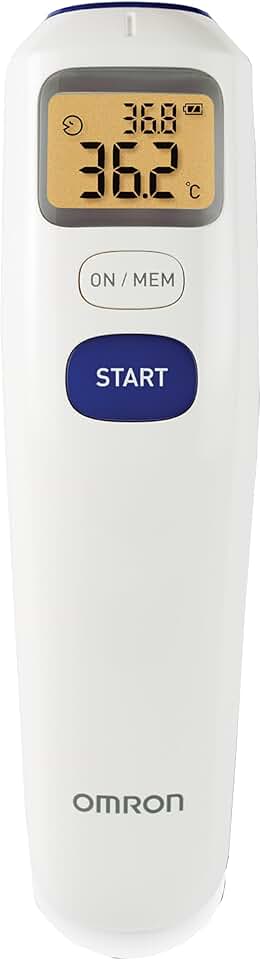
Non-Contact Measurement: The Omron MC720 uses infrared technology to measure temperature without needing to touch the skin. This feature is especially important for seniors who might be sensitive to touch or have difficulty holding a thermometer in place. Confirm this specification on the product listing to ensure it meets your needs.
Quick Read Time: It provides a reading in under a second. This speed is crucial for seniors who may become uncomfortable or impatient during longer waits. It’s a standout feature that reduces the stress often associated with health checks.
Backlit Display: The thermometer features a backlit display, which is essential for seniors with vision difficulties. It ensures that the temperature readings are visible even in low-light conditions, making it easier to use at any time of day.
Memory Recall: This device can store previous readings, which is particularly useful for tracking temperature changes over time. Seniors or caregivers can quickly access the last measurements without needing to write them down, a helpful feature for those managing ongoing health issues.
Silent Mode: The option to turn off the sound is a thoughtful addition for seniors who may be sensitive to noise or prefer a quieter environment. This feature allows for discretion and ease of use without causing unnecessary disturbances.
Setup: What to Expect
Setting up the Omron MC720 is straightforward and should take about 10 minutes. Start by installing the batteries, which are included with the product. The battery compartment is easily accessible, making it simple for most users. Once the batteries are in place, turn on the device by pressing the power button.
There’s no app to download or account to set up, which simplifies the process considerably. You can adjust the settings, such as switching between Celsius and Fahrenheit, using the mode button. Test the thermometer by pointing it at the forehead or an object, pressing the measure button, and confirming the reading. It’s a simple process that doesn’t require a tech-savvy user, making it suitable for seniors.
What to Know Before Buying
One of the best aspects of the Omron MC720 is that there are no monthly fees or subscriptions required. This can be a relief for those who are budget-conscious and don’t want to worry about recurring charges.
However, it is important to note that the thermometer requires two AAA batteries. While these are included initially, you will need to replace them as needed. The battery life is generally good, but if the device starts showing erratic readings, it’s a sign the batteries need changing. Also, ensure your senior can manage the battery compartment or have a caregiver assist when necessary.