Smartwatches have evolved from tech novelties into practical health and safety tools. For seniors and the family members who care about them, the right smartwatch can detect falls, monitor heart health, track medications, and provide a direct line to emergency services. But the category is crowded with options that vary wildly in their usefulness for older adults. This guide breaks down what actually matters in a senior smartwatch, what you can safely ignore, and how to set one up so it works reliably from day one.
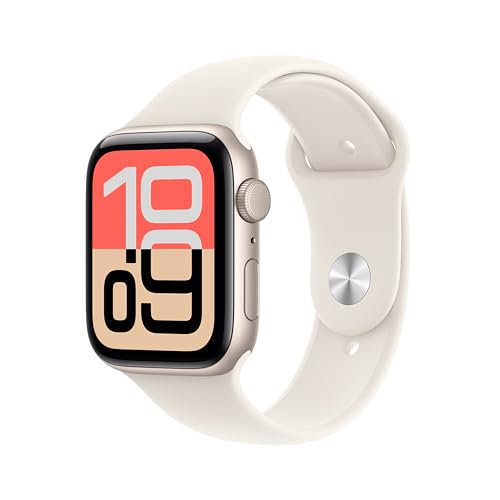
Apple Watch SE 3 (GPS, 44mm)
Built-in fall detection that automatically calls emergency services and shares your location if you are unresponsive for about a minute after a hard fall.
Check Price on AmazonWhat Makes a Smartwatch Senior-Friendly
Not every smartwatch is a good fit for older adults. A watch that works brilliantly for a 30-year-old fitness enthusiast can be frustrating or useless for a 75-year-old who just wants to feel safe at home. The features that matter most for seniors are specific and different from what the general market prioritizes.
A Large, Bright Display
Screen size is not a vanity feature for seniors. It is a usability requirement. A small, dim display means squinting, misreading information, and eventually giving up on the device entirely. Look for watches with screens 44mm or larger and Always-On displays that show the time without requiring a wrist raise gesture. Adjustable text size is essential.
Simple Navigation
The best smartwatch for a senior is one they will actually use. Watches with physical buttons or a rotating crown in addition to the touch screen give multiple ways to navigate, which matters when touch accuracy decreases with age. Voice assistants (Siri, Google Assistant) add another interaction method that bypasses the small screen entirely.
Automatic Safety Features
The most valuable smartwatch features for seniors are the ones that work without any input. Fall detection should activate automatically when it recognizes a hard fall. Emergency SOS should be reachable with a simple button press or, better yet, activate on its own if the wearer is unresponsive. Features that require the wearer to remember to activate them are less reliable than features that are always on.
Fall Detection Explained
Fall detection is the single most important smartwatch feature for seniors, and it is also the most misunderstood. Here is how it actually works and what to expect.
How Smartwatches Detect Falls
Modern smartwatches contain accelerometers and gyroscopes that measure motion and orientation hundreds of times per second. Fall detection algorithms analyze these motion patterns to identify the specific signature of a fall: a sudden downward acceleration followed by an impact, followed by a period of stillness or irregular movement.
When the watch detects this pattern, it triggers an alert. On Apple Watch, the watch taps the wrist, sounds an alarm, and asks if you are OK. If there is no response within approximately 60 seconds, it automatically calls emergency services and sends your location to your emergency contacts. Samsung and Google watches follow a similar process.
What Falls It Catches (And Misses)
Current smartwatch fall detection is optimized for hard falls. Tripping on a sidewalk, falling off a step stool, slipping on ice. These high-impact events produce clear accelerometer signatures that the algorithms recognize reliably.
Slower falls are harder to detect. Gradually sliding out of a chair, losing balance and sitting down heavily, or stumbling but catching yourself on a counter may not trigger the alert. The algorithms are calibrated to avoid false positives (alerting when no fall occurred), which means they sometimes miss gentler falls. This is a real limitation worth understanding. If the primary concern is slow, low-impact falls, a dedicated medical alert pendant with professional monitoring may be a better choice, either on its own or alongside a smartwatch.
False Alarms
Activities like clapping enthusiastically, slamming a car door, or dropping the watch on a hard surface can occasionally trigger false fall alerts. Most watches handle this gracefully: they alert you on screen and give you time to dismiss the alert before calling for help. In practice, false alarms are more of an inconvenience than a problem, and the detection accuracy improves with each software update.
Health Monitoring Features Worth Having
Beyond fall detection, smartwatches now offer a range of health sensors. Not all of them are equally useful for seniors. Here is a practical breakdown.
Heart Rate Monitoring
Continuous heart rate tracking is genuinely useful. The watch can detect abnormally high or low heart rates while you are at rest and send a notification. More importantly, some watches (Apple Watch, Samsung Galaxy Watch, Fitbit Sense) can detect irregular heart rhythms consistent with atrial fibrillation (AFib). AFib is a leading risk factor for stroke and often goes undetected because episodes can be brief and symptomless. Getting an alert that prompts a doctor visit could be genuinely life-saving.
Note: these are screening tools, not diagnostic devices. A smartwatch notification is a reason to see a doctor, not a diagnosis in itself.
Blood Oxygen (SpO2)
Blood oxygen monitoring measures the percentage of oxygen in your blood. Normal levels are typically 95% to 100%. Persistently low readings can indicate respiratory or cardiac issues. For seniors with COPD, heart failure, or other conditions where oxygen levels matter, having a trend log on the wrist can supplement clinical monitoring.
Sleep Tracking
Sleep tracking provides data on how long you slept, how many times you woke up, and sometimes what sleep stages you went through. The data is approximate, not clinical-grade, but it provides objective information that can be useful when discussing sleep problems with a doctor. The trade-off is that you need to wear the watch to bed, which means finding a daytime charging window.
Medication Reminders
Apple Watch and some Samsung watches support medication tracking that sends reminders to your wrist at scheduled times. You tap to confirm you took the dose, building a log over time. For seniors managing multiple medications, this is more reliable than memory alone and less intrusive than a phone alarm.
Features That Sound Good but Matter Less
ECG (electrocardiogram) readings, skin temperature tracking, body composition analysis, and stress monitoring are features that appear on spec sheets but rarely change outcomes for seniors. ECG is occasionally useful for documenting AFib episodes to show a cardiologist, but the irregular heart rhythm notification (which works passively in the background) is more practical for daily use. The others generate data that most people, including most doctors, do not act on.
Battery Life: The Real-World Concern
Battery life is the biggest practical challenge with smartwatches for seniors. Here is what to expect by platform.
Apple Watch: 18 to 36 hours depending on the model. The SE 3 lasts about 18 hours. This means daily charging is required. For most people, charging while showering in the morning and for 30 minutes before bed provides enough power to get through the day and night.
Samsung Galaxy Watch: 40 to 50 hours for recent models. Less frequent charging is needed, but you will still charge every other day.
Google Pixel Watch: About 24 hours. Similar charging routine to Apple Watch.
Fitbit Sense/Versa: 5 to 6 days. Significantly less charging hassle, though the health and safety features are not as comprehensive.
If daily charging is a dealbreaker, a Fitbit or Samsung watch may be a better fit despite having fewer safety features. A smartwatch that sits uncharged on a nightstand is not protecting anyone.
Choosing Between Platforms
The smartwatch you choose is largely determined by the phone you own.
iPhone users: Apple Watch is the only serious option. It is deeply integrated with the iPhone, and no Android-based smartwatch works with an iPhone at all.
Android users: Samsung Galaxy Watch and Google Pixel Watch are the top choices. Samsung offers a robust health suite and longer battery life. Google Pixel Watch integrates tightly with Fitbit health tracking.
No smartphone: This is a challenge. Most smartwatches require a paired smartphone for setup and for some features to work. If the senior does not have a smartphone and does not want one, a dedicated medical alert device (pendant or wristband) is a more appropriate solution than a smartwatch.
Setup Tips for Caregivers
If you are setting up a smartwatch for a parent or older family member, plan for about 30 to 45 minutes. Here is a checklist that covers the essentials.
Before You Start
Make sure the senior’s phone is running the latest operating system. Update it before beginning the watch setup. Charge the watch fully before pairing. Have the senior’s Apple ID or Google account credentials handy.
During Setup
Pair the watch with the phone following the on-screen prompts. When asked about features to enable, turn on: fall detection, Emergency SOS, heart rate notifications, and irregular rhythm notifications. Add yourself and other family members as emergency contacts. Fill out the Medical ID with allergies, medications, blood type, and doctor information.
Customize for Usability
Increase the text size to the largest comfortable setting. Enable Bold Text. Choose a watch face with large numbers and minimal complications. Disable notification sounds for apps that are not essential (social media, news, games). Turn on the Always-On display so the time is always visible. Set the watch to Haptic alerts (vibration) so notifications are felt rather than heard, which is less intrusive.
Test the Safety Features
Walk through the Emergency SOS process so the senior knows how it works. On Apple Watch, press and hold the side button. On Samsung, press the Home key three times quickly. Do a test call (you can cancel before it connects) so the motion feels familiar. Show the senior the fall detection alert screen so they know what it looks like and how to dismiss a false alarm.
Establish a Charging Routine
Place the charger on the nightstand or bathroom counter where the senior will see it every day. Suggest a specific charging time: “Charge it while you eat breakfast” or “Put it on the charger when you watch the evening news.” A consistent routine prevents the watch from dying at 2 AM when fall detection matters most.
Smartwatch vs. Medical Alert Device
Smartwatches and medical alert devices serve overlapping but different purposes. Understanding the differences helps you choose the right tool.
Medical alert devices (like Medical Guardian or Bay Alarm Medical) connect to a professional monitoring center staffed 24/7. When you press the button, a trained operator answers, assesses the situation, and dispatches help if needed. They work even if you cannot speak. Monthly fees range from $20 to $50. They are single-purpose and extremely reliable.
Smartwatches call 911 directly or contact your personal emergency contacts. There is no professional monitoring center in the middle. They offer broader functionality (health tracking, communication, apps) but rely on the wearer or automated systems to initiate the call. There are no monthly fees for the safety features.
For seniors who are active, independent, and comfortable with technology, a smartwatch provides safety features alongside daily utility. For seniors who are frail, have cognitive decline, or live alone in remote areas, a dedicated medical alert with professional monitoring is more appropriate. Some families choose both: a medical alert pendant for home and a smartwatch for going out.
What to Expect Going Forward
Smartwatch health features are improving rapidly. Blood pressure monitoring is arriving in some Samsung models. Continuous glucose monitoring is in development. Fall detection algorithms are becoming more sensitive with each generation. The gap between what a smartwatch can track and what requires a clinical visit is narrowing every year.
For today, the practical value of a senior smartwatch comes down to three things: automatic fall detection, passive heart monitoring, and a fast path to emergency help. Everything else is useful but secondary. Choose a watch that does those three things well, pair it with the right phone, set it up thoughtfully, and establish a charging routine. That combination provides a meaningful safety net that fits on a wrist.