Managing multiple medications is one of the most common challenges for aging adults and their families. The average senior takes four to five prescription medications, and adding over-the-counter supplements makes the picture even more complex. Missed doses, double doses, and dangerous interactions are real risks — but with the right system in place, medication management becomes much less stressful for everyone.
Start With a Complete Medication Inventory
Before setting up any system, you need a clear picture of what your parent is actually taking. Gather every medication bottle — prescription and over-the-counter — and create a master list that includes:
- Medication name (both brand and generic)
- Dosage (how much per dose)
- Frequency (how often, and at what times)
- Prescribing doctor
- What it treats
- Special instructions (take with food, avoid grapefruit, etc.)
- Pharmacy and phone number
Bring this list to your parent’s next doctor’s appointment for a medication review. Doctors can identify medications that may no longer be necessary, check for dangerous interactions, and simplify the regimen where possible. This step alone can make everything else easier.
Level 1: Simple Pill Organizers
For parents who are generally independent but occasionally forget a dose, a basic pill organizer may be all that’s needed.
Weekly Pill Organizers
The classic 7-day pill organizer with compartments for each day of the week works well for people taking medications once a day. For multiple daily doses, choose one with AM/PM compartments or four-times-daily slots.
Tips for success:
- Fill the organizer on the same day each week — make it part of your routine
- Keep the organizer in a visible spot, like next to the coffee maker or on the dining table
- Choose one with large compartments and easy-open lids, especially if arthritis is a factor. Some organizers have push-button lids instead of snap-close ones.
- Consider a pill organizer with braille or raised letters for anyone with vision challenges
Monthly Pill Organizers
If filling weekly isn’t practical (for example, if you visit your parent only monthly), monthly organizers or a set of four weekly organizers can reduce how often someone needs to sort pills.
Level 2: Pill Organizers with Reminders
If forgetting is the main issue, adding reminders to the mix helps significantly.
Timer-Cap Pill Bottles
These inexpensive caps replace standard prescription bottle caps and display how many hours have passed since the bottle was last opened. A quick glance tells your parent whether they’ve already taken today’s dose. They cost around $10-15 each.
Alarm-Based Organizers
Several pill organizers have built-in alarms that beep or flash at scheduled times. The e-pill TimeCap and MedCenter systems are popular options. The alarm keeps going until the correct compartment is opened, which helps even if your parent is in another room.
Phone and Smart Speaker Reminders
If your parent uses a smartphone or smart speaker, setting recurring reminders is free and effective:
- Amazon Echo: “Alexa, remind me to take my blood pressure pill every day at 8 AM”
- Google Nest: “Hey Google, set a daily reminder at 8 AM to take morning medications”
- iPhone: Use the built-in Reminders app or the Health app to set medication reminders
- Android: Google Clock app can set recurring alarms with custom labels
Level 3: Automatic Pill Dispensers
For parents who need more structure — especially those with cognitive changes — automatic dispensers provide the highest level of support short of having someone physically hand them their pills.
How They Work
You load medications into the dispenser (usually a week or month at a time). The dispenser locks the medications inside and only makes the correct dose available at the scheduled time. An alarm sounds when it’s time to take pills. If the dose isn’t taken, the dispenser can notify a caregiver via text, email, or app notification.
Top Options
- Hero Automatic Dispenser — holds up to a 90-day supply of 10 different medications. It sorts and dispenses the right pills at the right time, and sends notifications to caregivers through an app. It requires a monthly subscription ($30-40/month) but handles everything automatically.
- MedMinder — a locked pill organizer that flashes, beeps, and sends alerts to caregivers. Simpler than the Hero but still very effective. Plans start around $40/month.
- TabSafe — a compact automatic dispenser that’s popular in senior living communities but also available for home use.
The monthly cost may seem high, but compare it to the cost of a hospital stay from a medication error. For many families, these devices are well worth the investment.
Level 4: Pharmacy-Based Solutions
If sorting medications at home is too complicated or error-prone, let the pharmacy do it.
Pre-Sorted Medication Packets
Services like PillPack (now part of Amazon Pharmacy) and many local pharmacies will pre-sort all medications into individual packets labeled with the date and time. Your parent simply tears open the packet for that time slot — no sorting, no guessing.
Benefits include:
- Pharmacists verify the medications, reducing error risk
- No need for a weekly pill-sorting session
- Packets are clearly labeled and easy to use
- Most services deliver to your door
Blister Packs
Many local pharmacies offer blister pack (or compliance pack) services, where they package your medications into sealed plastic bubbles on a card organized by day and time. Ask your parent’s pharmacy if they offer this — many do it at no extra charge.
Medication Management Apps
For tech-comfortable parents or for caregivers who want to track remotely:
- Medisafe — free app with medication reminders, interaction warnings, and the ability to add a “Medfriend” (caregiver) who gets notified of missed doses
- CareZone — stores medication lists, allows you to scan prescription labels to add medications automatically, and includes a journal feature for tracking symptoms
- MyMedSchedule — generates a printable medication schedule with pictures of each pill, which is helpful for visual identification
Preventing Common Medication Mistakes
Whatever system you use, these practices help prevent errors:
- Use one pharmacy for all prescriptions so the pharmacist can check for interactions across all medications
- Never share medications between people, even if they take the same drug
- Dispose of expired medications properly — many pharmacies accept them for safe disposal
- Don’t stop medications abruptly without talking to the prescribing doctor, even if side effects seem bothersome
- Keep the master medication list updated and bring it to every medical appointment
- Use good lighting when taking medications — taking pills in a dim room increases the risk of grabbing the wrong bottle
Getting Started
Start with your parent’s current situation. If they’re mostly managing but occasionally forget, a simple pill organizer and phone reminders might be enough. If they’re regularly confused about what to take and when, jump to an automatic dispenser or pharmacy-sorted packets. Match the solution to the problem — there’s no need to over-engineer it, but also don’t under-invest in something this important.
And remember: the best medication management system is the one your parent will actually use. Involve them in choosing it. Explain how it works. And check in regularly to make sure it’s still working well as their needs change.
Our Pick: Hero Smart Pill Dispenser
If you’re shopping in this category, here’s our one recommendation.
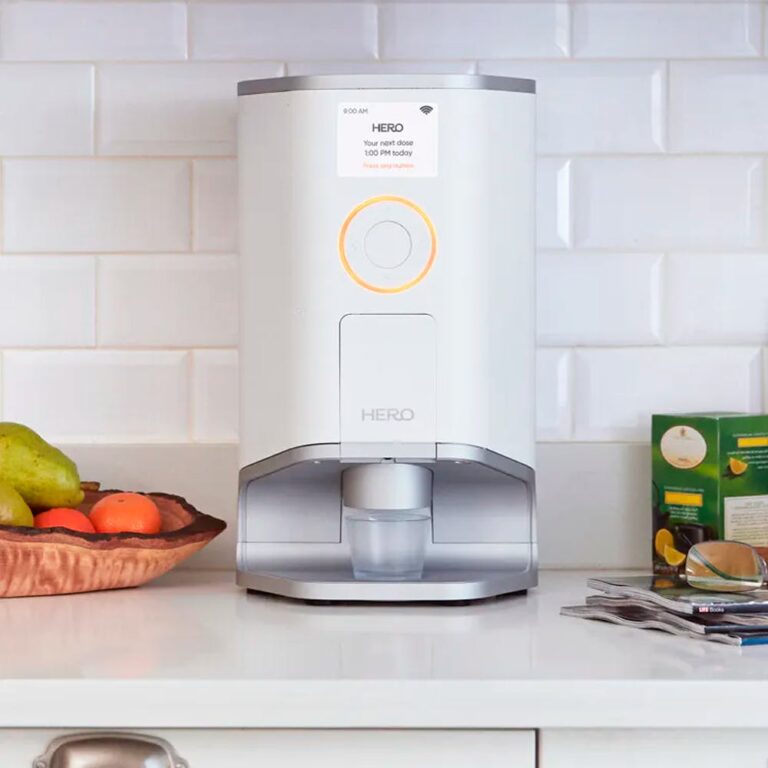
Hero Smart Pill Dispenser
Automated dispensing minimizes user error and eases physical handling for seniors.
Check Price