
Setting Up a Smart Thermostat for a Senior Parent: Comfort Without Complexity
Temperature is one of the most overlooked factors in senior health and safety. As we age, our bodies become less efficient at regulating heat and cold, which means a home that feels fine to a 45-year-old visitor can be genuinely dangerous for an 80-year-old resident. At the same time, heating and cooling costs are a real concern on a fixed income. A smart thermostat for seniors addresses both problems at once, and the Google Nest Thermostat does it in a way that doesn’t require anyone to learn complicated technology.
This guide is for two audiences: seniors who want to understand what they’re installing and why it helps, and the adult children or caregivers who are often the ones doing the setup. Both of you will find answers here.
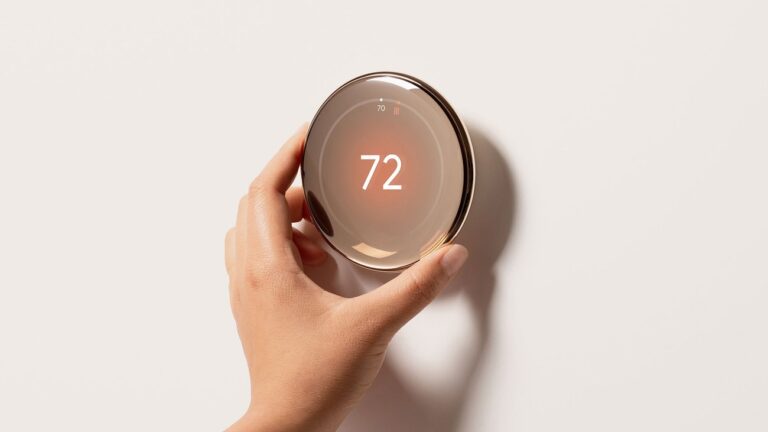
Google Nest Thermostat
Simple smart thermostat with remote control and energy savings
Check Price on AmazonWhy Temperature Control Matters More After 65
The stakes around indoor temperature rise significantly as we age. This isn’t about comfort preferences. It’s about genuine physiological changes that make temperature regulation harder for older bodies.
Heat Stroke and Overheating Risks
Older adults are significantly more vulnerable to heat-related illness than younger people. The body’s ability to sweat and cool itself declines with age, and many seniors don’t feel thirsty or overheated until they’re already in a dangerous situation. In a home where the air conditioning fails or the thermostat drifts upward during a summer afternoon, the risks escalate quickly.
The danger is compounded by the fact that many seniors live alone. There’s no one around to notice when something seems off. A smart thermostat that alerts a family member when the home gets too warm can provide an important safety net.
Hypothermia: A Year-Round Concern
Cold is equally dangerous, and hypothermia can set in at indoor temperatures that most people wouldn’t consider alarming. Older adults lose body heat faster and feel the effects of cold more quickly. An older person with circulation issues, thyroid problems, or low body weight is especially vulnerable.
The challenge is that seniors often underestimate how cold they are, or they resist turning up the heat because of concerns about the energy bill. A smart thermostat takes this decision out of the equation. You set a minimum temperature, and the home stays at or above it automatically.
Medication and Temperature Sensitivity
A number of common medications affect how the body handles heat and cold. Diuretics, beta-blockers, and some antidepressants can impair the body’s temperature regulation. Blood pressure medications sometimes reduce circulation to the extremities, making people feel cold even in a warm room. If your parent takes multiple medications, their temperature comfort and safety needs may be different from what you’d expect based on the thermostat reading alone.
Talking to their doctor about what temperature range is appropriate is worth doing before you set up any schedule on a smart thermostat. Once you have that information, you can program it in once and rely on it.
How a Smart Thermostat Helps the Whole Family
The appeal of a smart thermostat isn’t just the tech. It’s the peace of mind it creates across a household, and across a family that may be spread across different cities.
Remote Monitoring for Adult Children
One of the most practical features for caregivers is the ability to check and adjust the home temperature from anywhere using a smartphone app. If you get a call that your mother isn’t feeling well, you can check her home temperature before you even get in the car. If you know a heat wave is coming, you can lower the cooling setpoint before it arrives, without her having to navigate any settings.
This kind of remote access also makes it easier to help without being intrusive. You’re not calling to ask if she remembered to turn on the air conditioning. You’re just quietly making sure things are right.
Automatic Schedules Remove the Daily Task
One thing that gets overlooked in conversations about smart home technology is how much cognitive load it removes. Remembering to adjust the thermostat morning and evening, figuring out what temperature to set before bed, deciding whether to turn off the heat when leaving for a doctor’s appointment, all of these are small decisions that add up over the course of a day.
A smart thermostat handles all of this automatically. Once the schedule is set, the home stays comfortable without anyone thinking about it. For a senior managing a busy medical schedule, multiple medications, and the thousand small decisions of daily life, removing this task is genuinely helpful.
Energy Savings on a Fixed Income
Google reports that Nest users save an average of 10-12% on heating bills and 15% on cooling bills. For someone on a fixed income spending several hundred dollars a month on utilities, that’s meaningful. The thermostat pays for itself within the first year or two for most households, and continues to reduce costs afterward.
The energy savings come from the learning algorithm and from smarter scheduling. The Nest learns when the home is occupied versus empty and adjusts accordingly. If your parent consistently leaves for their weekly bridge game at 10am on Thursdays, the Nest figures this out and reduces heating or cooling during that window without anyone having to program it explicitly.
Why the Google Nest Thermostat Is the Right Pick for Seniors
There are a handful of smart thermostats on the market, but the Google Nest Thermostat stands out as the right choice when seniors or their comfort and safety are the priority. Here’s what makes it different.
Simple Physical Interface
The Nest has a large, clear display and a straightforward physical interface. The most common adjustment, changing the temperature, involves turning a ring and pressing to confirm. That’s it. There are no tiny buttons, no complicated menu trees to navigate, and no touchscreen that requires precise finger placement.
The display itself shows the current temperature and the setpoint in large, easy-to-read numbers. For a senior with any degree of vision difficulty, this is considerably easier to use than a traditional programmable thermostat with a small LCD screen and multiple buttons.
Learning Schedules That Set Themselves
The Nest Learning Thermostat (the higher-end version) famously programs itself based on your adjustments over the first week. But even the standard Nest Thermostat can be set up with a schedule through the app in minutes, and then left alone indefinitely.
This is important for seniors who don’t want to interact with technology daily. You set it up once, verify that it’s working correctly over the first few days, and then it runs on its own. Many families find that their parent doesn’t need to touch the thermostat at all after the initial setup, which is exactly the point.
App Control for Caregivers
The Google Home app gives family members the ability to view and adjust the thermostat from a phone. Multiple family members can be added to the home’s account, so a spouse, an adult child in another city, and a home health aide can all have access if appropriate.
The app also shows temperature history, so you can see whether the home has been maintained at appropriate temperatures over time. This is useful for catching patterns that might otherwise go unnoticed, like a thermostat that tends to drift warm in the afternoons because of afternoon sun on a particular wall.
Energy History and Home Reports
The Nest app provides monthly energy reports and home heating and cooling history. For someone trying to understand and manage their utility bills, this information is genuinely useful. You can see exactly what’s driving costs and adjust accordingly.

Installation: What to Expect
Installing a Nest Thermostat is a reasonable DIY project for most homes. The whole process takes about 20 minutes once you’ve confirmed compatibility. Here’s what’s involved.
Step 1: Check Compatibility First
Before purchasing, use Google’s compatibility checker at the Nest website. You’ll need to look at your existing thermostat’s wiring, which involves removing the faceplate and checking which terminals have wires connected. The most common systems (central forced air, heat pump, gas furnace) are compatible. Older systems and some radiant heat setups may not be.
The one important note: the standard Nest Thermostat requires a common wire (C-wire) for power in many installations. Many modern HVAC systems have one. If yours doesn’t, Google sells an adapter, or an HVAC technician can add the wire during a routine visit.
Step 2: Turn Off Power to the HVAC System
This is done at the circuit breaker. Turn off the breaker that controls your heating and cooling system before touching any wires. The Nest app walks you through this step.
Step 3: Remove the Old Thermostat and Label the Wires
The Nest installation process is genuinely well designed. Before disconnecting anything, you photograph or label each wire with the sticker labels included in the box. The wires are color-coded and correspond to labeled terminals. You disconnect them from the old thermostat one at a time and note which wire went to which terminal.
Step 4: Install the Nest Base and Connect the Wires
The Nest base mounts on the wall, and the wires connect to the corresponding labeled terminals. The app guides you through each connection. Once everything is connected, you snap the Nest display onto the base, restore power, and follow the setup wizard on the device itself.
Step 5: Download the App and Connect to Wi-Fi
The final step is connecting the thermostat to your home Wi-Fi network and setting up the Google Home app. This is where you create the account, add family members as guests or home members, and configure the initial schedule.
If you’re not comfortable doing the installation yourself, any HVAC technician can install it as a routine service call, typically in under an hour.
Setting Up Remote Access for Family Members
This step is worth doing carefully, because it’s one of the most practical features of the system.
In the Google Home app, the person who sets up the thermostat can invite others to join the home. A family member accepting the invitation gets access to view and adjust the thermostat. You can control the level of access, giving some people full control and others view-only access if appropriate.
For adult children who live in different cities, this means they can check in on their parent’s home temperature during extreme weather events, adjust the schedule seasonally without making a trip, and catch any issues before they become emergencies. It takes about five minutes to set up and works on both iOS and Android.
Addressing Common Concerns
“Will This Be Confusing to Use?”
The honest answer is: it depends on the person. Some seniors take to smart home technology immediately. Others find anything new frustrating at first. The key is that after the initial learning curve, most seniors find the Nest easier to use than their old thermostat because it does most things automatically.
The most important thing is to spend time during setup explaining the two or three things your parent might ever need to do: how to adjust the temperature by a degree or two if they’re too warm or too cold. That’s usually all they need. Everything else can be handled through the app.
“What Happens During a Power Outage?”
The Nest stores its settings internally. When power is restored, it resumes its programmed schedule automatically. No one needs to reprogram it or set a clock. This is a meaningful advantage over traditional programmable thermostats, which often end up stuck in override mode after an outage because no one knows how to reset them.
“What If the Internet Goes Down?”
The thermostat continues to work normally on its programmed schedule even without internet access. The only thing that stops working without internet is the remote app access. Local adjustments at the thermostat itself still work fine.
Thinking About the Cost
The Google Nest Thermostat retails for around $130. Installation, if you hire an HVAC technician, typically adds $75 to $150 to that cost.
Weighed against the energy savings, most households recover that cost within one to two heating seasons. Weighed against the peace of mind it provides for families managing a senior parent’s comfort and safety from a distance, the value is harder to put a number on but no less real.
For a senior on a fixed income who is both cost-conscious and health-conscious, a smart thermostat for seniors isn’t a luxury purchase. It’s a practical tool that makes the home safer, reduces one category of monthly expenses, and removes a small but real daily cognitive burden.
The Bottom Line
Choosing a smart thermostat for seniors doesn’t need to be complicated. Temperature management is one of the most straightforward ways to support a senior’s health and safety at home, and the risks of getting it wrong, in either direction, are serious.
The Google Nest Thermostat strikes the right balance: simple enough for a senior to use independently, connected enough for family members to monitor and help remotely, and smart enough to handle most of the day-to-day management automatically. If you’re looking for a single home upgrade that pays for itself in savings while genuinely supporting an older parent’s wellbeing, this is a strong place to start.
Install it on a weekend visit, spend an hour getting everyone set up on the app, and then step back. The best part of a well-configured smart thermostat is that you stop thinking about temperature entirely, because the home is always right.