Getting a medical alert system for a parent is one of those decisions that feels bigger than it is. There are dozens of options, confusing pricing, and the emotional weight of acknowledging that your parent needs help. This guide cuts through the noise and walks you through the entire process, from choosing the right type of system to getting it set up and working.
The goal is simple: if your parent falls, has a medical emergency, or simply needs help, they can get it with a single button press. Or better yet, automatically, without pressing anything at all.
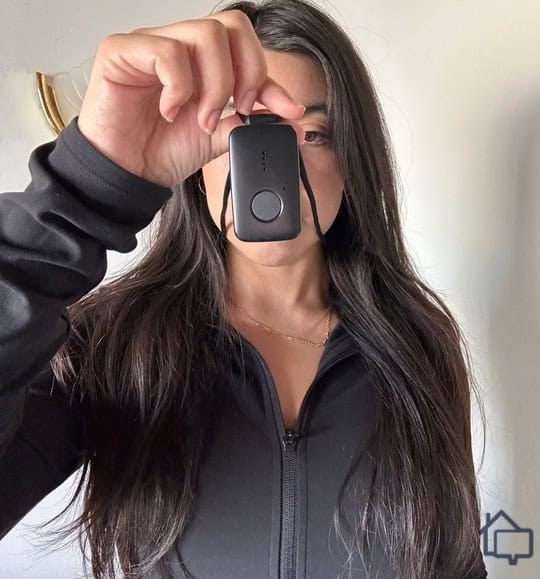
Medical Guardian Mini
Smallest mobile medical alert with 24/7 monitoring
Check Price on AmazonSmartwatch vs. Dedicated Medical Alert: The Big Decision
This is the first fork in the road, and getting it right matters more than any specific product choice.
Choose a Smartwatch (Apple Watch) If:
- Your parent is already comfortable with technology
- They own and use an iPhone
- They are willing and able to charge a device every night
- They want something that does not look medical
- They are relatively active and mobile
The Apple Watch offers fall detection, heart rate monitoring, irregular rhythm notifications, crash detection, and emergency SOS. It is a powerful health and safety device disguised as a mainstream consumer product. Many seniors prefer it because it carries no stigma. It looks like what it is: a nice watch.
The tradeoff is complexity and maintenance. It requires daily charging, an iPhone for setup and cellular connectivity, and comfort with touchscreen interactions. If your parent regularly forgets to charge their phone or struggles with small screens, the Apple Watch may create more frustration than safety.
Choose a Dedicated Medical Alert If:
- Your parent has cognitive decline or memory issues
- They are not comfortable with smartphones or touchscreens
- Charging devices daily is unreliable
- They need 24/7 professional monitoring with a human response
- They live alone and you want the highest reliability possible
The Medical Guardian Mini is a small, lightweight pendant that can be worn around the neck or clipped to clothing. Press the button and you are connected to a live monitoring center within seconds. The operator knows your parent’s name, address, medical conditions, medications, and emergency contacts. They stay on the line, assess the situation, and dispatch help if needed.
The Mini uses cellular connectivity (no Wi-Fi required) and has GPS built in. It works at home, at the grocery store, on a walk, anywhere with cell coverage. Battery life lasts up to five days on a single charge, and the charging cradle is simple: just drop the pendant in.
What “Professional Monitoring” Actually Means
This is the key differentiator between a smartwatch and a dedicated system. When the Apple Watch detects a fall, it calls 911. That is powerful, but it is a cold handoff. The 911 operator does not know your parent, does not have their medical history, and may not have the address if your parent cannot speak.
Professional monitoring through Medical Guardian works differently. The call goes to a certified Emergency Response Center staffed 24/7. The operator immediately sees a profile with your parent’s:
- Full name and home address
- Medical conditions and allergies
- Current medications
- Primary doctor’s contact information
- Emergency contacts (you, siblings, neighbors)
- Lock box code or key location for EMS access
The operator can talk to your parent through the pendant speaker, assess the situation, and make the right call. Sometimes the right response is an ambulance. Sometimes it is calling you or a neighbor. Sometimes your parent just needs reassurance after a scare. A human on the other end makes that judgment call.
Step-by-Step Setup: Medical Guardian Mini
Here is exactly what to expect when you order and set up the system.
Before the Device Arrives
- Gather medical information: You will need your parent’s medications list, doctor’s name and number, known conditions (diabetes, heart disease, etc.), and allergies.
- Choose emergency contacts: List 3-5 people in order of priority. Include at least one local contact who could physically get to your parent within 15 minutes.
- Check cell coverage: Medical Guardian uses AT&T’s network. Verify that there is strong signal at your parent’s home. You can check coverage maps online or simply test with an AT&T phone.
When the Device Arrives
- Charge the pendant fully before first use. This takes about 2 hours.
- Call Medical Guardian to activate the device and set up the monitoring profile. This call takes about 15-20 minutes. Have your medical information ready.
- Test the device by pressing the button. Tell the operator it is a test. They will confirm the connection is clear, the GPS location is accurate, and all contacts are correct.
- Walk the property while wearing the device and test it from different rooms, the yard, the garage, and the driveway. Make sure it connects reliably from everywhere your parent spends time.
Helping Your Parent Get Comfortable
The biggest challenge with any medical alert is getting your parent to actually wear it. Here are approaches that work:
- Frame it as helping you, not them: “It would give me such peace of mind to know you can reach someone if you need to.”
- Make it part of the morning routine: Pendant goes on with the glasses and hearing aids. It becomes automatic.
- Let them choose how to wear it: Neck lanyard, belt clip, or wrist strap. Whatever feels most natural.
- Normalize it: “Millions of people wear these. It is like a seatbelt. You hope you never need it, but you are glad it is there.”
Understanding the Costs
Medical alert pricing can be confusing because companies bundle hardware and monitoring fees differently. Here is a straightforward breakdown for the Medical Guardian Mini:
- Equipment: Typically included with a monitoring plan (no large upfront purchase)
- Monthly monitoring: Plans start around $30-40/month for basic monitoring
- Fall detection add-on: Usually an additional $10/month for automatic fall detection
- No long-term contract required: Month-to-month plans are available, though quarterly and annual plans offer savings
Compare this to the cost of a single ER visit after a fall where your parent lay on the floor for hours because they could not reach help. The monitoring fee pays for itself many times over in prevented complications.
Common Concerns and Honest Answers
What if they press the button accidentally?
It happens, and it is completely fine. The monitoring center handles accidental presses every day. They will simply ask if everything is okay and cancel the alert. There is no penalty or charge for false alarms.
What about shower and bath time?
The Medical Guardian Mini is water-resistant (not waterproof for submersion, but fine for showers). Many falls happen in the bathroom, so wearing it in the shower is actually recommended. For bath time, keep it within arm’s reach on the edge of the tub.
Does it work during a power outage?
Yes. The Mini is battery-powered and uses cellular connectivity. It does not depend on your home’s electricity or Wi-Fi. This is a significant advantage over smart home devices and Wi-Fi-dependent systems during storms or outages.
Frequently Asked Questions
Can I monitor my parent’s location with the Medical Guardian Mini?
Yes. The companion app lets authorized family members see the pendant’s GPS location. This is helpful for knowing your parent arrived at a doctor’s appointment or made it home from the store. Location tracking works anywhere with cellular coverage.
What happens if my parent falls and is unconscious?
If automatic fall detection is enabled (recommended), the device detects the fall pattern and contacts the monitoring center even if your parent cannot press the button. The operator will attempt voice contact through the pendant speaker. If there is no response, they dispatch emergency services to the GPS location.
How long does the battery last?
The Medical Guardian Mini lasts up to five days on a single charge. The charging cradle is designed to be simple. Just drop the pendant in. Most people charge it every night on the nightstand, similar to a phone, so battery life is rarely an issue in practice.
Can I set it up remotely or do I need to visit?
You can order the device and have it shipped directly to your parent. However, an in-person setup visit is strongly recommended. Testing the device throughout the home, helping with the initial call to activate monitoring, and physically showing your parent how to wear and charge it makes a significant difference in whether they actually use it consistently.