Telehealth went from a niche curiosity to a mainstream healthcare delivery method during the COVID-19 pandemic, and it is not going back. Medicare now covers a wide range of telehealth services. Doctors have invested in the infrastructure. Patients, especially seniors who find office visits physically draining, prefer the convenience of being seen from home.
But there is a problem. Most telehealth visits for seniors are conducted in conditions that make it nearly impossible for the doctor to provide good care. The camera is angled up at the ceiling. The lighting makes the patient look washed out or shadowed. The audio is so poor that the doctor asks the patient to repeat everything. The internet connection drops mid-sentence. And the entire visit takes place on a phone screen so small that the doctor can barely see the patient’s face, let alone examine a skin lesion or assess their color.
A bad telehealth visit is worse than no visit at all, because it creates the illusion that medical care happened when, in reality, the doctor could not see or hear well enough to assess anything meaningful. The visit gets checked off the list, but the clinical value approaches zero.
Setting up a proper telehealth station at home takes about an hour and turns virtual visits from a frustrating formality into genuine medical encounters. Here is what you need.
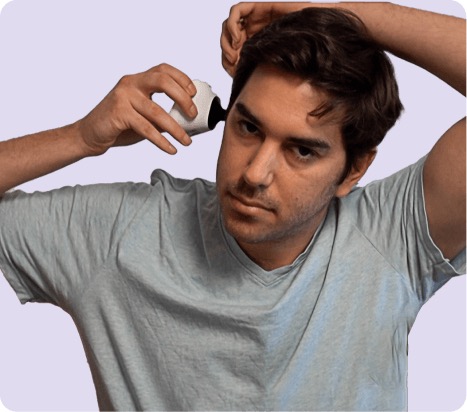
TytoCare Home Smart Exam Kit
All-in-one exam kit with stethoscope, otoscope, and camera that lets doctors examine heart, lungs, ears, and throat during video visits
Check Price on AmazonInternet Speed: The Foundation
Video quality during a telehealth visit depends almost entirely on internet speed, specifically upload speed. Most people think about download speed (how fast they can load a website or stream Netflix), but during a video call, the upload speed determines how clearly the doctor sees and hears the patient.
For a stable, high-quality video call, you need at least 5 Mbps upload speed. Most modern internet plans provide this, but many seniors are still on older, cheaper plans that may not. You can check your parent’s internet speed at speedtest.net. If the upload speed is below 5 Mbps, upgrading the internet plan is step one.
Wi-Fi signal strength matters too. If your parent’s telehealth station is far from the router, or if the signal has to pass through multiple walls, the connection may be weak even with a fast plan. A Wi-Fi extender or mesh network system can solve this. Alternatively, a wired Ethernet connection (a cable from the router to the computer) provides the most reliable connection for video calls.
The Screen: Bigger Is Better
A phone screen is too small for an effective telehealth visit. The doctor needs to see the patient clearly, and the patient needs to see the doctor clearly. A tablet (10 inches or larger) is adequate. A laptop or desktop with a webcam is better. A larger screen makes it easier for the senior to read any instructions the doctor types in the chat, see visual aids the doctor shares, and feel like they are having a face-to-face conversation rather than squinting at a tiny image.
Position the screen at eye level. If using a laptop on a desk, a stack of books or a laptop stand can raise it to the right height. The camera should be approximately at the patient’s eye line so the doctor sees a natural, head-on view. A camera angled up from a lap creates a distorted view and makes it harder for the doctor to assess the patient’s condition.
Lighting: The Most Overlooked Factor
Lighting makes or breaks a telehealth visit. If the light source is behind the patient (a window, for example), the patient appears as a dark silhouette. If the light is directly overhead, shadows pool under the eyes and chin, obscuring facial features. If the room is dim, the camera compensates by amplifying the image, which creates a grainy, noisy picture.
The ideal setup is simple: face a window during daytime visits (natural light on the face is the most flattering and clear) or use a desk lamp positioned in front of and slightly above the patient for evening visits. Ring lights designed for video calls are inexpensive and effective if natural light is not available.
The background matters too. A cluttered background is distracting. A plain wall or bookshelf behind the patient keeps the focus on the person. Some telehealth platforms offer virtual backgrounds, but these can glitch with movement and are best avoided.
Audio: Can the Doctor Hear Your Parent?
Audio problems are the most common complaint from doctors about telehealth visits with elderly patients. The patient speaks quietly. The microphone is too far away. Background noise (television, open window, fan) competes with the patient’s voice. The patient wears hearing aids that create feedback with the device’s speakers.
For most seniors, the built-in microphone on a tablet or laptop is sufficient if the device is within arm’s reach. If your parent speaks quietly, a clip-on lapel microphone ($15 to $30) plugged into the device makes a significant difference. For audio output, if your parent has hearing difficulties, over-ear headphones connected to the device provide clearer sound than the device’s built-in speakers and eliminate feedback from hearing aids.
One critical rule: turn off the television and close windows before the visit starts. Background noise that the patient has learned to tune out is still picked up by the microphone and transmitted to the doctor.
Smart Exam Kits: The Game Changer
The biggest limitation of standard telehealth is that the doctor cannot physically examine the patient. They can look and listen, but they cannot check vital signs, listen to the heart or lungs, look in the ears, or examine the throat. This limits what conditions can be diagnosed and managed remotely.
The TytoCare Home smart exam kit changes this equation dramatically. It is a handheld device that connects to the telehealth platform and includes attachments for examining the ears, throat, heart, lungs, skin, and temperature. During a video visit, the doctor guides the patient (or caregiver) through using each attachment, and the data streams to the doctor in real time.
A doctor can listen to heart sounds and lung sounds through the digital stethoscope with clinical-grade audio. They can look inside the ear canal with the otoscope attachment, which is particularly valuable for seniors who get frequent ear infections. They can examine skin lesions, rashes, and wounds with the high-resolution camera. And they can take a temperature reading that is transmitted directly into the visit record.
For seniors who find office visits physically taxing (the drive, the waiting room, the walk from the parking lot), an exam kit at home can replace a meaningful percentage of routine visits. It does not replace all visits. Hands-on examinations, blood draws, imaging, and procedures still require an office. But for follow-ups, symptom checks, and medication adjustments, a well-equipped home telehealth station provides the doctor with enough data to make confident clinical decisions.
When Telehealth Can Replace an Office Visit
Telehealth works best for:
- Medication reviews and adjustments. The doctor reviews symptoms, checks vitals (blood pressure, weight, temperature from home devices), and adjusts prescriptions. This is the most common type of senior telehealth visit and one of the most effective.
- Follow-up visits. After a hospitalization, surgery, or new diagnosis, follow-up visits often require conversation more than examination. “How are you feeling? Any side effects from the new medication? Let me see your incision.” These translate well to video.
- Mental health. Therapy and psychiatry visits work well via telehealth for most patients, including seniors. The conversation-based nature of these visits does not require physical examination.
- Chronic disease management. Diabetes, heart failure, hypertension, and COPD can all be monitored remotely when the patient has the right home devices (glucose meter, scale, blood pressure cuff, pulse oximeter). The data flows to the doctor between visits, and the video visit becomes a review and adjustment session.
- Dermatology. Skin conditions can often be assessed via high-quality video or photos, especially with the camera attachment from a device like TytoCare.
When Your Parent Still Needs to Go In
Telehealth cannot replace:
- Annual physical examinations. A comprehensive physical requires hands-on assessment that even the best exam kit cannot fully replicate.
- Acute, unclear symptoms. Sudden chest pain, severe abdominal pain, new weakness on one side of the body. These need in-person evaluation and potentially imaging, labs, or emergency intervention.
- Blood work and lab tests. Drawing blood, urine tests, and other specimen-based diagnostics require a lab visit.
- Imaging. X-rays, MRIs, CT scans, and ultrasounds require specialized equipment.
- Procedures. Anything that involves needles, instruments, or physical intervention requires an office or hospital.
A realistic goal is to replace 30% to 50% of routine office visits with telehealth. For a senior who sees multiple specialists and has monthly check-ups, that could mean eliminating four to six office visits per year. Each eliminated visit saves the physical effort of the trip, the stress of the waiting room, the exposure to other sick patients, and several hours of the caregiver’s time if they handle transportation.
Helping Your Parent Prepare for Their First Virtual Visit
The first telehealth visit sets the tone. If it goes smoothly, your parent will be willing to do it again. If it is frustrating, they will insist on in-person visits only. Here is how to set them up for success:
- Do a test run. The day before the visit, open the telehealth platform and make sure it works. Log in, test the camera and microphone, and verify the internet connection is stable. Troubleshooting on the morning of the visit is stressful for everyone.
- Write down the questions. Seniors often forget what they wanted to ask the doctor, especially under the mild stress of navigating technology. A written list on the desk next to the screen keeps the visit productive.
- Have medications visible. Line up all current medication bottles near the screen. If the doctor asks about dosages or specific drugs, everything is right there.
- Prepare vitals in advance. Take blood pressure, temperature, and weight before the visit starts and write the numbers down. The doctor will ask for these, and having them ready keeps the visit efficient.
- Be present for the first one. If possible, be in the room (or on the call) for your parent’s first telehealth visit. You can handle the technology so your parent can focus on the doctor. After one or two visits, most seniors are comfortable handling it themselves.
Building the Telehealth Station
The ideal telehealth setup is a dedicated spot in the home, always ready, no assembly required. Here is what it looks like:
- A tablet or laptop on a desk or table, plugged in and charged
- A comfortable chair at the right height so the camera captures the patient’s face at eye level
- A desk lamp positioned to light the face (or a chair facing a window for daytime visits)
- Headphones or a speaker for clear audio
- The TytoCare exam kit or similar device within reach
- A blood pressure cuff, thermometer, and scale nearby
- A notepad and pen for questions and instructions
This does not need to be a separate room. A corner of the living room or bedroom works fine. The key is that everything is in one place and ready to go, so that preparing for a telehealth visit requires nothing more than sitting down.
Telehealth is not a lesser version of medical care. When done correctly, with good equipment, proper lighting, stable internet, and a smart exam kit, it is a legitimate clinical encounter that delivers real value. For seniors who find office visits exhausting, it can be the difference between consistent medical care and appointments that get skipped because the trip is too much. And consistent care is what keeps people healthy, independent, and at home.