Is the Amazon Echo Show 8 (3rd Gen) the Right Choice for Your Senior Loved One?
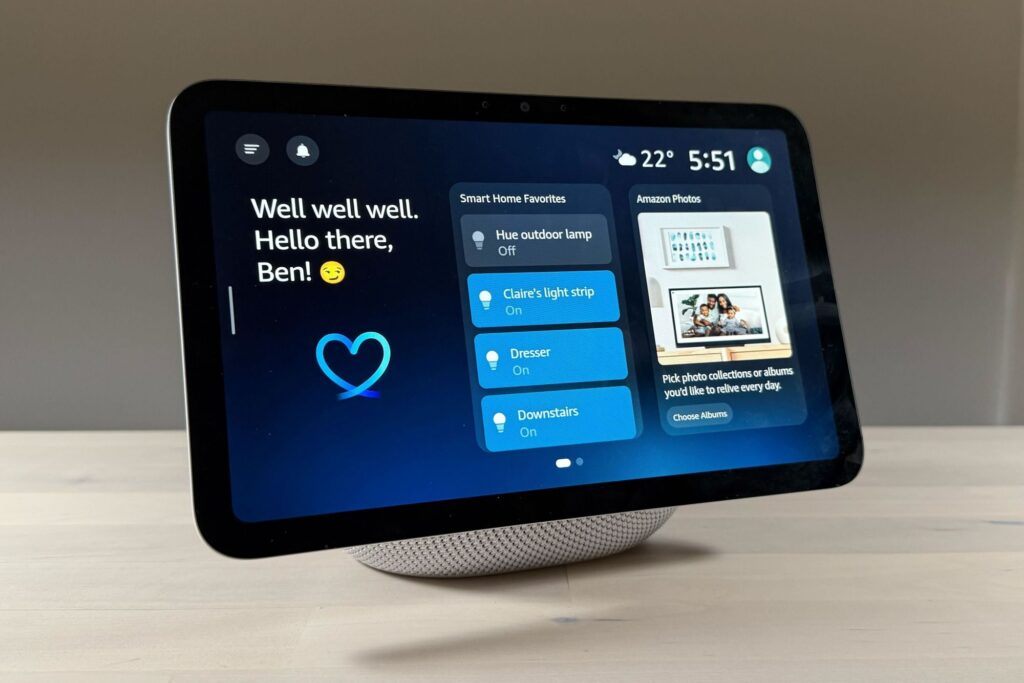
The Amazon Echo Show 8 (3rd Gen) offers a versatile solution for seniors who want to stay connected, entertained, and have a level of autonomy without requiring constant hands-on assistance. Priced at $149.99, it provides a good balance of functionality and ease of use, making it particularly valuable for seniors who might find smartphones or tablets challenging. The device is especially helpful for those living alone, as it can facilitate video calls, control smart home devices, and even serve as a digital photo frame.
For seniors, maintaining social connections and managing daily activities independently can be challenging. The Echo Show 8’s ability to make video calls through Alexa or Skype can bridge the gap for those who might struggle with traditional communication methods. Its voice-activated features reduce the need for complicated navigation, making it a practical tool for seniors. It stands out in the smart display category for its clear screen, robust sound, and ease of use, earning our recommendation for seniors needing a user-friendly technological companion.
Who This Is For (and Who It’s Not For)
The Echo Show 8 is ideal for seniors who are comfortable with basic tech or those eager to embrace smart technology without being overwhelmed by complexity. It suits individuals who wish to keep in touch with family through video calls or need a simple way to access information like weather updates, recipes, or news. It also appeals to those who enjoy music or podcasts, as the device can stream from various services effortlessly.
This device might not be the best pick for seniors who are entirely averse to technology or those who already have a comprehensive smart home setup managed by other ecosystems like Apple or Google. If your senior loved one struggles with memory issues and might inadvertently disable the device, consider options with more passive monitoring, such as a GPS tracker or a dedicated medical alert system.
Why This Beats the Alternatives
The Amazon Echo Show 8 distinguishes itself from competitors like the Google Nest Hub and Facebook Portal with its blend of features tailored to senior users. The Echo Show 8’s screen size hits a sweet spot,large enough to see clearly, yet compact enough to fit on a small table or counter. Its integration with Alexa makes voice commands intuitive and straightforward, allowing seniors to perform tasks without navigating complex menus.
Unlike the Facebook Portal, which primarily focuses on video chat, the Echo Show 8 offers a broader range of functionalities including home automation controls and multimedia options, providing more comprehensive support for daily needs. Additionally, its compatibility with a wide range of smart home devices and services makes it a more versatile choice for long-term use.
Key Features That Matter for Seniors
Display Quality: The Echo Show 8 features an 8-inch HD screen offering clear visuals for video calls and photo displays. This size is optimal for seniors who may struggle with smaller screens, providing enough clarity to read text and view images without excessive squinting.
Voice Control: Alexa’s voice control functionality is central to the Echo Show 8, allowing seniors to operate the device without relying on touch controls. This feature is crucial for those with dexterity challenges, enabling them to manage settings, make calls, or play music with simple voice commands.
Video Calling: The ability to make video calls via Skype or Alexa is significant for maintaining social connections. For seniors, seeing family members can alleviate feelings of isolation, and the straightforward process ensures they can communicate without technical difficulties.
Smart Home Integration: The Echo Show 8 integrates seamlessly with various smart home devices, allowing seniors to control lights, thermostats, and even security cameras with ease. This can enhance their home environment by making it safer and more comfortable.
Sound Quality: Good sound quality is essential for seniors with hearing impairments. The Echo Show 8 is equipped with powerful speakers that provide clear audio for calls, music, and voice responses, ensuring seniors don’t miss important information.
Setup: What to Expect
Setting up the Amazon Echo Show 8 typically takes around 15 to 30 minutes. Begin by unboxing the device and placing it on a stable surface near a power outlet. Plug it in and follow the on-screen instructions to connect to Wi-Fi. The device will guide you through the initial setup, including selecting your preferred language and updating any necessary software.
After the physical setup, you’ll need to link the Echo Show to an Amazon account, which a caregiver can handle. This involves downloading the Alexa app on a smartphone or tablet, signing in with the Amazon account, and pairing it with the device. Once paired, you can customize settings like device name and preferred news sources. It’s advisable to test video call functionality and demonstration of voice commands to ensure the senior user feels comfortable using the features.
What to Know Before Buying
While there are no ongoing fees to use the Echo Show 8, some features may require subscriptions, such as music or video streaming services. These should be considered if your senior plans to use these features extensively. The device itself doesn’t incur a subscription fee, but adding services like Amazon Prime can enhance functionality.
Compatibility is another factor to consider. The Echo Show 8 works best with other Amazon devices and services. Ensure that any existing smart home devices are compatible with Amazon Alexa to avoid functionality issues. Replacement parts or repairs might involve costs, so checking warranty information and customer service policies is wise before purchasing.