Is the GrandPad Worth It?
The GrandPad offers a tailored tablet experience designed specifically for seniors who may struggle with the complexity of modern technology. Its simplified interface, large icons, and easy navigation can be a game-changer for older adults who wish to stay connected with family without the hassle of a standard tablet. With features like video calling, photo sharing, and internet browsing, the GrandPad helps bridge the digital gap, making it a strong contender for those who find traditional devices overwhelming.
For many seniors, staying connected is not just a luxury but a necessity that can combat isolation and loneliness. The GrandPad is designed with these stakes in mind, offering a way to effortlessly communicate with loved ones through video calls and messages. While the price of $199.00 is an upfront investment, the value it offers in terms of connectivity and accessibility can be significant for the right user. Based on our research, the GrandPad stands out as our top pick for senior tablets because it simplifies technology without sacrificing functionality.
Who This Is For (and Who It’s Not For)
The GrandPad is ideal for seniors who have little to no experience with technology yet want a straightforward way to connect with their family and access basic internet services. It’s particularly useful for those who may struggle with standard tablets due to vision, dexterity, or memory challenges. If your parent is eager to stay in touch and enjoy a user-friendly digital experience, the GrandPad is a worthy consideration.
However, if your parent is already comfortable using more advanced technology, such as an iPad or Android tablet with accessibility settings adjusted, the GrandPad may feel limiting. Additionally, if your focus is on a device for tracking safety rather than communication, you might consider a GPS-enabled wearable instead.
Why This Beats the Alternatives
The GrandPad sets itself apart from other tablets with its senior-centric design and comprehensive support system, making it a better option than more generic tablets. Unlike standard tablets, the GrandPad’s interface is stripped down to the essentials, with large icons and limited options to prevent confusion. This simplified approach means seniors spend less time troubleshooting and more time enjoying their device.
Furthermore, GrandPad includes a dedicated support service that family members can access to assist with any technical issues. This added layer of support is rare among tablet options and significantly benefits those who might otherwise struggle to resolve tech-related problems. Products like the Apple iPad and Amazon Fire Tablet may offer broader app ecosystems, but they lack the senior-friendly design and support features that make GrandPad exceptional.
Key Features That Matter for Seniors
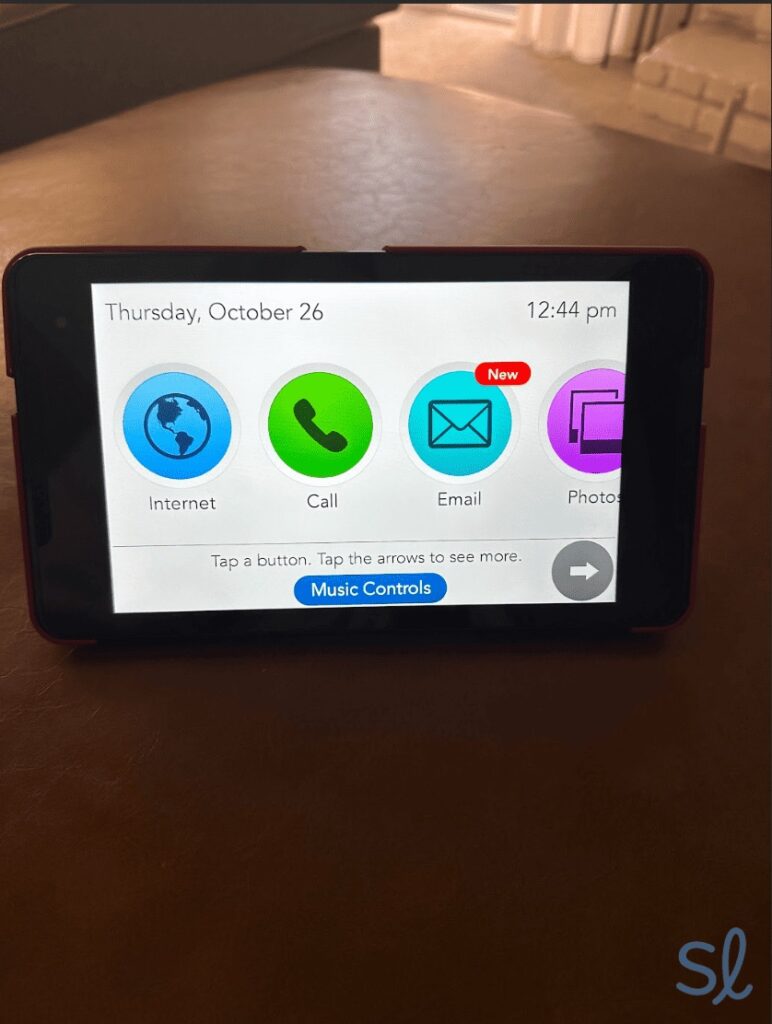
Simplified Interface: The GrandPad’s interface is designed to be intuitive for seniors, featuring large, colorful icons that are easy to see and tap. This matters greatly for users with vision impairments or dexterity issues, as it reduces the need for precise touchscreen interactions. Confirm the icon size on the product page to ensure it meets your needs.
Video Calling: With an integrated video call feature, seniors can easily connect with family members without navigating through complex app stores or downloads. This is crucial for maintaining social connections, especially for those who live alone or far from family.
Curated Content: GrandPad provides curated content, such as games, music, and news, tailored to seniors’ interests. This feature not only entertains but also helps keep the mind active, which can be particularly beneficial for cognitive health.
24/7 Support: The round-the-clock support service ensures that help is just a call away, reducing frustration for seniors and their families. This is especially helpful for those who may not have tech-savvy relatives nearby to assist with troubleshooting.
No Wi-Fi Required: The GrandPad can operate without Wi-Fi by using a 4G LTE connection, meaning it remains functional even if the senior’s home Wi-Fi is unreliable. This can be a lifesaver for those in areas with spotty internet service.
Setup: What to Expect
Setting up the GrandPad is a straightforward process that typically takes about 30 minutes. Unbox the device, ensure it is charged, and power it on. The GrandPad comes with a charging cradle, which is easier to use than a standard charging cable, especially for those with limited dexterity.
Once powered on, the tablet walks you through an initial setup process. Family members can help by downloading the GrandPad app on their own devices to manage contacts and settings remotely. This app allows caregivers to add family contacts, set reminders, and monitor the device usage if needed. Testing the video call feature and ensuring access to essential apps like email and photo sharing should be part of the initial setup. These steps ensure the senior is comfortable with the new device and can use it effectively right away.
What to Know Before Buying
The GrandPad requires a monthly subscription, typically around $40, which covers cellular service and 24/7 support. It’s essential to budget for this ongoing cost. Without this subscription, the device loses much of its functionality, as the support service and LTE connection are dependent on it.
Consider coverage limitations if the senior travels or lives in an area with weak cellular signals. While the device is designed to operate without Wi-Fi, it’s only as reliable as the local LTE network. The battery life is decent for a tablet, but regular charging is necessary to keep it operational. Replacement parts, such as charging cradles, should be priced on the GrandPad website, as these can incur additional costs over time.