Is the Amazon Echo Dot (5th Gen) Worth It for Voice Reminders?
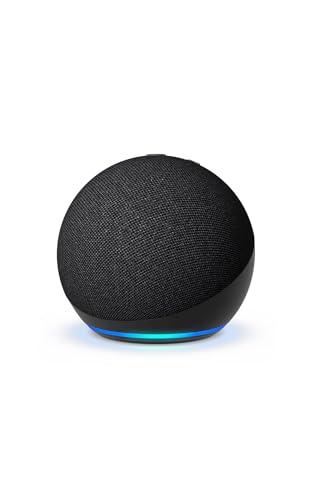
If you’re considering a device that can help your aging parent manage daily tasks through voice reminders, the Amazon Echo Dot (5th Gen) might be what you need. Priced at around $50, it provides a budget-friendly way to help seniors with memory prompts, such as medication schedules or appointment reminders. Our bottom-line recommendation is that this device is a solid choice for seniors who are comfortable with some technology and can benefit from having a virtual assistant at home.
For many older adults, the ability to remember key daily activities is crucial. Missing a medication dose or forgetting a doctor’s appointment can have significant consequences on their health and well-being. This is why a voice assistant like the Echo Dot is valuable,it can be programmed to provide gentle reminders throughout the day. Based on our research, the Echo Dot stands out due to its affordability and the ease with which it integrates into daily life, particularly for seniors who are familiar with basic smart devices.
Who This Is For (and Who It’s Not For)
The Amazon Echo Dot (5th Gen) is well-suited for seniors who live independently and have a basic comfort level with technology. It’s ideal for those who can use voice commands and would benefit from reminders about tasks like taking medication, attending appointments, or even simple things like watering plants. If your parent can interact with simple voice commands and has a stable internet connection, this could be an excellent tool to enhance their daily routine.
However, this may not be the right choice for seniors who have cognitive impairments such as advanced dementia, where voice commands might be confusing or hard to remember. In these cases, a more straightforward reminder system, like a daily pill organizer with alarms, may be more effective. Additionally, if your parent already uses a comprehensive smart home system such as Google Nest, integrating another brand might create unnecessary complexity.
Why This Beats the Alternatives
The Amazon Echo Dot (5th Gen) outshines alternatives due to its robust feature set and affordability. Compared to the Google Nest Mini, it offers better integration with Amazon’s wide range of smart home devices, providing a more cohesive experience if you plan to expand the smart capabilities at home. The Echo Dot also supports a wide variety of skills, allowing users to extend its functionality beyond simple reminders to include services like weather updates, music streaming, and audiobook playback.
Another reason this device wins is its sound quality. While not an audiophile-grade speaker, the Echo Dot offers clear and loud enough sound for voice responses, which can be crucial for seniors with hearing difficulties. This makes it more effective for delivering reminders compared to other mini smart speakers.
Key Features That Matter for Seniors
Voice Command Capability: The Echo Dot allows seniors to set reminders using voice commands, which is essential for those who might not be comfortable typing on a smartphone or tablet. This hands-free interaction can significantly enhance usability for seniors with limited dexterity or vision.
Integration with Alexa: As part of the Alexa ecosystem, the Echo Dot can connect with various smart devices around the home, enabling seniors to control lights, thermostats, and more through voice. This can help enhance independence while also offering convenience.
Sound Quality: The Echo Dot is equipped with a speaker that delivers clear audio, which is particularly beneficial for seniors with mild hearing loss. Being able to hear reminders and responses clearly ensures that the device is effective in its role.
Routine Automation: Seniors can automate daily routines with Alexa, such as having the device recite daily schedules or important tasks each morning. This feature can help structure the day and ensure important activities are not forgotten.
Affordability: At a retail price of around $50, this device is accessible without a high financial commitment, especially compared to hiring a personal assistant or caregiver for daily reminders.
Setup: What to Expect
Setting up the Echo Dot takes about 10,15 minutes with the right preparation. Start by plugging the device into a power outlet and downloading the Amazon Alexa app on a smartphone or tablet. Make sure to place the Echo Dot in a central location in the home where it can be easily accessed by voice.
Next, use the Alexa app to connect the Echo Dot to the home Wi-Fi network. This step involves following the on-screen prompts to register the device to an Amazon account. It’s advisable for a family member or caregiver to handle the initial setup, including creating common reminders. Once connected, test the device by asking it to set a reminder or perform a simple task to ensure everything is functioning as expected.
What to Know Before Buying
Though there are no monthly fees associated with using the basic features of the Echo Dot, some skills or additional services might require subscriptions. It’s important for you or a caregiver to review and understand these potential additional costs before enabling new features.
Be aware that the device relies on a stable Wi-Fi connection. If service lapses, the Echo Dot will not be able to perform tasks or provide reminders. Additionally, while Alexa is compatible with many devices, you should check compatibility if you plan to integrate it with existing smart home devices. Replacement parts for the Echo Dot itself are generally not required, but maintaining a functioning Wi-Fi network is crucial for ongoing use.