Is the Flipper Big Button Universal TV Remote Right for Your Parent?
The Flipper Big Button Universal TV Remote is designed to solve a very specific problem: the frustration many seniors face with overly complicated remote controls. For seniors who struggle with small buttons, confusing layouts, or accidental channel changes, this remote offers a straightforward solution. It’s ideal for someone who primarily needs an easy way to control their TV and cable box without hassle. Our bottom-line recommendation is that if your parent often complains about the complexity of their current remote, the Flipper remote is worth considering.
For seniors, the ability to enjoy TV without the stress of technology is important. Television is a primary source of entertainment, news, and connection to the world for many older adults. When a remote is difficult to use, it can interrupt this vital connection. The Flipper remote simplifies the experience by focusing on the essentials and reducing the chances of unwanted settings changes. This makes it a particularly compelling choice for seniors with vision impairments or cognitive challenges, as its simplicity can alleviate much of the frustration they might otherwise face. This ease of use is why we’ve selected it as the top pick in the large button remote category.
Who This Is For (and Who It’s Not For)
This remote is perfect for seniors who have difficulty with the small buttons and complicated layouts of standard remotes. It’s especially beneficial for those with vision impairments, arthritis, or reduced dexterity, as the larger buttons are easier to press and see. Additionally, if a senior tends to get overwhelmed by the numerous buttons and functions of modern remotes, the simplified design of the Flipper provides a less stressful experience.
However, if your parent is tech-savvy and enjoys using advanced features found on smart remotes, this may not be the right choice. This is a basic remote, focused on simplicity rather than advanced capabilities. For seniors who want to control smart home devices or access streaming services directly, a more complex remote like the Logitech Harmony might be more appropriate. Moreover, if their current remote is paired with a smart TV or advanced cable box that requires a specific remote for full functionality, the Flipper might not be compatible enough to meet their needs.
Why This Beats the Alternatives
The Flipper Big Button Universal TV Remote stands out from its competitors due to its intuitive design and focus on simplicity. Unlike other universal remotes that try to pack in features, the Flipper concentrates on doing a few things well. It has a streamlined setup, which involves just a few steps compared to the often lengthy and complicated setup processes of competitors like the GE Universal Remote.
Another reason the Flipper excels is its ease of use. The remote has a lock feature that prevents accidental reprogramming, a common issue with other universal remotes. This means fewer frustrating interruptions for seniors who may not have the patience to troubleshoot these problems. Additionally, it combines the TV and cable box controls into one easy-to-use remote, reducing the need to juggle multiple devices,something the RCA Big Button Remote doesn’t quite manage as seamlessly.
Key Features That Matter for Seniors
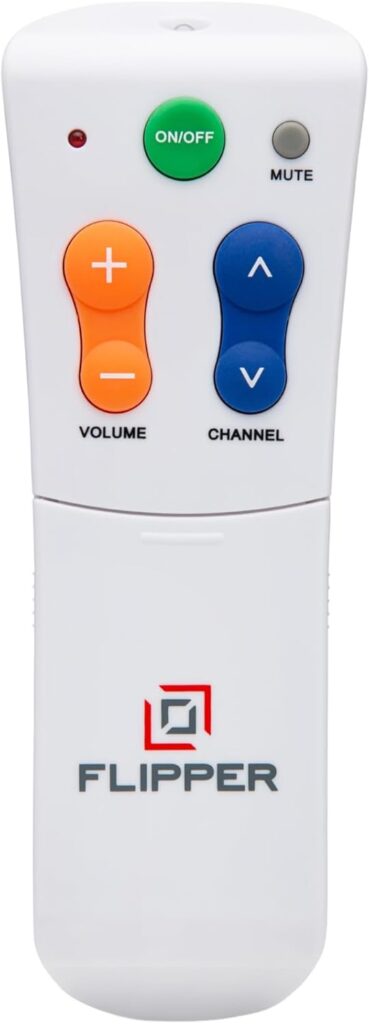
Large Buttons: The Flipper remote features large, clearly labeled buttons that are easy to see and press. This is crucial for seniors with vision impairments or arthritis, as it minimizes the strain on their eyes and hands. The simple design helps reduce confusion, making it easier to navigate channels and adjust the volume without accidentally pushing the wrong button.
Simple Interface: Unlike many remotes that are cluttered with buttons for features many seniors don’t use, the Flipper focuses on core functions: power, channel, and volume. This makes it ideal for someone who wants to watch TV without having to navigate unnecessary buttons that could lead to confusion or frustration.
Compatibility: The Flipper remote is compatible with most TVs and cable boxes, which means it can replace two remotes with one. For seniors, this means less clutter and fewer devices to misplace. While it covers a broad range of models, it’s still important to check compatibility with your specific devices before purchasing.
Locking Feature: One standout feature is the ability to lock the settings, which prevents the remote from being accidentally reprogrammed. For seniors who might accidentally press a sequence of buttons that resets the device, this feature is invaluable, reducing the risk of needing technical help to restore settings.
Simple Setup: Setting up the Flipper remote is straightforward and doesn’t require technical expertise. This is particularly beneficial for caregivers or seniors who might be intimidated by technology, as it ensures the device can be up and running quickly without stress.
Setup: What to Expect
Setting up the Flipper Big Button Universal TV Remote is a straightforward process that typically takes about 15-20 minutes. Start by removing it from its packaging and inserting the batteries, which are usually included. Next, gather the current remotes for your TV and cable box, as you’ll need them for the programming process.
Turn on both your TV and cable box. Using the Flipper, hold down the TV button until the LED lights up, then enter the code for your TV model (which you can find in the accompanying manual). Repeat this process for the cable box. Once both devices are programmed, test the remote by using it to change channels and adjust the volume to ensure everything works correctly. This simple setup means less time spent frustrated over instructions and more time watching favorite shows.
What to Know Before Buying
One of the main advantages of the Flipper remote is that there are no ongoing monthly fees or subscriptions to worry about. Once purchased, it’s a one-time investment, so you won’t need to budget for anything beyond occasional battery replacements.
However, there are some coverage limitations. The remote is designed primarily for standard TV and cable box functionality. If the senior’s TV setup includes smart features or multiple external devices like DVD players or sound systems, you may need a more versatile remote. Additionally, battery life can vary, so it’s important to have a few spare AAA batteries on hand to avoid interruptions. Finally, while replacement parts are not typically needed, the remote is not indestructible, so it’s wise to handle it with care to extend its lifespan.