Is the Clarity XLC3.4 Big Button Caption Phone Worth It?
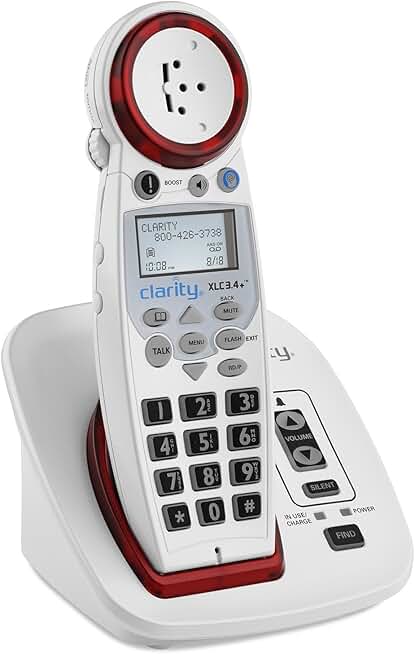
For seniors who struggle with hearing on the phone or have difficulty managing small buttons, the Clarity XLC3.4 Big Button Caption Phone is an excellent choice. This phone combines amplified sound with large, easy-to-read buttons to address common challenges faced by older adults. It’s particularly useful for those who are hard of hearing or have vision impairments. Based on research, this phone stands out as an effective solution for those needing clearer conversations and simpler phone navigation.
Ensuring effective communication is crucial for seniors, especially when living independently. The Clarity XLC3.4 helps by offering features like high volume amplification and bright visual ringers that cater to specific sensory needs. For those who must keep in touch with family and caregivers, this phone provides peace of mind without the ongoing costs associated with some other high-tech solutions. It’s a one-time purchase that significantly improves daily communication, making it our top pick for ease of use and practicality.
Who This Is For (and Who It’s Not For)
The Clarity XLC3.4 is perfect for seniors experiencing hearing loss and those with limited dexterity or vision. If your parent finds regular phones challenging due to small buttons or hard-to-hear audio, this phone offers a more accessible design. It’s also a great option for seniors who might not be comfortable with smartphones or more complicated devices.
This is not the ideal choice if your loved one already uses a smartphone with hearing aid compatibility or if they rely on features like video calling. In such cases, a smartphone with amplified settings or a captioned phone with internet connectivity like the CaptionCall may be more suitable. Additionally, if portability is essential, a mobile phone solution with similar features might be better.
Why This Beats the Alternatives
The Clarity XLC3.4 distinguishes itself from competitors like the Panasonic Amplified Cordless Phone by focusing on the essentials: sound amplification and button size. It offers one of the highest amplification levels without distortion, making it a standout for those with significant hearing challenges. Additionally, its intuitive design makes it more straightforward for seniors to use compared to multi-function devices.
Compared to alternatives like the CapTel Captioned Telephone, the Clarity XLC3.4 doesn’t require internet connectivity, which can be a deal-breaker for seniors without reliable access. Its simplicity and focus on core features like sound clarity and visibility ensure it remains user-friendly and effective, addressing the primary concerns of hearing and visual aid without unnecessary complexity.
Key Features That Matter for Seniors
Amplified Sound: The Clarity XLC3.4 is known for its significant sound amplification, which can be a game changer for those with moderate to severe hearing loss. It boosts the incoming voice volume to an impressive level, allowing for clearer conversations without the need for additional hearing aids. This feature is especially crucial for seniors who have difficulty hearing even with hearing aids.
Large, Backlit Buttons: Seniors with vision impairments will appreciate the extra-large, backlit buttons. This feature helps prevent dialing errors and makes the phone easier to use in various lighting conditions. It’s particularly beneficial for those who may struggle with dexterity, as it reduces the strain of pressing small buttons.
Visual Ringer Alerts: The phone includes bright visual ringers that can be seen from across the room. This is particularly useful for those who may not hear the phone ring due to hearing difficulties. The visual cues ensure that calls are not missed, maintaining essential lines of communication.
Hearing Aid Compatibility: The XLC3.4 is compatible with hearing aids, providing a seamless experience for users who rely on them. This compatibility ensures that the sound is transmitted clearly without interference, enhancing the overall phone experience for hearing aid users.
Speakerphone Functionality: For hands-free conversations, the Clarity XLC3.4 includes a speakerphone feature. This is beneficial for seniors with limited hand mobility, allowing them to engage in conversations without holding the phone physically.
Setup: What to Expect
The physical setup of the Clarity XLC3.4 is straightforward and should take about 15 to 20 minutes. Start by unpacking the phone and connecting it to a phone line. Plug it into a power outlet using the included adapter. The large buttons and clear instructions make it easy to see what goes where, ideal for seniors who might be setting it up themselves.
Once physically connected, there’s no need for an app or complex configuration. Adjust the volume settings to the desired level and test the ringer and speakerphone features to ensure everything works as expected. Caregivers can assist with these steps to ensure that the settings are optimally adjusted for the user’s needs. Testing a call to verify sound clarity and volume is a good final step before regular use.
What to Know Before Buying
One of the benefits of the Clarity XLC3.4 is that there are no monthly fees or subscription requirements. This makes it an affordable choice in the long run, as you only need to consider the upfront cost of the device itself. It’s a one-time investment into a product designed to improve daily life without hidden costs.
However, it’s important to note that it requires a landline connection to function. For seniors who have moved away from using traditional phone lines, this could be a limitation. Additionally, while it offers excellent sound amplification and visual cues, it lacks internet-based features some might find necessary. Replacement parts like additional handsets are available but consider this when budgeting for long-term use.