Is the Amazon Kindle Paperwhite (12th Gen) Worth It for Seniors?
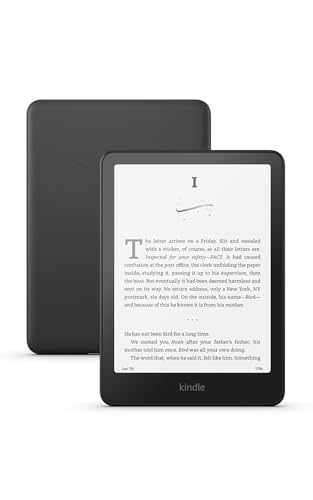
For seniors who love reading but find physical books cumbersome, the Amazon Kindle Paperwhite (16 GB) 12th Generation offers a practical solution. With its lightweight design and adjustable features, it provides a comfortable reading experience without the bulk of traditional books. If your primary goal is to allow a senior to enjoy reading without eye strain or the need for frequent trips to the library, the Kindle Paperwhite is a strong contender. It’s particularly useful for those who appreciate digital convenience and need an e-reader that’s easy on the eyes.
Reading is a cherished pastime for many seniors, but as eyesight changes, the need for a device that can adapt to personal comfort becomes important. What makes the Kindle Paperwhite stand out is its ability to increase font size, adjust lighting, and hold thousands of books, making it an ideal companion for seniors who might otherwise struggle with traditional print. While there’s an upfront cost of $160, the investment pays off in terms of ease of use and accessibility features tailored to older adults. This e-reader is a paperless, portable library, offering endless hours of reading without the potential strain of holding a heavy book.
Who This Is For (and Who It’s Not For)
This Kindle is a perfect fit for seniors who enjoy reading and could benefit from adjustable text sizes and lighting. It’s especially suitable for those living in small spaces where storing numerous books isn’t feasible. If your parent or loved one enjoys reading anywhere,be it in bed, in a comfy chair, or while traveling,the Kindle Paperwhite’s portability is a major plus.
However, this e-reader might not be the best choice for individuals who are not comfortable with technology or prefer the tactile experience of holding a real book. For those who need a device primarily for audiobooks, a dedicated audiobook player like the Victor Reader Stream might be more suitable. Additionally, if a senior has severe vision impairment, devices with larger screens or those specifically designed for low vision, such as the HumanWare Explore 8, may provide a better experience.
Why We Picked the Kindle Paperwhite
The Kindle Paperwhite stands out because of its blend of accessibility features and user-friendly design. Compared to alternatives like the Nook GlowLight 4, the Kindle offers a better balance of features that cater to seniors, including a higher resolution screen and a more robust ecosystem of books and audiobooks through Amazon’s store. The fact that it’s waterproof is another advantage, reducing the worry of accidental spills, an appealing feature for those who enjoy reading in a bath or by the pool.
Furthermore, its battery life is exceptional, often lasting weeks on a single charge, which means it requires less frequent attention,a boon for seniors who might forget regular charging. Its intuitive interface also makes navigation easier, reducing the learning curve for those who aren’t as tech-savvy.
Key Features That Matter for Seniors
Adjustable Text Size: The Kindle Paperwhite allows users to increase the font size significantly, making it easier for those with visual impairments to read comfortably. This feature is crucial for a senior who finds small print difficult to read, as it reduces eye strain and makes reading more enjoyable.
Backlight and Warmth Adjustment: The built-in adjustable light allows reading in various lighting conditions without straining the eyes. Seniors can control the brightness and even the warmth of the screen, which can help reduce blue light exposure during evening reading sessions.
Lightweight Design: Weighing less than a paperback, the Kindle Paperwhite is easy to hold for long durations, which is beneficial for seniors who might have arthritis or difficulty holding heavier books. Its compact size also makes it easy to carry around, whether going for a walk or traveling.
Long Battery Life: A single charge can last weeks, not days, which is a significant benefit for seniors who may not remember to charge their devices frequently. This feature alleviates one more potential source of frustration, allowing uninterrupted reading time.
Waterproof Rating: The Kindle Paperwhite is designed to withstand accidental spills, which means seniors can enjoy reading by the pool or in the bath without anxiety. This added durability also adds to the device’s longevity, making it a reliable choice.
Setup: What to Expect
Setting up the Kindle Paperwhite is straightforward and can typically be completed in under an hour. Start by unboxing the e-reader and charging it fully using the included USB cable. The device is ready to use once charged, and its lightweight design means it can be comfortably handled by seniors with limited dexterity.
Next, connect the Kindle to a Wi-Fi network. This step is crucial as it allows the device to download books from Amazon’s digital store. Registering the device requires an Amazon account, which can either be set up by the senior or a caregiver. Once registered, you may want to assist in downloading a few books or setting up a Kindle Unlimited subscription if desired. The intuitive interface guides you through these steps, but a caregiver might need to help initially, especially if the senior is unfamiliar with digital devices.
What to Know Before Buying
Be aware that while there are no monthly fees to operate the Kindle Paperwhite, purchasing books or subscribing to services like Kindle Unlimited will incur additional costs. Kindle Unlimited offers access to a large library of books for a monthly fee, which might be worth considering if your senior loves to read.
In terms of compatibility, ensure that the Wi-Fi network the senior plans to use is reliable, as downloads depend on it. Consider investing in a protective case to safeguard against drops. Replacing a damaged screen can be costly, so a case is a wise precaution. Also, note that while the Kindle Paperwhite supports audiobooks, they need to be played through Bluetooth headphones or speakers, as there is no built-in speaker.