Is the Jitterbug Flip2 by Lively Worth It?
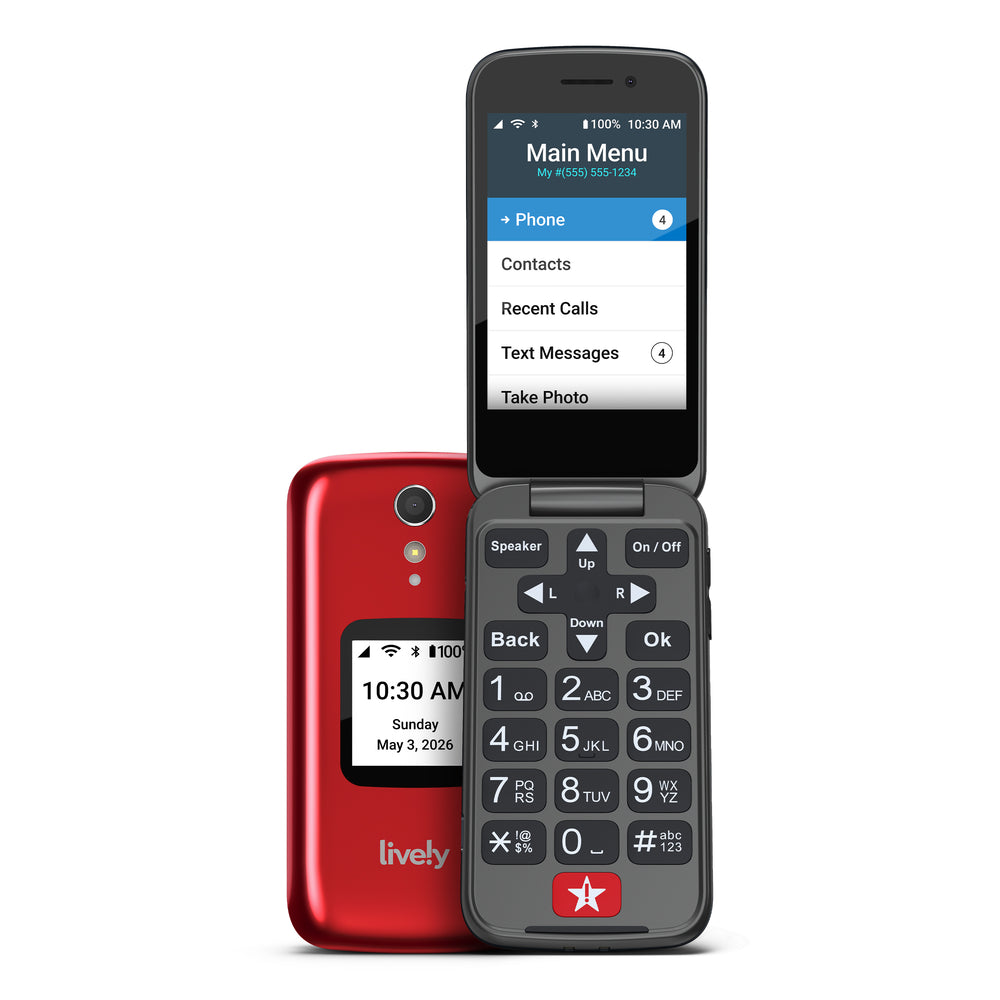
The Jitterbug Flip2 by Lively is designed to address a crucial need for seniors: reliable, easy-to-use emergency communication. It’s particularly useful for those living alone or who may struggle with more complex smartphones. With straightforward features and a dedicated emergency button, this device provides a simple solution. However, it does come with a price of $99 upfront and a monthly service fee of $25. Based on our research, this is a solid option for seniors who prioritize ease of use and reliable emergency support.
For seniors, the stakes are high when it comes to emergency communication. A device like the Jitterbug Flip2 can be a lifeline, offering not just a phone but also a connection to urgent help if needed. The $25 monthly fee is a manageable cost for many, considering the peace of mind it provides. We recommend the Jitterbug Flip2 for its simplicity and effectiveness, particularly for seniors who find smartphones cumbersome and want a more straightforward device.
Who This Is For (and Who It’s Not For)
The Jitterbug Flip2 is ideal for seniors who prefer a simple, flip phone design over modern smartphones. It suits those who value having a dedicated emergency button and straightforward communication features. If a senior is primarily looking for a device that combines phone functionality with emergency support, this is a fitting choice.
However, this might not be the best pick for seniors who are already comfortable using a smartphone or have an Apple Watch with fall detection, which offers similar emergency features. For dementia patients who may not remember to press the emergency button, a GPS tracking device with automatic alerts could be a more suitable alternative.
Why This Beats the Alternatives
The Jitterbug Flip2 stands out because of its focus on simplicity and dedicated emergency assistance. Unlike some competitors, it provides a large, red emergency button directly on the phone, which is crucial for immediate access. Additionally, Lively’s services are specifically designed for senior users, offering 24/7 access to urgent response agents. Where other devices might prioritize high-tech features, the Jitterbug Flip2 focuses on making emergency communication accessible without the complexity of a smartphone.
Compared to other emergency phones on the market, the Jitterbug Flip2’s design is particularly beneficial for seniors with visual or dexterity challenges. The large buttons and bright screen make it easier to use, and the simplicity of its interface ensures that users can quickly make calls or access emergency services.
Key Features That Matter for Seniors
Emergency Button: The Jitterbug Flip2 includes a prominent emergency button that allows users to connect instantly with Lively’s emergency monitoring service. This feature is critical for seniors who need immediate assistance and may not have the time or ability to navigate through a phone’s menu in an emergency.
Large Display: The phone features a sizable, bright screen that enhances readability for users with vision issues. It ensures that users can clearly see who is calling or easily navigate the phone’s simple menu.
Simple Menu: The Jitterbug Flip2 has a straightforward menu structure, designed with seniors in mind. This simplicity helps users who may have memory or cognitive challenges navigate their phone without frustration.
Loud Speaker: Equipped with a loud, clear speaker, this phone caters to those with hearing difficulties, ensuring that calls are easily heard and understood.
Voice Dialing: Voice dialing provides an additional layer of convenience, allowing seniors to make calls without navigating the keypad, which is particularly useful for those with dexterity issues.
Setup: What to Expect
Setting up the Jitterbug Flip2 is relatively straightforward and should take about an hour. Start by unboxing the phone and charging it fully. The physical setup is uncomplicated and only requires plugging the charger into a standard outlet and connecting it to the phone. Ensure that it powers on and confirm that all buttons and functions are working properly.
Next, set up the Lively service, which includes activating your account. This can be done online or by calling customer service. Caregivers may need to help the senior user with this step, as it involves entering personal information and setting up emergency contacts. Testing the emergency button and familiarizing the user with basic functions such as answering calls and using voice dialing are good final steps to ensure comfort with the device.
What to Know Before Buying
Be aware of the $25 monthly fee for the Lively service, which is necessary to maintain emergency connectivity. This service fee is in addition to the initial cost of $99 for the phone itself. If the service is not maintained, the emergency button will not connect to the monitoring agents, significantly reducing the device’s effectiveness.
Consider the coverage limitations. The Jitterbug Flip2 relies on cellular networks that may not be available in extremely remote areas. It’s essential to check the available coverage in your area prior to purchasing. Additionally, its battery life is solid for regular use but may require charging every few days. Ensure compatibility with any existing hearing devices, and be prepared for potential costs for any replacement parts or additional service features.