Is the Skylight Frame Worth It?
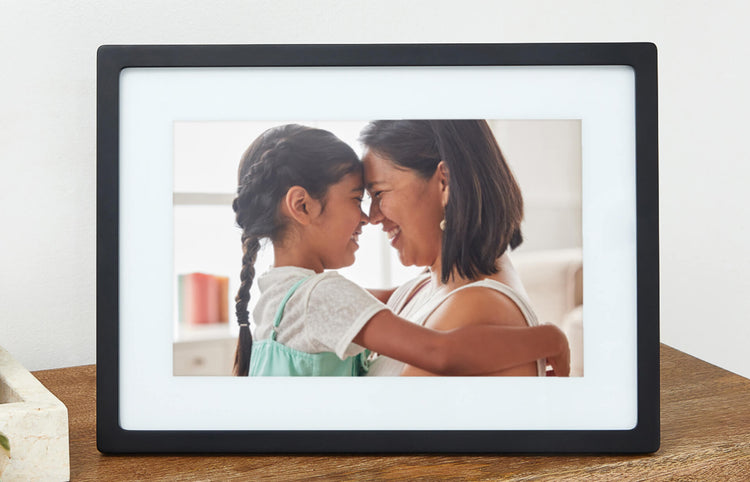
The Skylight Frame addresses a common issue faced by families today: keeping seniors connected with their loved ones, visually and emotionally, without the need for complex technology. This digital frame is especially useful for parents or grandparents who may live far from family members and can benefit from seeing new photos almost instantly. Based on our research, the Skylight Frame is a solid choice for seniors due to its ease of use and the emotional connection it fosters through shared images. At $159.00, it provides a reasonable investment for those prioritizing family connection.
For seniors, particularly those who may not be as tech-savvy, maintaining bonds with family through shared images can have significant emotional benefits. This digital frame eliminates the need to fiddle with smartphones or computers to view family photos, making it an appealing option for seniors who may struggle with more complicated technology. This is why we picked the Skylight Frame: it combines simplicity with effectiveness, allowing seniors to enjoy photos effortlessly.
Who This Is For (and Who It’s Not For)
The Skylight Frame is ideal for seniors who want to stay visually connected with their family without navigating complex devices. For example, it’s perfect for those who appreciate seeing the latest family photos but are not comfortable using email or social media to receive updates. It’s also great for families spread across different locations, as photos can be sent remotely and appear almost instantly.
This product might not be the best choice for seniors who already have access to smart devices like tablets or smartphones where they can easily access shared photo albums. Those seeking a digital frame with more advanced features, such as video playback or a touchscreen interface, might prefer alternatives like the Nixplay Seed Wave, which offers additional multimedia options.
Why This Beats the Alternatives
The Skylight Frame stands out due to its simplicity and ease of use, which are critical for seniors. Unlike some digital frames that require navigating complex menus, the Skylight Frame operates with minimal buttons and a user-friendly interface. What truly sets it apart is its email photo-sharing capability, which allows family members to send pictures directly to the frame through a dedicated email address. This feature is both unique and straightforward.
Furthermore, the setup process is hassle-free compared to competitors like the Pix-Star Digital Photo Frame, which requires more steps and technical know-how. The Skylight Frame’s streamlined process ensures that photos can start appearing on the frame quickly, without the need for extensive setup or ongoing management, making it an ideal choice for less tech-savvy users.
Key Features That Matter for Seniors
Simple Interface: The frame’s minimalistic design ensures that seniors don’t have to deal with complicated controls. It features a basic screen with only a few buttons, making it easy to navigate without needing a technical background. This is particularly beneficial for seniors with limited tech experience.
Email Photo Sharing: This unique feature allows family members to send photos directly to the frame via a dedicated email address. This is a game-changer for seniors who do not use social media or cloud photo services, as it simplifies the process of receiving and viewing new pictures.
Display Quality: The Skylight Frame provides a vibrant display that enhances photo visibility. The high-resolution screen ensures that images are sharp and clear, which is crucial for seniors who may have vision impairments.
Size and Design: The frame is designed to fit well in most living rooms or bedrooms, without being too bulky or obtrusive. Its sleek design offers an elegant, modern look that complements any home decor.
Reliability: Unlike frames that require constant updates or internet connectivity issues, the Skylight Frame is known for its consistent performance. Once set up, it runs smoothly with minimal maintenance, a critical factor for seniors who might not be able to troubleshoot devices frequently.
Setup: What to Expect
Setting up the Skylight Frame is straightforward and can be completed in about 15-20 minutes. First, unbox the frame and plug it into a power outlet, positioning it in a place where it can be easily seen and accessed. The frame’s stand allows it to sit securely on flat surfaces, adding stability.
For the software setup, you will need to connect the frame to a Wi-Fi network, which might require assistance if the senior is not familiar with Wi-Fi settings. Once connected, the frame will prompt you to set up an email address for photo sharing. This step can be done by a caregiver or family member. After this, test the email functionality by sending a test photo to ensure everything is working smoothly. This process allows the senior to start receiving photos immediately.
What to Know Before Buying
The Skylight Frame does not require a monthly subscription fee, which can be a relief for those worried about ongoing costs. However, be aware that if you want additional features like video playback, you may need to consider other models or brands. It’s crucial to confirm the current features on the product page to ensure it meets your specific needs.
The frame requires a stable Wi-Fi connection to receive photos, so it’s essential to ensure that the home has reliable internet service. Additionally, while the frame is generally low-maintenance, any service disruptions might affect its ability to display new photos. Finally, note that the frame’s replacement parts may not be readily available, so handle it carefully to avoid damage.