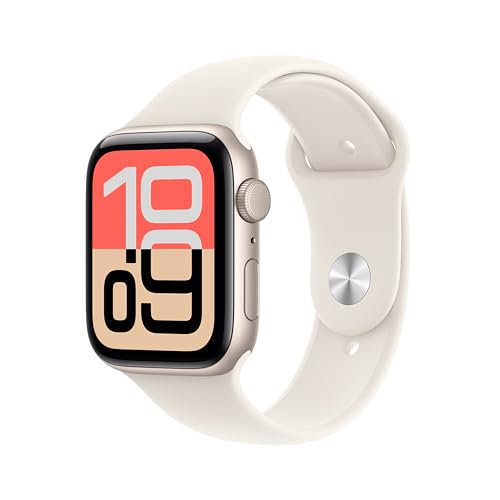
Is the Apple Watch SE 3 (GPS, 44mm) Worth It for Seniors?
The Apple Watch SE 3 (GPS, 44mm) can be a valuable tool for seniors who want to remain active and connected while potentially enhancing their safety. Our bottom-line recommendation is that it serves well for tech-savvy older adults, especially those familiar with smartphones, who appreciate the convenience of wearable technology. Its robust set of features offers more than just timekeeping, from health monitoring to safety alerts, making it suitable for seniors with specific needs.
For seniors, maintaining independence comes with unique challenges. Health and safety concerns are often at the forefront, and the Apple Watch SE 3 addresses these by providing heart-rate monitoring, fall detection, and emergency SOS capabilities. Compared to other smartwatches, the Apple Watch stands out for its ease of use and integration with iPhones,a common choice among older adults. This integration makes it an appealing choice for seniors and their caregivers seeking reliable tech solutions.
Who This Is For (and Who It’s Not For)
This smartwatch is ideal for seniors who are comfortable using iPhones and are looking for a device that can assist with health monitoring and emergency communications. It’s especially beneficial for those living independently who want an easy way to track their health metrics, like heart rate and activity levels, and need the security of a fall detection feature.
If your parent already owns an Apple Watch with fall detection or prefers a minimalist device without a touchscreen, this might not be a necessary upgrade. Those with dementia or significant memory issues may not benefit fully from its features; a dedicated GPS tracker with automatic location updates might be more appropriate. For budget-conscious buyers, alternatives like Fitbit or simpler fitness trackers could provide basic health monitoring at a lower cost.
What Makes the Apple Watch SE 3 Stand Out
The Apple Watch SE 3 outshines its competitors like the Samsung Galaxy Watch and Fitbit Sense due to its seamless integration with the Apple ecosystem, which is often favored for its user-friendly interface. This watch is equipped with essential safety features tailored for seniors, such as fall detection and emergency SOS, which are not as refined or widespread in competitor models. Additionally, its consistent software updates ensure that users benefit from the latest features and security enhancements.
Another reason it edges out alternatives is the variety of apps available to customize the user experience. From medication reminders to fitness tracking, the Apple ecosystem supports a range of functionalities that cater to diverse senior needs, making it a versatile choice for those familiar with iOS devices.
Key Features That Matter for Seniors
Fall Detection: This feature can automatically detect a hard fall and prompt the watch to call emergency services if the wearer does not respond. It’s crucial for seniors who may have balance issues or are prone to falling, providing a safety net when accidents happen.
Heart Rate Monitoring: An accessible feature that continuously tracks heart rate, providing alerts for unusually high or low heart rates. This is particularly useful for seniors managing cardiovascular conditions, allowing for early detection of potential issues.
Emergency SOS: In an emergency, seniors can hold the side button to call local emergency services quickly. This feature is a lifesaver for those living alone, as it offers a straightforward way to get help without needing a phone.
Activity Tracking: The watch encourages seniors to stay active by tracking daily movements, exercises, and even standing time. It’s great for those who want to keep a closer eye on their physical activity and maintain a healthy lifestyle.
Large Display and User Interface: With its 44mm size, the display is larger and easier to read, reducing the strain on aging eyes. Apple’s intuitive design makes navigation straightforward, with icons and text that are clear to see.
Setup: What to Expect
Setting up the Apple Watch SE 3 typically takes about 30 minutes. Physically, you’ll need to unbox the watch and ensure it’s fully charged before starting the process. The watch comes with a magnetic charging cable, which simply snaps onto the back of the watch.
Next, you’ll need an iPhone (compatible models can be confirmed on Apple’s website) to pair the watch. Once paired via the Watch app on the iPhone, you’ll be prompted to set up health and safety features like fall detection and heart rate notifications. Caregivers should assist by ensuring emergency contacts are added, and test the emergency SOS feature to familiarize everyone with its operation.
What to Know Before Buying
While the Apple Watch itself doesn’t require a monthly fee, some features may depend on having an iPhone with cellular service. If you opt for cellular functionality, there might be an additional monthly fee through your phone carrier. Ownership of an iPhone is a prerequisite, as the watch relies on it for most functionalities and setup.
Battery life generally lasts up to 18 hours, meaning it will need daily charging, which may be cumbersome for seniors who are not used to charging devices frequently. Replacement costs for the watch or its components (like straps) can be high, and it’s essential to consider compatibility, as it requires iOS 15 or later. Future-proofing by ensuring device compatibility is wise, especially if you’re planning to upgrade phones or other connected devices soon.